NagendraKumar
Silver ⭐️⭐️⭐️
July 19, 2024
Solved

Create custom format from the csv file content using Apache NiFi

We have a requirement to convert the CSV file content into a custom format. Please find the details of the input and expected output format below and help us with your expertise to achieve this using the NiFi Processors.

Input File Content :

username, first name, middle name, last name
test_user, test_FN, test_MN, test_LN
test_user2, test2_FN, test2_MN, test2_LN

Expected Output Format :

username = test_user
first name = test_FN
middle name = test_MN
last name = test_LN

username = test_user2
first name = test2_FN
middle name = test2_MN
last name = test2_LN

MattWho
MattWhoAnswer
Titanium ⭐️⭐️⭐️
July 19, 2024

@NagendraKumar 

Often times there is more then 1 may to solution a use case. 

Here is one possible solution:
NiFi Components used:
SplitRecord Used to split your multi-row CSV record in to individual records.
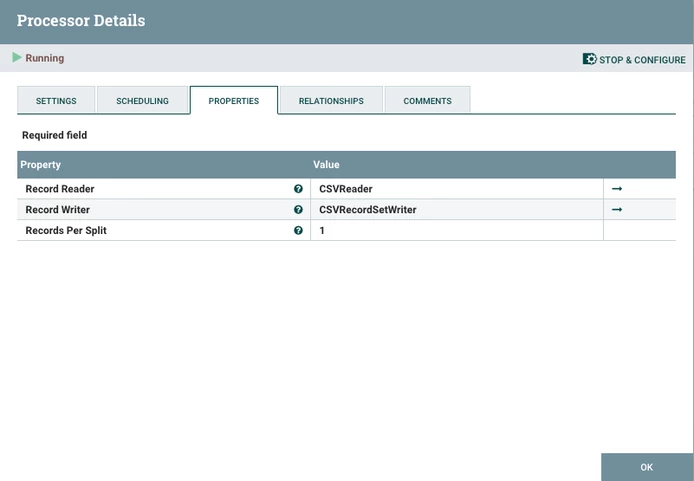
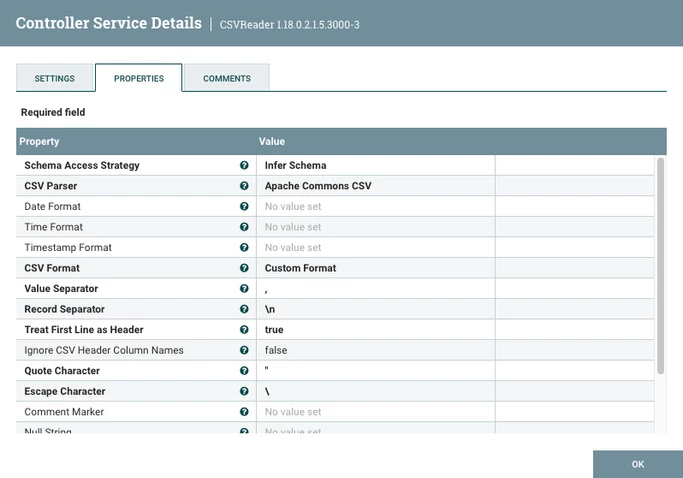
MattWho_0-1721417909234.pngThis processor will use a CSVReader:

MattWho_4-1721418465069.png
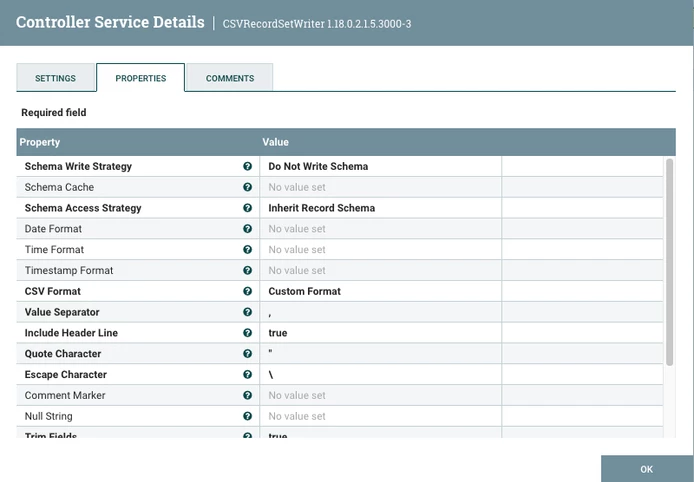
and CSVRecordSetWriter:

MattWho_5-1721418529320.png

The "Splits" relationship then gets routed to a ReplaceText processor (used to reformat the individual line record):
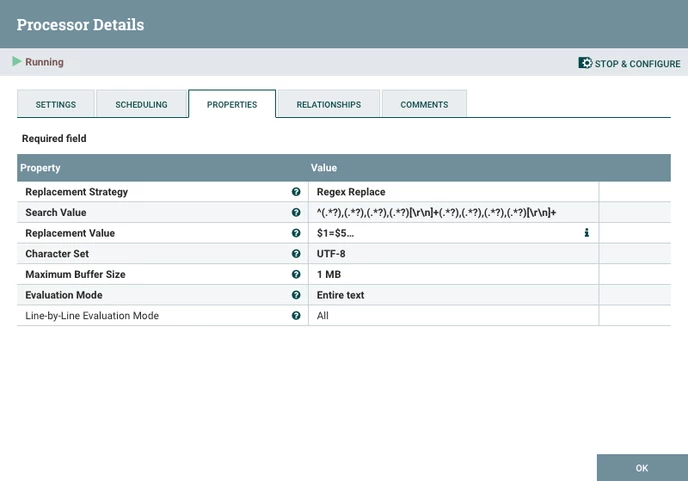
MattWho_1-1721418056440.png

"Search Value" based on four items per line (header and body):

^(.*?),(.*?),(.*?),(.*?)[\r\n]+(.*?),(.*?),(.*?),(.*?)[\r\n]+

"Replacement Value":
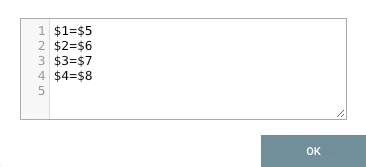
MattWho_2-1721418181297.png

The "Success" relationship is then routed to a MergeContent processor (used to recombine the original multi-records into a single FlowFile):
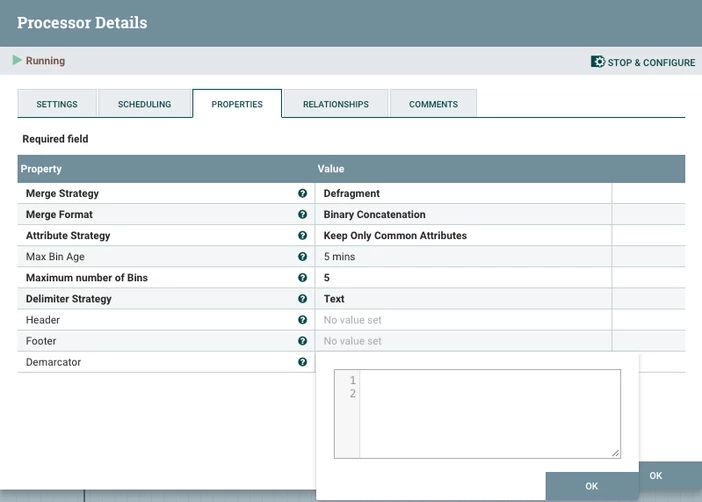
MattWho_3-1721418309692.png

Note: Demarcator is configured with line return to provide a new line between records in content. 

The assemble portion of this dataflow looks like this:
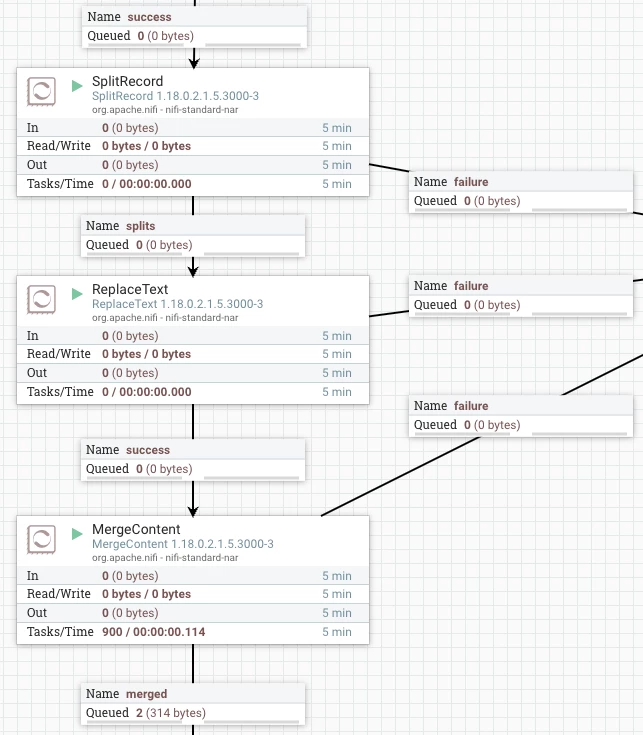
MattWho_6-1721418596933.png
Above is a working solution based on your shared example.  It works no matter how many CSV rows exist in the source file.


Other possibilities:
I feel like this use case could also be accomplished using maybe the ScriptedTransformRecord processor.  I am just not sure myself on how to write the scripted needed here correctly.  Perhaps others in the community have suggestions.

Please help our community thrive. If you found any of the suggestions/solutions provided helped you with solving your issue or answering your question, please take a moment to login and click "Accept as Solution" on one or more of them that helped.

Thank you,
Matt

5 replies

MattWho
Titanium ⭐️⭐️⭐️
MattWhoAnswer
Titanium ⭐️⭐️⭐️
July 19, 2024

@NagendraKumar 

Often times there is more then 1 may to solution a use case. 

Here is one possible solution:
NiFi Components used:
SplitRecord Used to split your multi-row CSV record in to individual records.

MattWho_0-1721417909234.pngThis processor will use a CSVReader:

MattWho_4-1721418465069.png
and CSVRecordSetWriter:

MattWho_5-1721418529320.png

The "Splits" relationship then gets routed to a ReplaceText processor (used to reformat the individual line record):

MattWho_1-1721418056440.png

"Search Value" based on four items per line (header and body):

^(.*?),(.*?),(.*?),(.*?)[\r\n]+(.*?),(.*?),(.*?),(.*?)[\r\n]+

"Replacement Value":

MattWho_2-1721418181297.png

The "Success" relationship is then routed to a MergeContent processor (used to recombine the original multi-records into a single FlowFile):

MattWho_3-1721418309692.png

Note: Demarcator is configured with line return to provide a new line between records in content. 

The assemble portion of this dataflow looks like this:

MattWho_6-1721418596933.png
Above is a working solution based on your shared example.  It works no matter how many CSV rows exist in the source file.


Other possibilities:
I feel like this use case could also be accomplished using maybe the ScriptedTransformRecord processor.  I am just not sure myself on how to write the scripted needed here correctly.  Perhaps others in the community have suggestions.

Please help our community thrive. If you found any of the suggestions/solutions provided helped you with solving your issue or answering your question, please take a moment to login and click "Accept as Solution" on one or more of them that helped.

Thank you,
Matt

Translate
NagendraKumar
Silver ⭐️⭐️⭐️
July 22, 2024

Thanks a lot @MattWho for the detailed explanation. This solution should work, but we have a huge volume of records, and splitting and merging might be costly. But I will consider these processors for my other requirements. Thanks!

Translate
SAMSAL
Platinum ⭐️⭐️⭐️
July 21, 2024

Hi,

Another option is to use FreeFormTextRecrodSetWriter for that. The documentation is lacking about this unfortunately but you can find some examples like this if you google it.

All you need is a ConvertRecord processor to get the desired result. here is an example :


SAMSAL_0-1721522523885.png


- GenerateFlowFile is to simulate generating the csv input:

SAMSAL_1-1721522582667.png

- ConvertRecord: which takes the CSV input using CSVReader and Record Writer using the FreeFormTextRecordSetWriter:

SAMSAL_2-1721522654799.png


- CSVReader Service Configuration: You can use default configuration.

SAMSAL_3-1721522763819.pngSAMSAL_4-1721522783848.png


-FreeFormTextRecordSetWriter:

SAMSAL_5-1721522846611.png

The Text used in the above Service to provide desired output:

username = ${username}
first name = ${"first name"}
middle name = ${"middle name"}
last name = ${"last name"}


Output:

username = test_user
first name = test_FN
middle name = test_MN
last name = test_LN

username = test_user2
first name = test2_FN
middle name = test2_MN
last name = test2_LN


Hope that helps.


Translate
NagendraKumar
Silver ⭐️⭐️⭐️
July 22, 2024

Thanks a lot @SAMSAL This solution worked.

Translate