

pdev
Silver ⭐️⭐️⭐️
December 6, 2019
Solved

Different Log directory free space warning on one host in cloudera

Hi, 

We are running CDH 5.14.0 version of cloudera.There are multiple warnings coming related to log data directory for only one Data node( hadoop-slave-1). please see warnings.
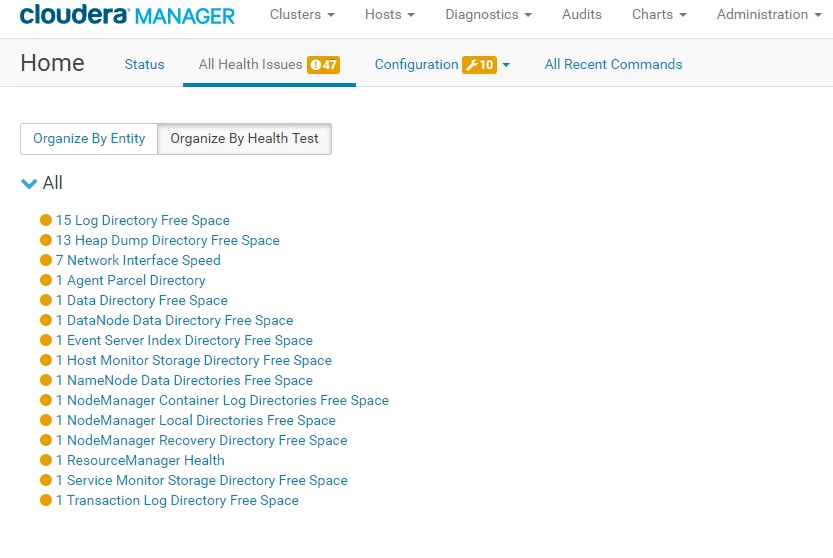
 

hadoop-slave-1-alarms.PNG

for the same node,root / dir space is showing critical.
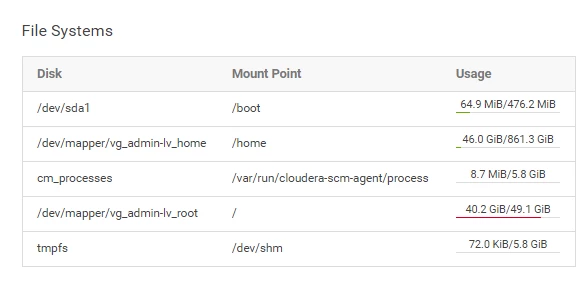
hadoop-slave-1-alarms1.PNG

can anyone suggest what files i should delete from "/ ,so that i can clear these alarms .


Thanks

Devendra



salimhussain
Gold ⭐️
December 7, 2019

Hi Devendra,


I see you are seeing multiple low disk space alerts for various role log and role data directories. It is not advised to delete anything manually from these directories instead adjust the retention policy for them in CM and let CM delete it automatically for you.


Review the documentation to find default retention policy for Cloudera Management Services data directories and following documentation for setting retention policy for any role log that by default reside in /var/log/. Remove and Delete any unused parcel from CM > Parcel page to reclaim disk space occupied by parcels. Details are given here. 


I hope that will help.


Thanks,

Salim 

4 replies

sagarshimpi
Gold ⭐️
December 6, 2019

Hi @pdev  Login to the host and execute below command -


for a in /*; do mountpoint -q -- "$a" || du -s -h -x "$a"; done


command which will ignore all mounts and only give size details of filesystem/dirs which resides under "/"

You can check and delete data accordingly.

Translate
salimhussain
Gold ⭐️
Gold ⭐️
December 7, 2019

Hi Devendra,


I see you are seeing multiple low disk space alerts for various role log and role data directories. It is not advised to delete anything manually from these directories instead adjust the retention policy for them in CM and let CM delete it automatically for you.


Review the documentation to find default retention policy for Cloudera Management Services data directories and following documentation for setting retention policy for any role log that by default reside in /var/log/. Remove and Delete any unused parcel from CM > Parcel page to reclaim disk space occupied by parcels. Details are given here. 


I hope that will help.


Thanks,

Salim 

Translate
pdev
pdevAuthor
Silver ⭐️⭐️⭐️
December 12, 2019

Thanks salim.

Translate
cjervis
Community Manager
Community Manager
December 12, 2019

@pdev 

Can you advise if your issue is now resolved? If so, please mark the appropriate reply as the solution, as it will make it easier for others to find the answer in the future. 


Screen Shot 2019-08-06 at 1.54.47 PM.pngmark as solution button


Translate
Keep the questions coming

