Dominika
DominikaAnswer
Gold ⭐️
December 10, 2021

In case this helps, you can download a separate PDF for each item that is an actual publication.

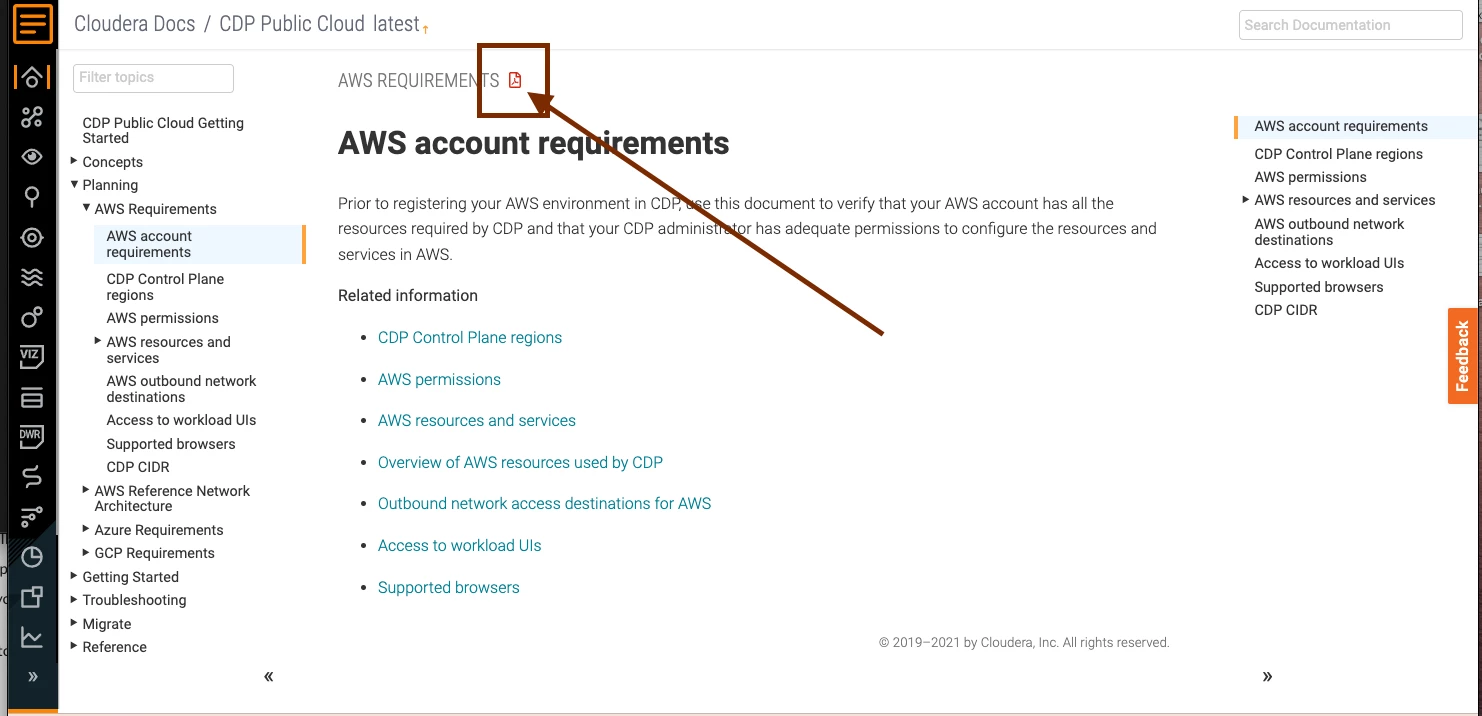
A publication is an item directly nested in one of the sections that you can see in the left nav. For example, "AWS Requirements" under "Planning" is a publication and it can be downloaded as a PDF by clicking on the PDF icon, as shown in the below screenshot:

Screen Shot 2021-12-09 at 9.51.43 PM.png


3 replies

Dominika
Gold ⭐️
DominikaAnswer
Gold ⭐️
December 10, 2021

In case this helps, you can download a separate PDF for each item that is an actual publication.

A publication is an item directly nested in one of the sections that you can see in the left nav. For example, "AWS Requirements" under "Planning" is a publication and it can be downloaded as a PDF by clicking on the PDF icon, as shown in the below screenshot:

Screen Shot 2021-12-09 at 9.51.43 PM.png


Translate
andrea_pretotto
Silver ⭐️⭐️⭐️
December 10, 2021

Thank you Dominika, it really helps!

And moreover, I think it would be a really nice feature having a complete pdf of all this documentation. 


Best regards

Andrea

Translate
VidyaSargur
Community Manager
Community Manager
December 10, 2021

@andrea_pretotto, Thanks for the confirmation. If the reply helped resolve your issue, kindly mark the appropriate reply as the solution, as it will make it easier for others to find the answer in the future. 

Translate
Regards, Vidya Sargur, Community Manager Was your question answered? Make sure to mark the answer as the accepted solution. If you find a reply useful, say thanks by clicking on the thumbs up button.