kumarv0686
Silver ⭐️⭐️
March 10, 2017
Solved

Downloading Only SFTP Files Modified Within a Specific Time Window Using Apache NiFi

Current setup is using getSftp --> puSFTP to sync data from sftp server to a remote linux host.

Problem is with getSFTP i cannot define File age i wish to download, though i found getFile has the min max file age option, however nifi doesn't allow on canvas link between getSFTP and getFile.

I was wondering how i can accomplish this, thanks in advance.

MattWho
MattWhoAnswer
Titanium ⭐️⭐️⭐️
March 10, 2017
@vikash kumar

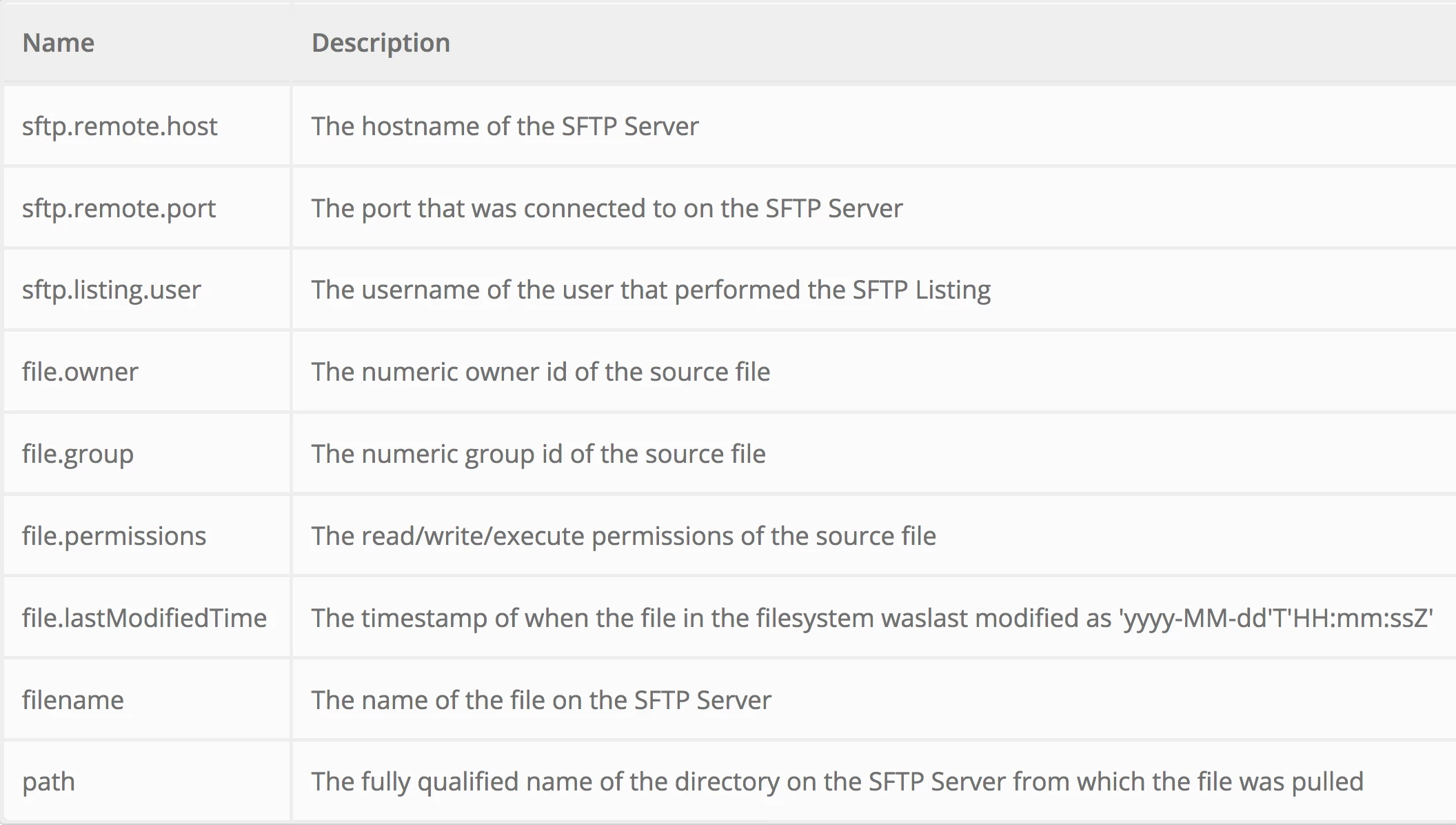
You can use the ListSFTP processor to list all files on your SFTP server. The ListSFTP processor will create a 0 byte file with the following additional attributes written to it:

13496-screen-shot-2017-03-10-at-103409-am.png

Take the success relationship of the ListSFTP and send it to a routeOnAttribute processor.

Use the routeOnAttribute processor to route on those FlowFiles where the attribute "file.lastModifiedTime" date falls within your desired range to a FetchSFTP processor. All other listed files could just be auto-terminated.

Thanks,

Matt

9 replies

MattWho
Titanium ⭐️⭐️⭐️
MattWhoAnswer
Titanium ⭐️⭐️⭐️
March 10, 2017
@vikash kumar

You can use the ListSFTP processor to list all files on your SFTP server. The ListSFTP processor will create a 0 byte file with the following additional attributes written to it:

13496-screen-shot-2017-03-10-at-103409-am.png

Take the success relationship of the ListSFTP and send it to a routeOnAttribute processor.

Use the routeOnAttribute processor to route on those FlowFiles where the attribute "file.lastModifiedTime" date falls within your desired range to a FetchSFTP processor. All other listed files could just be auto-terminated.

Thanks,

Matt

Translate
MattWho
Titanium ⭐️⭐️⭐️
Titanium ⭐️⭐️⭐️
March 11, 2017

@vikash kumar

The RouteOnAttribute processor expects that a NiFi expression Language statement is used. If the the evaluation of that EL statement results in a true, then the FlowFile will be routed to the corresponding property name's relationship.

Here is an example that will route FlowFile where the value associated to "file.lastModifiedTime" on the incoming FlowFile falls within the last 24 hours to the "last24hours" relationship:

13512-screen-shot-2017-03-10-at-33350-pm.png

Here is the full EL statement so you can copy it:

${file.lastModifiedTime:toDate("yyyy-MM-dd'T'HH:mm:ssZ"):toNumber():ge(${now():minus(86400000)})}

Thank you,

Matt

Translate
kumarv0686
Silver ⭐️⭐️
March 11, 2017

Thanks Matt, i added the processors you recommended, but the Route on attribute processor is compaining about "file.lastmodified validated against '2017-03-08'T'11:00:00Z' is invalid because no Expressions found.

Translate
MattWho
Titanium ⭐️⭐️⭐️
Titanium ⭐️⭐️⭐️
March 11, 2017

@vikash kumar

Can you share the NiFi expression language routing rule you created in your RouteOnAttribute processor? The rule must evaluate to "true" before a FlowFile will be routed to that relationship.

Translate
kumarv0686
Silver ⭐️⭐️
March 11, 2017

sure, here they are

13500-data-from-sftp.jpg

13511-routeonattribute.jpg

Translate
thaishidaib
Silver ⭐️
May 10, 2017

Hi Matt,

I'm trying to do the same flow, but I need to get the newest file from an FTP server.

I tried to set the time to 600000ms but the flow did not work.

${file.lastModifiedTime :toDate("yyyy-MM-dd'T'HH:mm:ssZ") :toNumber() :ge(${now():minus(21600000)}) }

How can I get the newest file?

Thanks in advance,

Thais

,

Hi Matt! I'm trying to do the same flow, but I need to get the newest file from an FTP.

Ho can I do that?

I tried to use 600000 (1 minute) but it did not work.

${file.lastModifiedTime :toDate("yyyy-MM-dd'T'HH:mm:ssZ") :toNumber() :ge(${now():minus(6000000)}) }

Can you help?

Translate