
ahong
Silver ⭐️
May 30, 2019 4:33 PM UTC
Solved

Encounter error for ambari-server setup

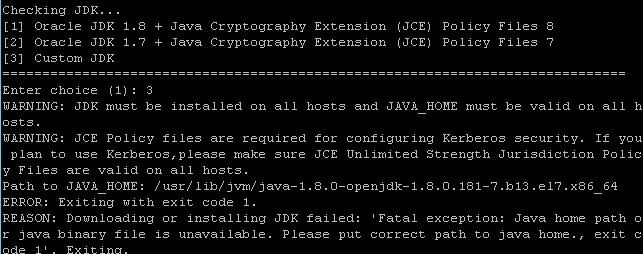
I ran the the command ambari-server setup, after which I select accordingly. I am prompt to select the java and selected custom JDK and enter the JAVA_HOME but I was shown the error below.

109047-error2.png

Shelton
SheltonAnswer
Gold ⭐️⭐️⭐️
May 30, 2019 5:00 PM UTC

@Hak Tiong Ong

That for sure is obvious means you yum repo could be a problem can you run this independently on that host?

$ sudo yum install java-1.8.0-openjdk-devel

You can use this command to locate your JAVA_HOME

$ java -XshowSettings:properties -version

Then use the JAVA_HOME when running your ambari-server setup!!


3 replies

Shelton
SheltonAnswer
Gold ⭐️⭐️⭐️
May 30, 2019 5:00 PM UTC

@Hak Tiong Ong

That for sure is obvious means you yum repo could be a problem can you run this independently on that host?

$ sudo yum install java-1.8.0-openjdk-devel

You can use this command to locate your JAVA_HOME

$ java -XshowSettings:properties -version

Then use the JAVA_HOME when running your ambari-server setup!!


Translate
ahong
ahongAuthor
Silver ⭐️
Jun 1, 2019 5:58 PM UTC

Thanks it works, I use ambari-server setup -j JAVA_HOME.

Translate
ask_bill_brooks
Platinum ⭐️
Platinum ⭐️
Jun 4, 2019 11:00 AM UTC

The above was originally posted in the Community Help Track. On Tue Jun 4 03:58 UTC 2019, a member of the HCC moderation staff moved it to the Cloud & Operations track. The Community Help Track is intended for questions about using the HCC site itself.

Translate
Bill Brooks, Community Moderator Was your question answered? Make sure to mark the answer as the accepted solution. If you find a reply useful, say thanks by clicking on the thumbs up button.