LucasMorgado
Gold ⭐️
July 7, 2021
Solved

Error while upgrading NiFi 1.11.1 to 1.13.2

Hello!


Can you kindly help me in an NiFi upgrade error?


I followed this tutorial: https://cwiki.apache.org/confluence/display/NIFI/1.x.0+to+1.x.0+Upgrade


Following it, i stopped my processors, waited until my flows had no queued flowfiles, stopped old nifi services, changed property names to my new nifi version, moved the flow.xml.gz to my new installation and started the services in the new version.


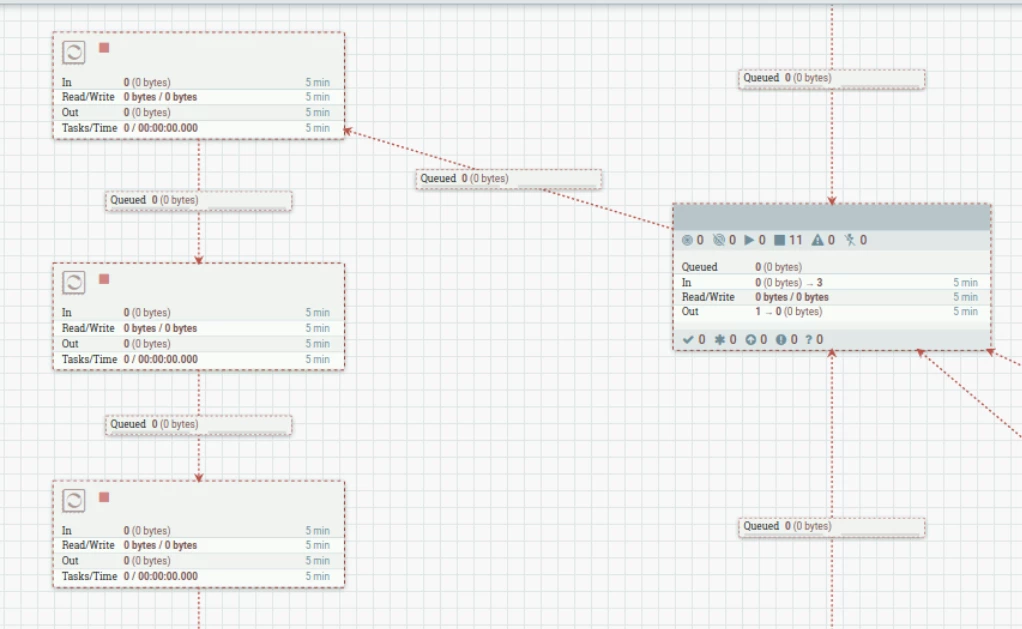
After this, i get the error shown bellow:
 

LucasMorgado_0-1625689079666.pngLucasMorgado_1-1625689101061.png


Is this a regular mistake? Do you know any alternatives in this case?


Thank you,

Lucas



LucasMorgado
Gold ⭐️
July 12, 2021

Hy! Thanks for the answer!


My old nifi wasn't secured and didn't have users. In my new installation we have some users, in this error after inserting and configuring acess policies my error was resolved.


Thank you!

3 replies

dyadav1
Gold ⭐️
Gold ⭐️
July 8, 2021

Hi Lucas,


Please check if user polices are defined properly and this logged in user have write access. You can refer the below article for more details on user and access policies:


https://nifi.apache.org/docs/nifi-docs/html/administration-guide.html#config-users-access-policies

Translate
LucasMorgado
LucasMorgadoAuthorAnswer
Gold ⭐️
July 12, 2021

Hy! Thanks for the answer!


My old nifi wasn't secured and didn't have users. In my new installation we have some users, in this error after inserting and configuring acess policies my error was resolved.


Thank you!

Translate
MattWho
Titanium ⭐️⭐️⭐️
Titanium ⭐️⭐️⭐️
July 12, 2021

@LucasMorgado 

I don't see any ERROR?

Was your old NiFi secured?
Is the new NiFi secured?
Along with your flow.xml.gz, did you also copy over your users.xml and authorizations.xml files to your new installation?

Your screenshot indicates that your user is not authorized to see any of the components (Processors, Process groups, labels, etc), so they are all ghost implementations.

Make sure your authorizers.xml is setup just like your old NiFi and that the above mentioned files were also copied over to your new install.  NIFi only reads these files on startup.

If you found this addressed yoru question, please take a moment to login and click "Accept" on this solution.
Thank you,
Matt

Translate