

Ismail27
Bronze ⭐️⭐️⭐️
November 12, 2021
Question

Errors when Enable Auto-TLS (CDP private cloud base 7.1.6)

Hi, 


Has anyone come across such a problem when enabling Auto-TLS?

Thanks appreciate your comments


java.lang.IllegalStateException: Failed to run CMCA command, return code: 2
at com.cloudera.cmf.command.CertmanagerRunner.runCmcaCommand(CertmanagerRunner.java:55)
at com.cloudera.cmf.command.GenerateCmcaCmdWork.runSetupCmcaCommand(GenerateCmcaCmdWork.java:65)
at com.cloudera.cmf.command.GenerateCmcaCmdWork.doWork(GenerateCmcaCmdWork.java:202)
at com.cloudera.cmf.command.flow.CmdStep.doWork(CmdStep.java:178)
at com.cloudera.cmf.command.flow.SeqCmdWork.doWork(SeqCmdWork.java:107)
at com.cloudera.cmf.command.flow.CmdStep.doWork(CmdStep.java:178)
at com.cloudera.cmf.command.flow.SeqFlowCmd.run(SeqFlowCmd.java:117)
at com.cloudera.cmf.command.CmdWorkCommand.execute(CmdWorkCommand.java:107)
at com.cloudera.cmf.service.ServiceHandlerRegistry.executeGlobalCommandHelper(ServiceHandlerRegistry.java:865)
at com.cloudera.cmf.service.ServiceHandlerRegistry.executeGlobalCommand(ServiceHandlerRegistry.java:833)
at com.cloudera.server.cmf.components.OperationsManagerImpl$4.get(OperationsManagerImpl.java:1969)
at com.cloudera.server.cmf.components.OperationsManagerImpl$4.get(OperationsManagerImpl.java:1966)
at com.cloudera.server.web.cmf.AuthScopeContext.privilegedMode(AuthScopeContext.java:198)
at com.cloudera.server.cmf.components.OperationsManagerImpl.executeCmd(OperationsManagerImpl.java:3198)
at com.cloudera.server.cmf.components.OperationsManagerImpl.executeGlobalCmd(OperationsManagerImpl.java:1966)
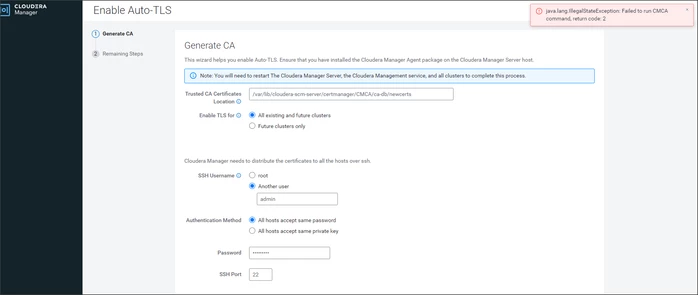



Ismail27_0-1636710563377.png


8 replies

GangWar
Platinum ⭐️⭐️
Platinum ⭐️⭐️
December 6, 2021

@Ismail27 The user you are specifying "admin", does this have root access on CM host? I believe you are providing the Cloudera Manager UI user but here you need SSH user i.e root which have same root privileges on host to run CMCA commands then only it can work. 

Translate
Cheers! Was your question answered? Make sure to mark the answer as the accepted solution. If you find a reply useful, say thanks by clicking on the thumbs up button.
rvillab
Silver ⭐️
October 31, 2022

I have same issue with Cloudera 7.4.4 installation. I try with server users, like root, and other users with the same result. I try SSH connection with these users, and i haven't problems.

Translate
Loaimohamed79
Silver ⭐️⭐️
February 7, 2024

have any solution for this error?

Translate
Nagarajaiah
Silver ⭐️⭐️⭐️
October 10, 2024

This occurs in two scenarios

1. Jdk-11 installed but not provided mod 777
2. jdk-11 not properly extracted and moved 

install openjdk11

download the file openjdk-11_linux-x64_bin.tar to /tmp
tar -xf openjdk-11_linux-x64_bin.tar
mv /tmp/jdk-11 /usr/lib/jvm
chmod 777 /usr/lib/jvm/jdk-11

update-alternatives --install "/usr/bin/java" "java" "/usr/lib/jvm/jdk-11/bin/java" 1010
update-alternatives --install "/usr/bin/javac" "javac" "/usr/lib/jvm/jdk-11/bin/javac" 1010
verify > java -version & javac -version
restart cloudera-scm-server

Translate
Loaimohamed79
Silver ⭐️⭐️
February 7, 2024

I have the same error while using root user.

Translate
DianaTorres
Community Manager
Community Manager
February 7, 2024

@Loaimohamed79 Welcome to the Cloudera Community!
As this is an older post, you would have a better chance of receiving a resolution by starting a new thread. This will also be an opportunity to provide details specific to your environment that could aid others in assisting you with a more accurate answer to your question. You can link this thread as a reference in your new post. Thanks.

Translate
Regards, Diana Torres, Senior Community Moderator
veerak
Silver ⭐️
June 28, 2024

Solution: Trusted CA Certificates Location should be the file path. (The full file path containing a concatenated list of CA certificates in pem format). 

veerak_0-1719542416968.png

I came across the same issue and resolved.

Translate
Nagarajaiah
Silver ⭐️⭐️⭐️
October 10, 2024

This occures in two scenarios

1. Jdk-11 installed but not provided mod 777
2. jdk-11 not properly extracted and moved 

install openjdk11

download the file openjdk-11_linux-x64_bin.tar to /tmp
tar -xf openjdk-11_linux-x64_bin.tar
mv /tmp/jdk-11 /usr/lib/jvm
chmod 777 /usr/lib/jvm/jdk-11

update-alternatives --install "/usr/bin/java" "java" "/usr/lib/jvm/jdk-11/bin/java" 1010
update-alternatives --install "/usr/bin/javac" "javac" "/usr/lib/jvm/jdk-11/bin/javac" 1010
verify > java -version & javac -version

restart cloudera-scm-server

Translate
