@Henrik OlsenThe FetchSFTP processor is deprecated in favor of the ListSFTP/FetchSFTP processors. The list/fetch model is works better in a NiFi cluster type configuration. Both the GetSFTP and ListSFTP processor should only ever be run on "primary node" only when used in a NiFi cluster. FetchSFTP should be configured to run on all nodes.
-
That being said, the GetSFTP will retrieve up to the configured "Max Selects" in a single connection. The ListSFTP will return the filenames of all files in a single connection. (The 0 byte Flowfiles generated from listSFTP should be routed to a Remote Process Group that will redistribute those 0 Byte FlowFiles to all nodes in the cluster where FetchSFTP will retrieve the actual content.
-
Regardless of how you retrieve the files, you are looking for a way to only process those files where you also retrieved the corresponding sha256 file. This can be accomplished using the Wait and Notify processors:
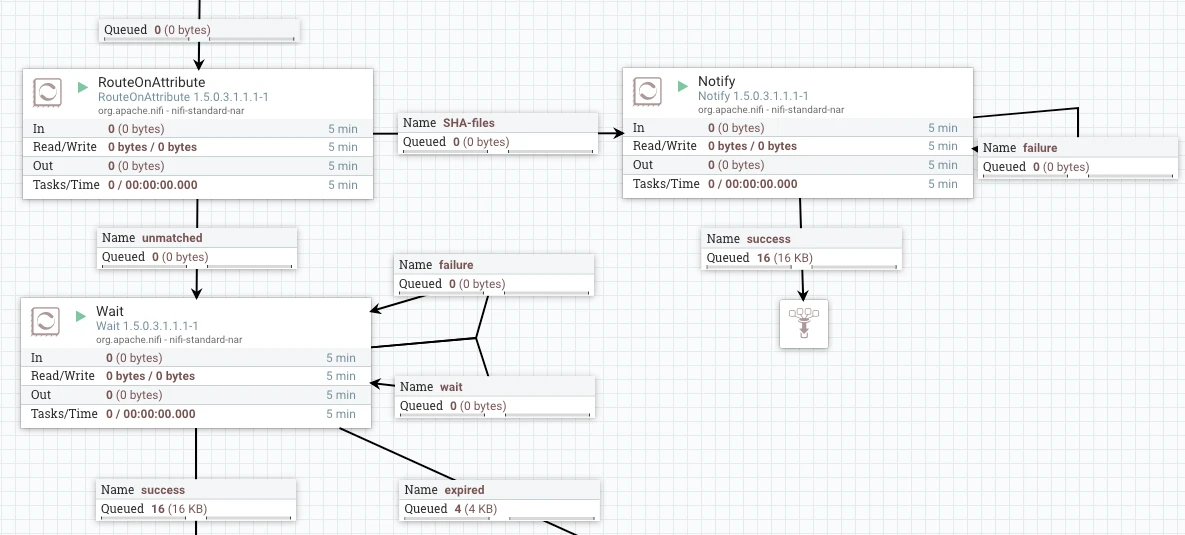
In the above flow I have all the retrieved data (both <datafile> and <datafile>.sha256 files) coming in to a RouteOnAttribute processor. I route all the <datafile>.sha256 FlowFiles to a Notify processor. (in my test I had 20 <datafile> files and only 16 corresponding <datafile>.sha256 files). The Notify processor is configured to write the ${filename} to a DistributeMapCache service that every node in my cluster can access. My Wait processor is then designed to check that same DistributedMapCache service looking for "${filename}.sha256". If a match is found the Wait processor will release the <datafile> to the success relationship for further processing in your dataflow. The Wait processor is also configured to wait on so long looking for a match. So you see in my example that after the length of time the 4 Flowfiles that did not have a matching sha256 filename in the cache were routed to "expired" relationship. Set expiration high enough to allot for the time needed to retrieve both files.
-
Thank you,
Matt
-
If you found this Answer addressed your original question, please take a moment to login and click "Accept" below the answer.