Hello ,
If your input json is coming below format
{
"TOT_NET_AMT" : "55.00",
"H_OBJECT" : "File",
"H_GROSS_AMNT" : ["55.00","58.00"],
"TOT_TAX_AMT" : "9.55"
}
If the value of H gross amount is in List of String ["55.00","58.00"] instead of String "55.00,58.00" , then you can use Jolt transformation JSON NiFi processor to define jolt spec to convert into the required output.
{
"TOT_NET_AMT" : "55.00",
"H_OBJECT" : "File",
"H_GROSS_AMNT" : "58.00",
"TOT_TAX_AMT" : "9.55"
}
Jolt transformation JSON configuration.
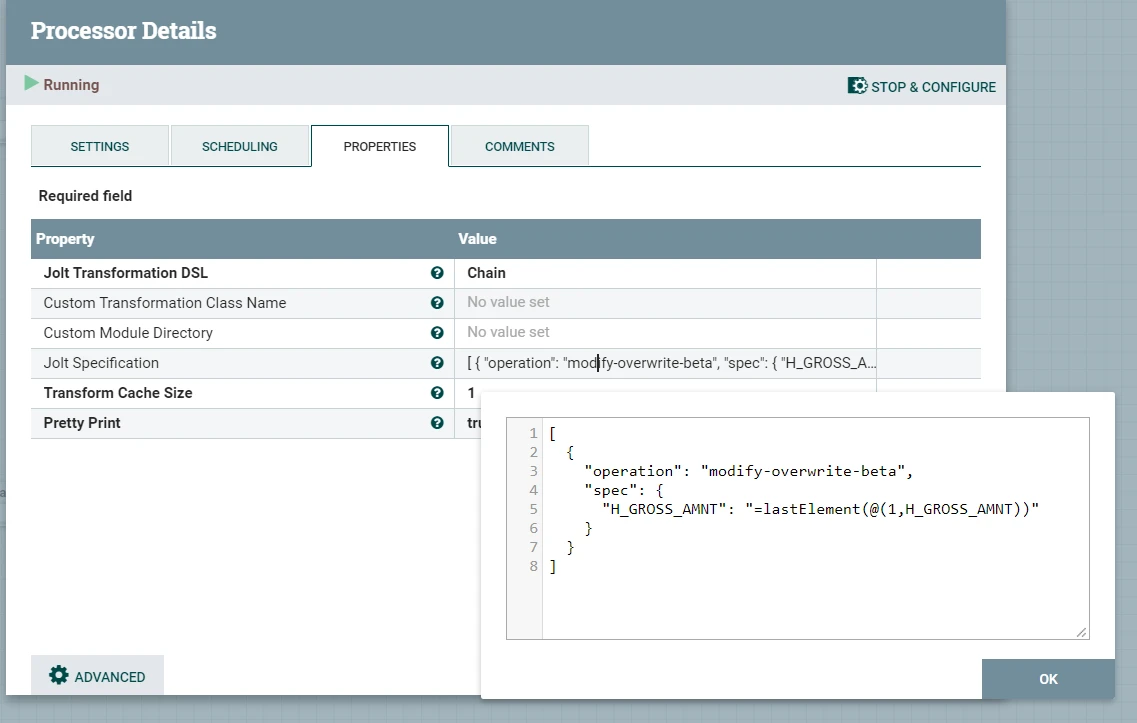
Jolt specification :
[
{
"operation": "modify-overwrite-beta",
"spec": {
"H_GROSS_AMNT": "=lastElement(@(1,H_GROSS_AMNT))"
}
}
]
If the input is not list of String for H Gross amount and only string with comma speparated, then please follow the below steps in order.
you will have to extract whole json into single attribute using extracttext processor and the attribute will hold entire json content , Next you can use EvaluateJsonPath which extracts each json element into each attributes , once you have all 4 attributes with value after EvaluateJsonPath , then you construct the json in Replace text processor ,H_GROSS_AMNT will still hold the string comma separated and u can use H_GROSS_AMNT:substringAfterLast(,) which extracts last element from the string value .
Examples of EvaluateJsonPath
https://nifi.apache.org/docs/nifi-docs/html/expression-language-guide.html#jsonpath