

Gerva
Silver ⭐️
Oct 11, 2019 11:59 AM UTC
Solved

HIVE MANAGED TABLE

Good Morning.
I am doing a small example with HIVE and MANAGED TABLE.

My environment is Oracle VM virtual Box 6.0
Hive 1.1.0-cdh5.13.0

I indicate the steps I have taken:
1st)
CREATE DATABASE scenariox

2nd)

USE scenariox

CREATE TABLE scenariox
(
smallint order;
name string;
)
ROW FORMAT DELIMITED FIELDS TERMINATED BY ',';

3rd) I load the table with my csv file that is stored in HDFS

HDFS> /scenariox/scenariox.csv

LOAD DATA LOCAL INPATH '/scenariox/scenariox.csv' INTO TABLE scenariox

The table loads correctly. I can run: '' Select * from scenariox ''. I recover data correctly. The table has been loaded successfully.
The directories in hive are created correctly:

/user/hive/warehouse/scenariox.db/scenariox/scenariox.csv

I execute the sentence: SELECT COUNT (1) FROM scenariox;
MAP / REDUCE launched
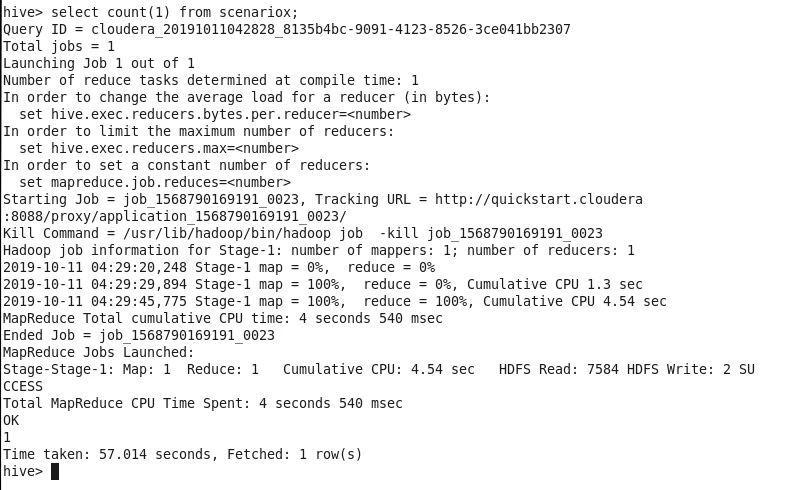
 

Captura.JPG

My problem is: I can't find the output file that produces the map / reduce.

What directory is it stored in? I thought that a file of type '00000_0' was generated and stored in the HDFS.

Can somebody help me? Thank you. Greetings

Shu_ashu
Shu_ashuAnswer
Gold ⭐️⭐️⭐️
Oct 13, 2019 3:29 AM UTC

@Gerva 


Select count(*) from <table>; 

Query launches map reduce job and output will be displayed to the console.

-

If you want to store the output to file then use 

Insert overwrite directory '<directory_name>' select count(*) from scenariox;


Now output of map reduce job will be stored into the given hdfs directory and you can find 00000_0 file in directory..

2 replies

Shu_ashu
Shu_ashuAnswer
Gold ⭐️⭐️⭐️
Oct 13, 2019 3:29 AM UTC

@Gerva 


Select count(*) from <table>; 

Query launches map reduce job and output will be displayed to the console.

-

If you want to store the output to file then use 

Insert overwrite directory '<directory_name>' select count(*) from scenariox;


Now output of map reduce job will be stored into the given hdfs directory and you can find 00000_0 file in directory..

Translate
Gerva
GervaAuthor
Silver ⭐️
Oct 14, 2019 8:14 AM UTC

@Shu_ashu Great!. With the instructions you have given me, the output file is created correctly. I also tried the option: CREATE TABLE AS scenariox_out AS SELECT select count (*) from scenariox; And the output file was created in: /user/hive/warehouse/scenariox.db/scenariox/scenariox_out/000000_0 Thank you. You have a good day

Translate

