MPHSpeed
Silver ⭐️
January 17, 2024
Solved

How do I search through FlowFiles and pull out all lines that match a multiple string values?

Greetings,

I'm currently grabbing data from a website, "splitting" it into its separate components and trying to route them so I can save them into a single zipped file.

My workflow currently works as follows:
InvokeHTTP --> SplitText --> RouteText ...

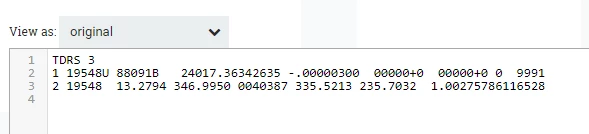
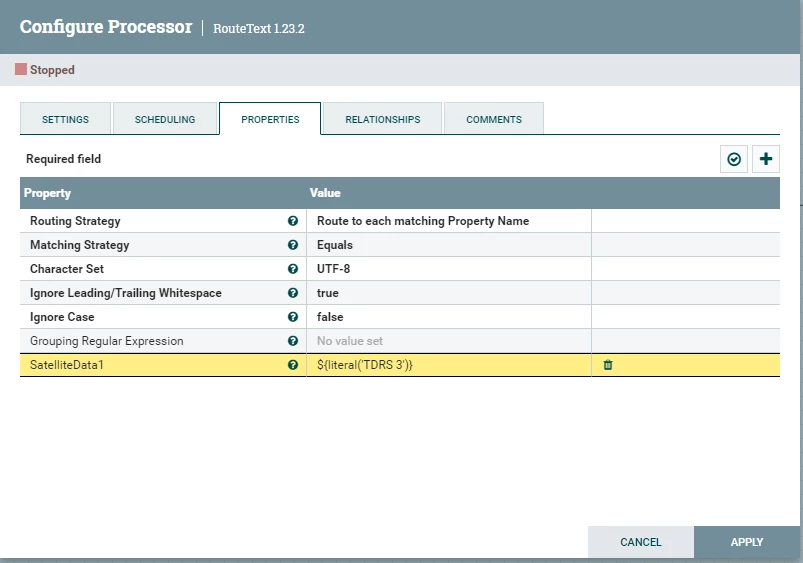
The original Dataset is a bunch of satellite data (example below).  I’m then splitting it into separate 3 line records. I then run RouteText and try and grab specific records.  For example, if I wanted TDRS 3 and AMSC 1 and SKYNET 4C, how do I pull them out with its respected 2 lines?  I tried adding a Property:  SatelliteData1 = ${literal('TDRS 3')}.  This only gives me the first line of the Split record (I need all 3).  I tried OR-Statement, but don't think I'm using it right. 

${literal('TDRS 3''):or(${literal('AMSC 1')}):or(${literal('SKYNET 4C')})}

Any suggestions will be greatly appreciated.  Thanks in advance.

Original Data:
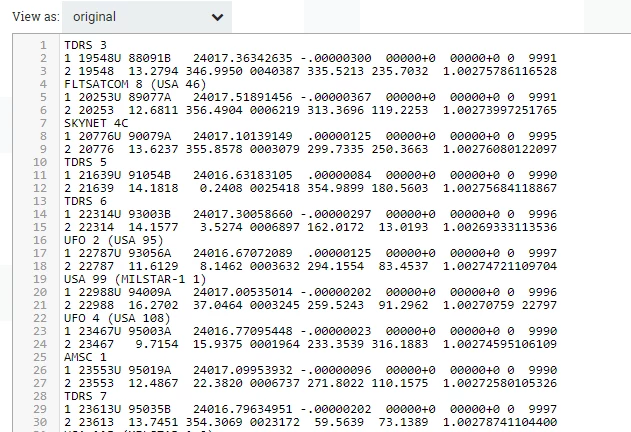
MPHSpeed_0-1705512709062.png

Splitting:

MPHSpeed_1-1705512709071.png

MPHSpeed_2-1705512709072.png

MPHSpeed_3-1705512709076.png


MattWho
MattWhoAnswer
Titanium ⭐️⭐️⭐️
January 18, 2024

@MPHSpeed 

Working with the actual data instead of sample data I build, i would recommend making these two changes:

1. In extractText processor change "Enable Unix Lines Mode" to true.
2. In each dynamic property in RouteOnAttribute, change "equals" function to "contains" function.

If you found any of the suggestions/solutions provided helped you with your issue, please take a moment to login and click "Accept as Solution" on one or more of them that helped.

Thank you,
Matt

4 replies

DianaTorres
Community Manager
Community Manager
January 17, 2024

@MPHSpeed Welcome to the Cloudera Community!

To help you get the best possible solution, I have tagged our NiFi experts @MattWho @steven-matison  who may be able to assist you further.

Please keep us updated on your post, and we hope you find a satisfactory solution to your query.

Translate
Regards, Diana Torres, Senior Community Moderator
MattWho
Titanium ⭐️⭐️⭐️
Titanium ⭐️⭐️⭐️
January 17, 2024

@MPHSpeed 

Rather than using RouteText processor which routes individual lines of a text file, you could use RouteOnContent processor that routes the entire FlowFile whose content matches to a dynamic relationship.

What i would do is extract the data type TDRS 3, or AMSC 1 or SKYNET 4C, etc to a FlowFile attribute using ExtractText processor and then you have that type associated with the FlowFile through your entire flow making it easy to do things like merge FlowFiles all of same type together (MergeContent with "Correlation Attribute Name"), route FlowFiles of a specific type using RouteOnAttribute, etc...

Then you also have options using the many Record based processors if you can define a schema for your data that defines your record as those three lines.  

Example:
SplitText (splits relationship) ---> ExtractTEXT:

MattWho_0-1705526991646.png


MattWho_3-1705527064741.png

ExtractText (Matched relationship) --> RouteOnAttribute

MattWho_4-1705527171077.png

RouteOnAttribute with above configuration will have three dynamically created relationships for the data types you want to keep.  connect each to the unique dataflow path for processing that data type.

MattWho_6-1705527384059.png

If you found any of the suggestions/solutions provided helped you with your issue, please take a moment to login and click "Accept as Solution" on one or more of them that helped.

Thank you,
Matt

Translate
MPHSpeed
MPHSpeedAuthor
Silver ⭐️
January 17, 2024

@MattWho  I get what we are doing.  It makes sense and seems to be the right way to handle it.  Unfortunately, It seems to send everything to 'unmatched' on ExtractText (at least on my end).  I made sure I had everything the same as what you provided.
I'm extracting data from here:
https://celestrak.org/NORAD/elements/gp.php?GROUP=geo&FORMAT=tle

MPHSpeed_3-1705532108830.png

SplitText:

MPHSpeed_4-1705532516477.png

ExtractText:

MPHSpeed_0-1705531889720.png

RouteOnAttribute:

MPHSpeed_1-1705532056967.png

Translate
MattWho
Titanium ⭐️⭐️⭐️
MattWhoAnswer
Titanium ⭐️⭐️⭐️
January 18, 2024

@MPHSpeed 

Working with the actual data instead of sample data I build, i would recommend making these two changes:

1. In extractText processor change "Enable Unix Lines Mode" to true.
2. In each dynamic property in RouteOnAttribute, change "equals" function to "contains" function.

If you found any of the suggestions/solutions provided helped you with your issue, please take a moment to login and click "Accept as Solution" on one or more of them that helped.

Thank you,
Matt

Translate