paulpaul1076
Gold ⭐️
February 8, 2019
Solved

How do I set log level of namenode to DEBUG?

103423-hadoop-root-loggerpng.jpg

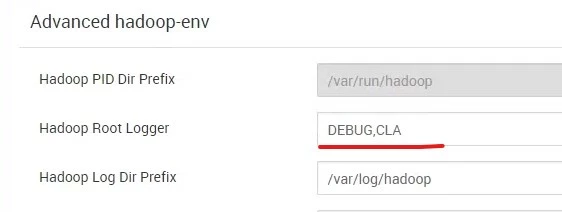
In the picture I attached to this post you can see my current log level value. This does not work. In /var/log/hadoop/hdfs/hadoop-hdfs-namenode-sandbox-hdp.hortonworks.com.log I can only see INFO and WARN messages.

Shelton
SheltonAnswer
Gold ⭐️⭐️⭐️
February 8, 2019

@Pavel Orekhov

You can change the log level while logged on as hdfs with the below steps, you don't need to restart the namenode

Get the current log level

$ hadoop daemonlog -getlevel {namenode_host}:50070 BlockStateChange

Output

Connecting to http://{namenode_host}:50070/logLevel?log=BlockStateChange
Submitted Log Name: BlockStateChange
Log Class: org.apache.commons.logging.impl.Log4JLogger
Effective Level: INFO

Change to DEBUG

$ hadoop daemonlog -setlevel {namenode_host}:50070 BlockStateChange DEBUG

Output

Connecting to http://{namenode_host}:50070/logLevel?log=BlockStateChange&level=DEBUG
Submitted Log Name: BlockStateChange
Log Class: org.apache.commons.logging.impl.Log4JLogger
Submitted Level: DEBUG
Setting Level to DEBUG ...
Effective Level: DEBUG

Validate DEBUG mode

$ hadoop daemonlog -getlevel {namenode_host}:50070 BlockStateChange

Output

Connecting to http://{namenode_host}:50070/logLevel?log=BlockStateChange
Submitted Log Name: BlockStateChange Log
Class: org.apache.commons.logging.impl.Log4JLogger
Effective Level: DEBUG

You should be able to notice the logging level in namenode.log has been updated, without restarting the service. After finishing your diagnostics you can reset the logging level back to INFO

Reset to INFO

$ hadoop daemonlog -setlevel {namenode_host}:50070 BlockStateChange INFO

Output

Connecting to http://{namenode_host}:50070/logLevel?log=BlockStateChange&level=INFO
Submitted Log Name: BlockStateChange
Log Class: org.apache.commons.logging.impl.Log4JLogger
Submitted Level: INFO
Setting Level to INFO ...
Effective Level: INFO

Validate INFO

$ hadoop daemonlog -getlevel {namenode_host}:50070 BlockStateChange

Output

Connecting to http://{namenode_host}:50070/logLevel?log=BlockStateChange
Submitted Log Name: BlockStateChange
Log Class: org.apache.commons.logging.impl.Log4JLogger
Effective Level: INFO

There you go
If you found this answer addressed your question, please take a moment to log in and click the "accept" link on the answer.


3 replies

Shelton
SheltonAnswer
Gold ⭐️⭐️⭐️
February 8, 2019

@Pavel Orekhov

You can change the log level while logged on as hdfs with the below steps, you don't need to restart the namenode

Get the current log level

$ hadoop daemonlog -getlevel {namenode_host}:50070 BlockStateChange

Output

Connecting to http://{namenode_host}:50070/logLevel?log=BlockStateChange
Submitted Log Name: BlockStateChange
Log Class: org.apache.commons.logging.impl.Log4JLogger
Effective Level: INFO

Change to DEBUG

$ hadoop daemonlog -setlevel {namenode_host}:50070 BlockStateChange DEBUG

Output

Connecting to http://{namenode_host}:50070/logLevel?log=BlockStateChange&level=DEBUG
Submitted Log Name: BlockStateChange
Log Class: org.apache.commons.logging.impl.Log4JLogger
Submitted Level: DEBUG
Setting Level to DEBUG ...
Effective Level: DEBUG

Validate DEBUG mode

$ hadoop daemonlog -getlevel {namenode_host}:50070 BlockStateChange

Output

Connecting to http://{namenode_host}:50070/logLevel?log=BlockStateChange
Submitted Log Name: BlockStateChange Log
Class: org.apache.commons.logging.impl.Log4JLogger
Effective Level: DEBUG

You should be able to notice the logging level in namenode.log has been updated, without restarting the service. After finishing your diagnostics you can reset the logging level back to INFO

Reset to INFO

$ hadoop daemonlog -setlevel {namenode_host}:50070 BlockStateChange INFO

Output

Connecting to http://{namenode_host}:50070/logLevel?log=BlockStateChange&level=INFO
Submitted Log Name: BlockStateChange
Log Class: org.apache.commons.logging.impl.Log4JLogger
Submitted Level: INFO
Setting Level to INFO ...
Effective Level: INFO

Validate INFO

$ hadoop daemonlog -getlevel {namenode_host}:50070 BlockStateChange

Output

Connecting to http://{namenode_host}:50070/logLevel?log=BlockStateChange
Submitted Log Name: BlockStateChange
Log Class: org.apache.commons.logging.impl.Log4JLogger
Effective Level: INFO

There you go
If you found this answer addressed your question, please take a moment to log in and click the "accept" link on the answer.
Translate
paulpaul1076
Gold ⭐️
February 8, 2019

Hey, thanks so much!

Translate
nirmal_106
Silver ⭐️
September 30, 2020

Can you please help here. When I give "-protocol https", getting below error

Connecting to https://HOST:PORT/logLevel?log=BlockStateChange
Exception in thread "main" java.io.IOException: Server returned HTTP response code: 403 for URL: https://HOST:PORT/logLevel?log=BlockStateChange
at sun.net.www.protocol.http.HttpURLConnection.getInputStream0(HttpURLConnection.java:1894)
at sun.net.www.protocol.http.HttpURLConnection.getInputStream(HttpURLConnection.java:1492)
at sun.net.www.protocol.https.HttpsURLConnectionImpl.getInputStream(HttpsURLConnectionImpl.java:263)
at org.apache.hadoop.log.LogLevel$CLI.process(LogLevel.java:297)
at org.apache.hadoop.log.LogLevel$CLI.doGetLevel(LogLevel.java:234)
at org.apache.hadoop.log.LogLevel$CLI.sendLogLevelRequest(LogLevel.java:127)
at org.apache.hadoop.log.LogLevel$CLI.run(LogLevel.java:110)
at org.apache.hadoop.util.ToolRunner.run(ToolRunner.java:76)
at org.apache.hadoop.util.ToolRunner.run(ToolRunner.java:90)
at org.apache.hadoop.log.LogLevel.main(LogLevel.java:72)

Translate


