saciya
Silver ⭐️
Dec 12, 2019 12:00 PM UTC
Solved

How to add customer headers to csv file in NIFI

Hi,


I want to add headers to a csv file. I have used Replace text processor for this purpose.

But final output just append headers to the first line.

eg:

Sample :

2-Dec-15,Mumbai,120

Expected output :

date,city,temp
2-Dec-15,Mumbai,120

Output :

date,city,temp2-Dec-15,Mumbai,120


I have tried both ways by adding '\n' and 'shift+enter' after the header line

  id,name,site,score\n

  id,name,site,scoreshift+enter as the replacement value,

but no luck instead \n and shift+enter was taken as a value.


Could anyone help to resolve this issue.

MattWho
MattWhoAnswer
Titanium ⭐️⭐️
Dec 17, 2019 3:04 PM UTC

@saciya 


I am not sure why this is not working for you.

I built a test flow and it is working fine for me.
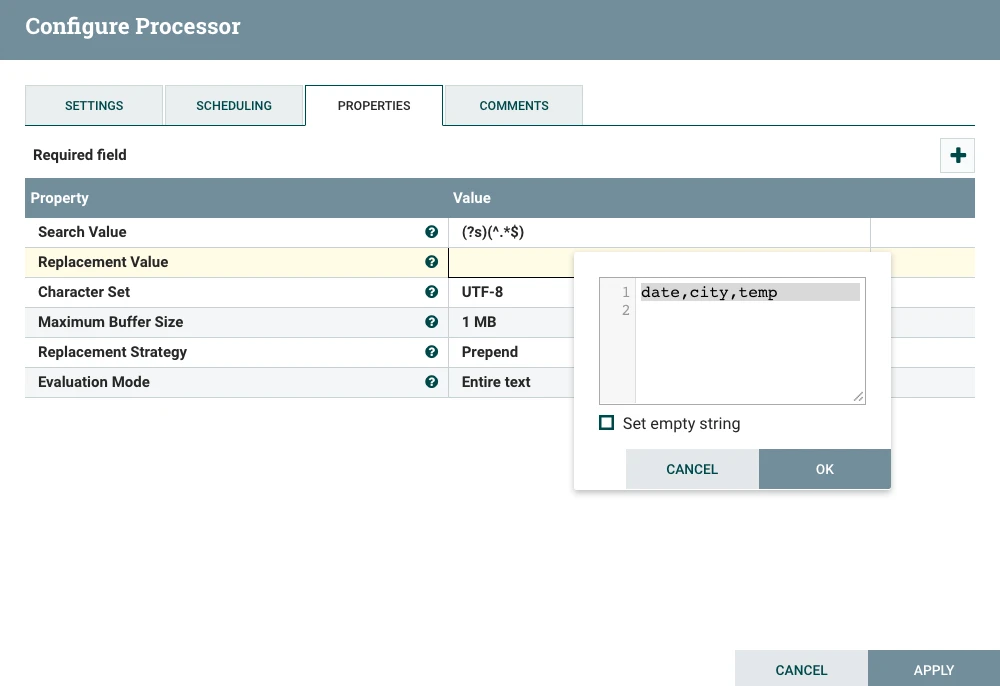
Here is how I have my ReplaceText processor component configured:
Screen Shot 2019-12-17 at 9.56.21 AM.png

I also used "shift+enter" to create a new line at the end of the header being inserted (note that a blank line "2" is shown) and the "Prepend" replacement strategy.


I passed it the following test CSV content:

15-Dec-19,Baltimore,27
17-Dec-19,Baltimore,34


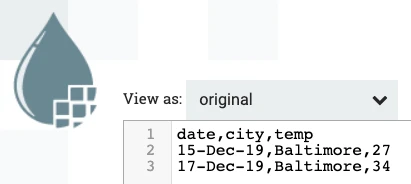
I then listed the queue on the success relationship connection outbound from the ReplaceText processor.  From there I could click on "View Details" icon to far left of my FlowFile in the queue list and then click "VIEW' to see what the resulting content looked like.

Here is what I see for my sample source content above:
Screen Shot 2019-12-17 at 10.02.54 AM.png


I am using Apache NiFi 1.9

Hope this helps,
Matt

2 replies

MattWho
Titanium ⭐️⭐️
MattWhoAnswer
Titanium ⭐️⭐️
Dec 17, 2019 3:04 PM UTC

@saciya 


I am not sure why this is not working for you.

I built a test flow and it is working fine for me.
Here is how I have my ReplaceText processor component configured:
Screen Shot 2019-12-17 at 9.56.21 AM.png

I also used "shift+enter" to create a new line at the end of the header being inserted (note that a blank line "2" is shown) and the "Prepend" replacement strategy.


I passed it the following test CSV content:

15-Dec-19,Baltimore,27
17-Dec-19,Baltimore,34


I then listed the queue on the success relationship connection outbound from the ReplaceText processor.  From there I could click on "View Details" icon to far left of my FlowFile in the queue list and then click "VIEW' to see what the resulting content looked like.

Here is what I see for my sample source content above:
Screen Shot 2019-12-17 at 10.02.54 AM.png


I am using Apache NiFi 1.9

Hope this helps,
Matt

Translate
saciya
saciyaAuthor
Silver ⭐️
Dec 18, 2019 4:51 AM UTC

Thanks Matt for the quick response.

Translate