kunalrj946
Silver ⭐️⭐️⭐️
January 8, 2019
Solved

How to add new hosts in extisting cluster whenever All Process are Done Successfull ....

Hi Everyone,

I am gonna adding a new hosts in existing cluster ....All Network Process are done successfully ...after then did't register new hosts by AMBARI....

hdp version details : hdp 2.6 with ambari 2.6

Os - centso7

Please Suggest How to do ,

Your Help is Highly appreciated .

screenshot-from-2018-12-28-18-17-06.pngscreenshot-from-2018-12-28-18-23-15.pngscreenshot-from-2018-12-28-18-40-11.png

jsensharma
Platinum ⭐️⭐️
January 8, 2019

@Kunal Kumar

If you want to setup a multi node cluster then please refer to the following Hortonworks Youtube Video

Hadoop Series- Part1 Multinode Hadoop Cluster Installation using Ambari : https://www.youtube.com/watch?v=wHaVBoLwzwU

.

Regarding the failure which you posted in your last comment is happening due to:

File "/var/lib/ambari-agent/tmp/os_check_type1546513757.py", line 40, in main
raise Exception("Local OS is not compatible with cluster primary OS family.
Please perform manual bootstrap on this host.")
Exception: Local OS is not compatible with cluster primary OS family. Please perform manual bootstrap on this host.

.

Looks like you are trying to register a new host which has slightly different OS version/type.

In that case we will suggest you to try using Manual Host installation & registration instead of doing it via Ambari UI. You can find the instructions to Manually Register Ambari Agenrt here:

https://docs.hortonworks.com/HDPDocuments/Ambari-2.6.2.2/bk_ambari-administration/content/install_the_ambari_agents_manually.html

.

12 replies

Shelton
Gold ⭐️⭐️⭐️
January 8, 2019

@Kunal Kumar

Can you share your /etc/hosts files? To me it seems this is the first host in the cluster, what is your cluster name?

Translate
kunalrj946
Silver ⭐️⭐️⭐️
January 8, 2019

@Geoffrey Shelton Okot

Hi Sir Thanks For the reply ...

Sir , You Are Absolutely Right , It is the first host in the cluster ......

also my cluster name is default "Sandbox" , if there is needed for Change this Please suggest the process..

i am new in Hadoop and it is my first experiment on hdp .

Thanks


screenshot-from-2018-12-31-12-27-12.pngscreenshot-from-2018-12-31-12-28-26.png


Translate
jsensharma
Platinum ⭐️⭐️
Platinum ⭐️⭐️
January 8, 2019

@Kunal Kumar

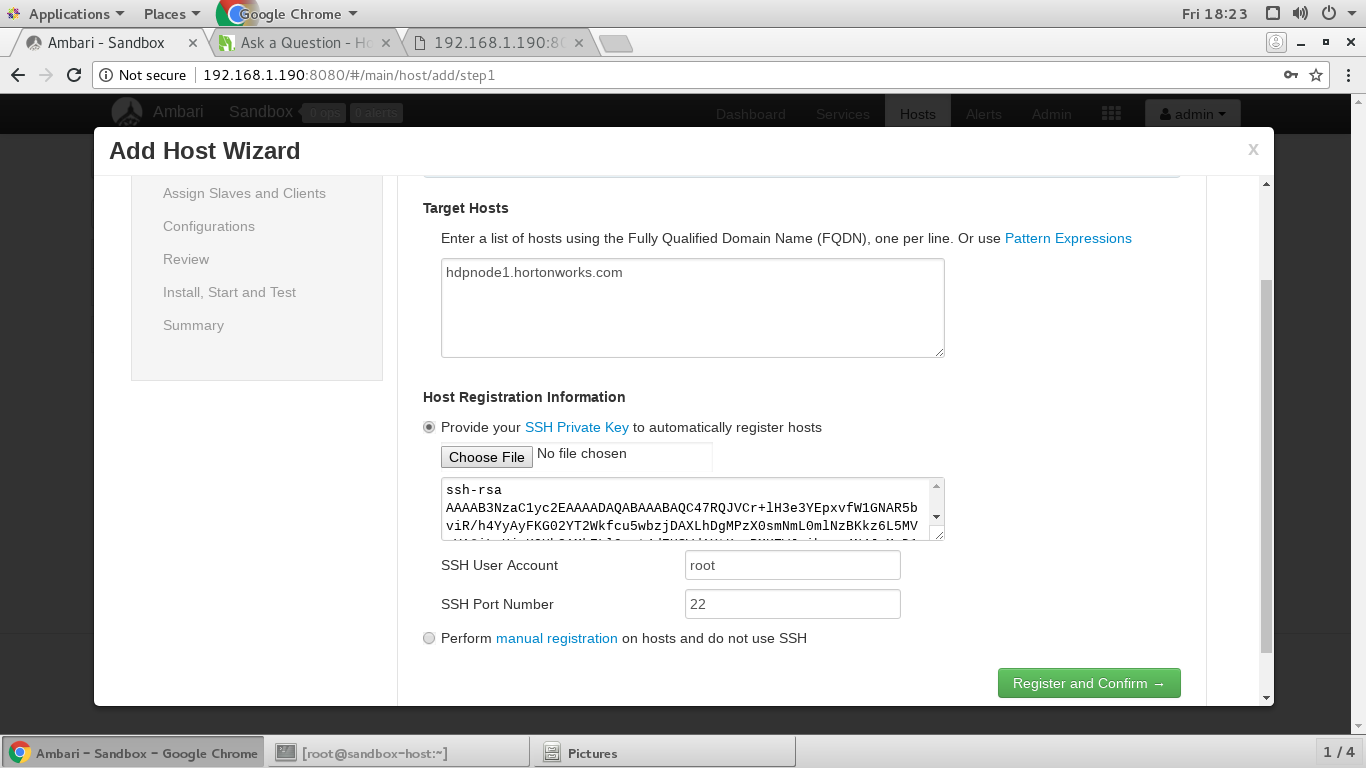
The problem seems to be the incorrect "SSH Private Key". Based on screenshot "screenshot-from-2018-12-28-18-23-15.png" looks like you are pasting the "Public" key content there instead of "Private Key" of the host "hdpnode1.hortonworks.com"

For example the following will be the Private Key: "~/.ssh/id_rsa" adn the content of private key file looks something like following which BEGIN and END marks:

Example:

-----BEGIN RSA PRIVATE KEY-----
ANCDEFGHIJKLMNOPoCUhgGazht5XrPbvkcD
.......
QRSTUVWXYZasdoeruoijlcsd,fns,cjsdklfjo=
-----END RSA PRIVATE KEY-----


Usually Public key file name is "~/.ssh/id_rsa.pub"

Also the Ambari API call is showing 404 because you will need to replace the "$name" with your clustername. You can get your ambari cluster name using the following API call.

http://192.168.1.190:8080/api/v1/clusters

.

Translate
jsensharma
Platinum ⭐️⭐️
Platinum ⭐️⭐️
January 8, 2019

@Kunal Kumar

Ownership of the "~/.ssh" directory and the keys files should be something like following:

# ls -l ~/.ssh/
total 20
-rw-------. 1 root root 818 Sep 12 08:03 authorized_keys
-rw-------. 1 root root 1679 May 22 2018 id_rsa
-rw-------. 1 root root 406 May 22 2018 id_rsa.pub
-rw-r--r--. 1 root root 1174 Sep 12 08:36 known_hosts
[root@newhwx1 ~]#
[root@newhwx1 ~]#
[root@newhwx1 ~]# ls -ld ~/.ssh/
drwx------. 2 root root 91 Sep 12 08:42 /root/.ssh/

.

Please check if you are able to do passwordless SSH to the mentioned host properly or not without suppliying the password (except for the first time)

You can also use the "ssh-copy-id" command to make sure that your correct public key is setup

# ssh-copy-id -i ~/.ssh/id_rsa.pub root@hdpnode1.hortonworks.com

.

Then try using the passwordless SSH to see if it works?

# ssh root@hdpnode1.hortonworks.com

.

Regarding your query: how to replace " $name" with my clustername.

The API calls the cluster name in your case is "Sandbox" so the correct Hosts call will be as following to list the hosts added to the cluster (Sandbox)

http://192.168.1.190:8080/api/v1/clusters/Sandbox/hosts

.

Also pelase verify if you have the FQDN setup correctly for your Ambari Server host as well as for the host which you are adding recently to the cluster:

# hostname -f

# cat /etc/hosts

.

If you still face any issue while doing host registration then please share the "Operation log" (the Complete error which you see in the ambari UI for failure)

Translate
kunalrj946
Silver ⭐️⭐️⭐️
January 8, 2019

@Jay Kumar SenSharma

when i clicked on failed :screenshot-from-2019-01-02-15-50-34.png

Registration log for hdpnode1.hortonworks.com

Registration with the server failed.

OK

Translate
jsensharma
Platinum ⭐️⭐️
Platinum ⭐️⭐️
January 8, 2019

@Kunal Kumar

If you want to setup a multi node cluster then please refer to the following Hortonworks Youtube Video

Hadoop Series- Part1 Multinode Hadoop Cluster Installation using Ambari : https://www.youtube.com/watch?v=wHaVBoLwzwU

.

Regarding the failure which you posted in your last comment is happening due to:

File "/var/lib/ambari-agent/tmp/os_check_type1546513757.py", line 40, in main
raise Exception("Local OS is not compatible with cluster primary OS family.
Please perform manual bootstrap on this host.")
Exception: Local OS is not compatible with cluster primary OS family. Please perform manual bootstrap on this host.

.

Looks like you are trying to register a new host which has slightly different OS version/type.

In that case we will suggest you to try using Manual Host installation & registration instead of doing it via Ambari UI. You can find the instructions to Manually Register Ambari Agenrt here:

https://docs.hortonworks.com/HDPDocuments/Ambari-2.6.2.2/bk_ambari-administration/content/install_the_ambari_agents_manually.html

.

Translate
kunalrj946
Silver ⭐️⭐️⭐️
January 8, 2019

Hello @Jay Kumar SenSharma

1.

I want 3 node cluster in our server .... please suggest which process is the best for multinode cluster . can i setup multinode cluster in installed single node cluster in sandbox....???

2.

yes ambari server host and its port 8080 is work fine except 8440 port

3.

after the adding hostname "hdpnode1.hortonworks.com" in /etc/hosts .....

Registratin log saying :

Registration log for hdpnode1.hortonworks.com

==========================
Creating target directory...
==========================

Command start time 2019-01-03 11:09:16

Connection to hdpnode1.hortonworks.com closed.
SSH command execution finished
host=hdpnode1.hortonworks.com, exitcode=0
Command end time 2019-01-03 11:09:16

==========================
Copying ambari sudo script...
==========================

Command start time 2019-01-03 11:09:16

scp /var/lib/ambari-server/ambari-sudo.sh
host=hdpnode1.hortonworks.com, exitcode=0
Command end time 2019-01-03 11:09:17

==========================
Copying common functions script...
==========================

Command start time 2019-01-03 11:09:17

scp /usr/lib/python2.6/site-packages/ambari_commons
host=hdpnode1.hortonworks.com, exitcode=0
Command end time 2019-01-03 11:09:17

==========================
Copying create-python-wrap script...
==========================

Command start time 2019-01-03 11:09:17

scp /var/lib/ambari-server/create-python-wrap.sh
host=hdpnode1.hortonworks.com, exitcode=0
Command end time 2019-01-03 11:09:17

==========================
Copying OS type check script...
==========================

Command start time 2019-01-03 11:09:17

scp /usr/lib/python2.6/site-packages/ambari_server/os_check_type.py
host=hdpnode1.hortonworks.com, exitcode=0
Command end time 2019-01-03 11:09:17

==========================
Running create-python-wrap script...
==========================

Command start time 2019-01-03 11:09:17

Connection to hdpnode1.hortonworks.com closed.
SSH command execution finished
host=hdpnode1.hortonworks.com, exitcode=0
Command end time 2019-01-03 11:09:18

==========================
Running OS type check...
==========================

Command start time 2019-01-03 11:09:18
Cluster primary/cluster OS family is redhat6 and local/current OS family is redhat7
Traceback (most recent call last):
File "/var/lib/ambari-agent/tmp/os_check_type1546513757.py", line 44, in <module>
main()
File "/var/lib/ambari-agent/tmp/os_check_type1546513757.py", line 40, in main
raise Exception("Local OS is not compatible with cluster primary OS family. Please perform manual bootstrap on this host.")
Exception: Local OS is not compatible with cluster primary OS family. Please perform manual bootstrap on this host.

Connection to hdpnode1.hortonworks.com closed.
SSH command execution finished
host=hdpnode1.hortonworks.com, exitcode=1
Command end time 2019-01-03 11:09:18

ERROR: Bootstrap of host hdpnode1.hortonworks.com fails because previous action finished with non-zero exit code (1)
ERROR MESSAGE: tcgetattr: Inappropriate ioctl for device
Connection to hdpnode1.hortonworks.com closed.

STDOUT: Cluster primary/cluster OS family is redhat6 and local/current OS family is redhat7
Traceback (most recent call last):
File "/var/lib/ambari-agent/tmp/os_check_type1546513757.py", line 44, in <module>
main()
File "/var/lib/ambari-agent/tmp/os_check_type1546513757.py", line 40, in main
raise Exception("Local OS is not compatible with cluster primary OS family. Please perform manual bootstrap on this host.")
Exception: Local OS is not compatible with cluster primary OS family. Please perform manual bootstrap on this host.

Connection to hdpnode1.hortonworks.com closed.

Also i want to say that my server ip where hdp2.6 -------.ova is installed is 192.168.1.190 ...when i connected from my local system to this ip
[root@hdpnode1 ~]# ssh root@192.168.1.190
Last login: Thu Jan 3 11:08:27 2019 from hdpnode1.hortonworks.com
[root@sandbox-host ~]#
it shows sandbox-host but here is nothing for hadoop or hdp or ambari server
and when i connected to root@172.17.0.2 here all hadoop daemons are running but as per you it is Sandbox which is suitable for a Single Node cluster only......Then how can achieve multinode cluster on hdp

[root@sandbox-hdp ~]# jps
8000 TagSynchronizer
8134 QuorumPeerMain
14214 -- process information unavailable
16011 RunJar
10060 JobHistoryServer
14476 LivyServer
14225 ZeppelinServer
11669 HistoryServer
21269 RunJar
22422
10520 RunJar
20953 DataNode
7323 -- process information unavailable
11100 ResourceManager
21475 NameNode
29608 AmbariServer
15080 Jps
8747 EmbeddedServer
28974 -- process information unavailable
9520 ApplicationHistoryServer
14705 NodeManager
9082 UnixAuthenticationService
20987 SparkSubmit
22652 SecondaryNameNode
16957 Bootstrap
[root@sandbox-hdp ~]#

Translate
akhilsnaik
Gold ⭐️⭐️⭐️
Gold ⭐️⭐️⭐️
January 8, 2019

Hi @Kunal Kumar,

It looks like your add host operation is failing.

Can you click on the hostname of failed host and see what is the error log saying.

Also, I would like you to investigate if there is any clue on why it's failing with having a look on ambari-server logs when the operation is ongoing.

tail -f /var/log/ambari-server/ambari-server.log

Hope this helps.

Translate
kunalrj946
Silver ⭐️⭐️⭐️
January 8, 2019

Hi @Akhil S Naik

Thanks For the Reply ,

after Triggered Your Command : ' tail -f /var/log/ambari-server/ambari-server.log '

there is No such file or directory

tail : no files remaining

And also , after clicked on Failed there is a message :

Registration with the server failed for hdpnode1.hortonworks.com

Translate