renuu
Silver ⭐️⭐️⭐️
June 3, 2020
Solved

how to configure listenerhttp processor in NIFI

We want to configure listenhttp processor that listen our web service. question is what are the configuration in http listener processor in nifi such that when we will make curl post request this ListenHttp processor will catch the update. basically i didn't understand what i have to put in Base path (is it i have to put nifi address i.e http://localhost:8080/contentListener or our web app service URL???) what is contentListener. And is it i have to put our web app port number in listening port? in the request command what i have to put in url part


curl --request POST 'http://(here i have to used the nifi url)' -H 'Authorization: Key demo-key


i know this is very basic question but i'm just using this don't know any thing about nifi and curl command .....thanks in advance
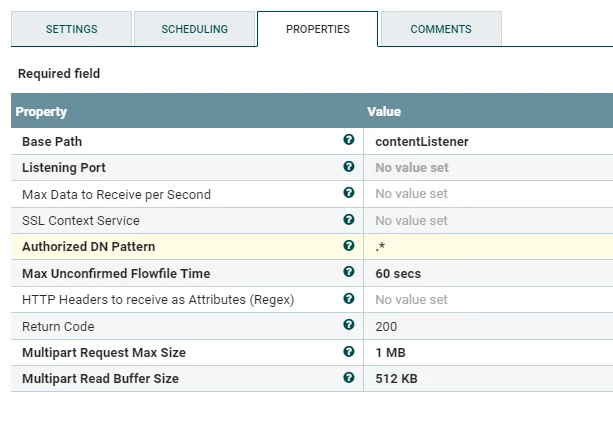

BNucf.png

hegdemahendra
Gold ⭐️⭐️
June 3, 2020

Hi @renuu ,


You can use'HandleHttpRequest' to listen for incoming GET/POST request on specific port and respond back using 'HandleHttpResponse' processor.
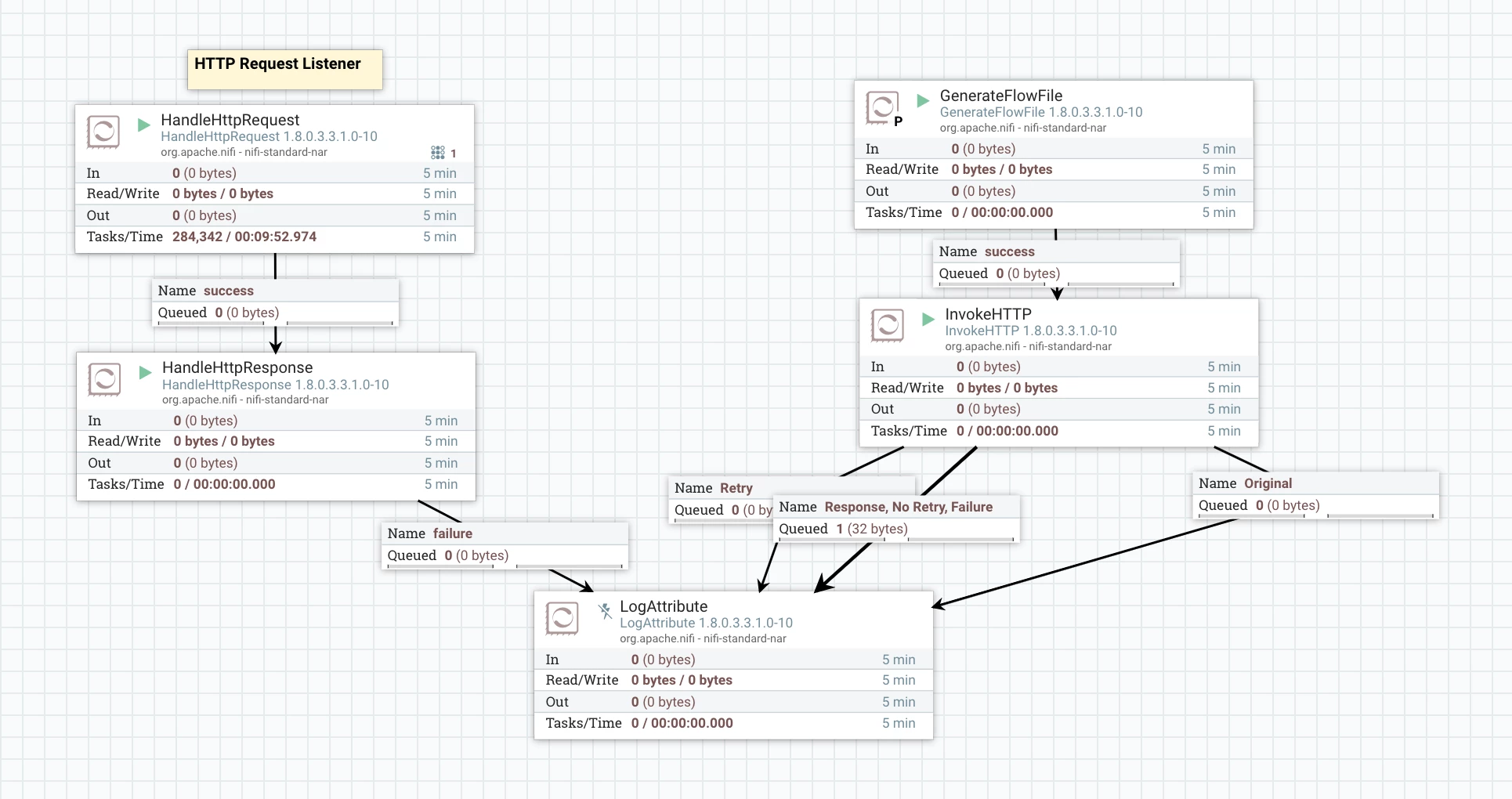
Add one Http Context Map controller service and use the same in both processor to map request to response, thats it.

Take a look at the below sample configurations.

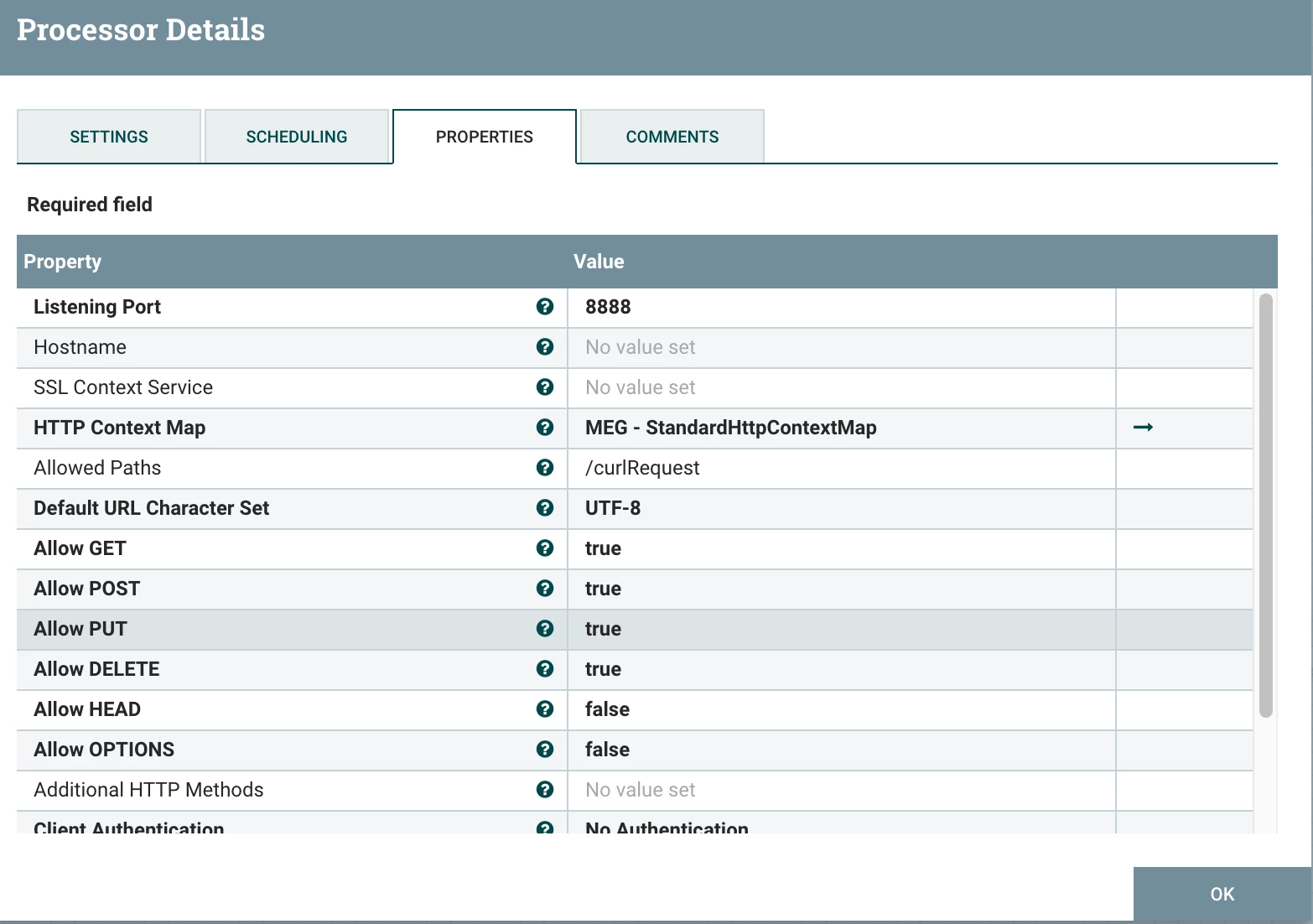
This HandleHTTPRequest listens for http requests on port 8888 & specifi path i.e /curlRequest.
'Allowed path' is optional, if you just want listen for any request then you ca remove that value.


HandleHTTPRequest processorHandleHTTPRequest processor


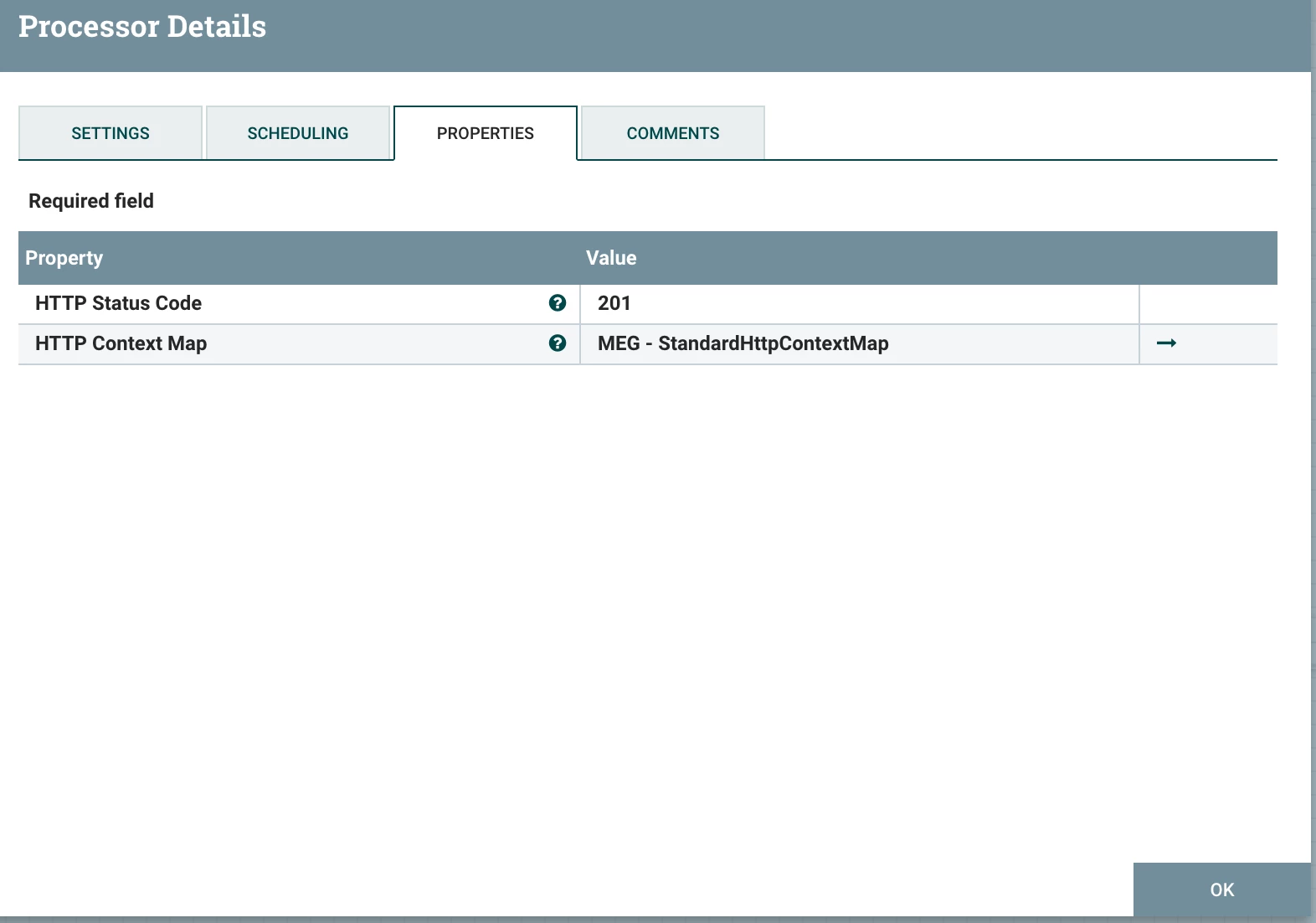
HandleHTTPResponse responds to client with 201 response code and any content which is flowfile content.


HandleHTTPResponse processorHandleHTTPResponse processor


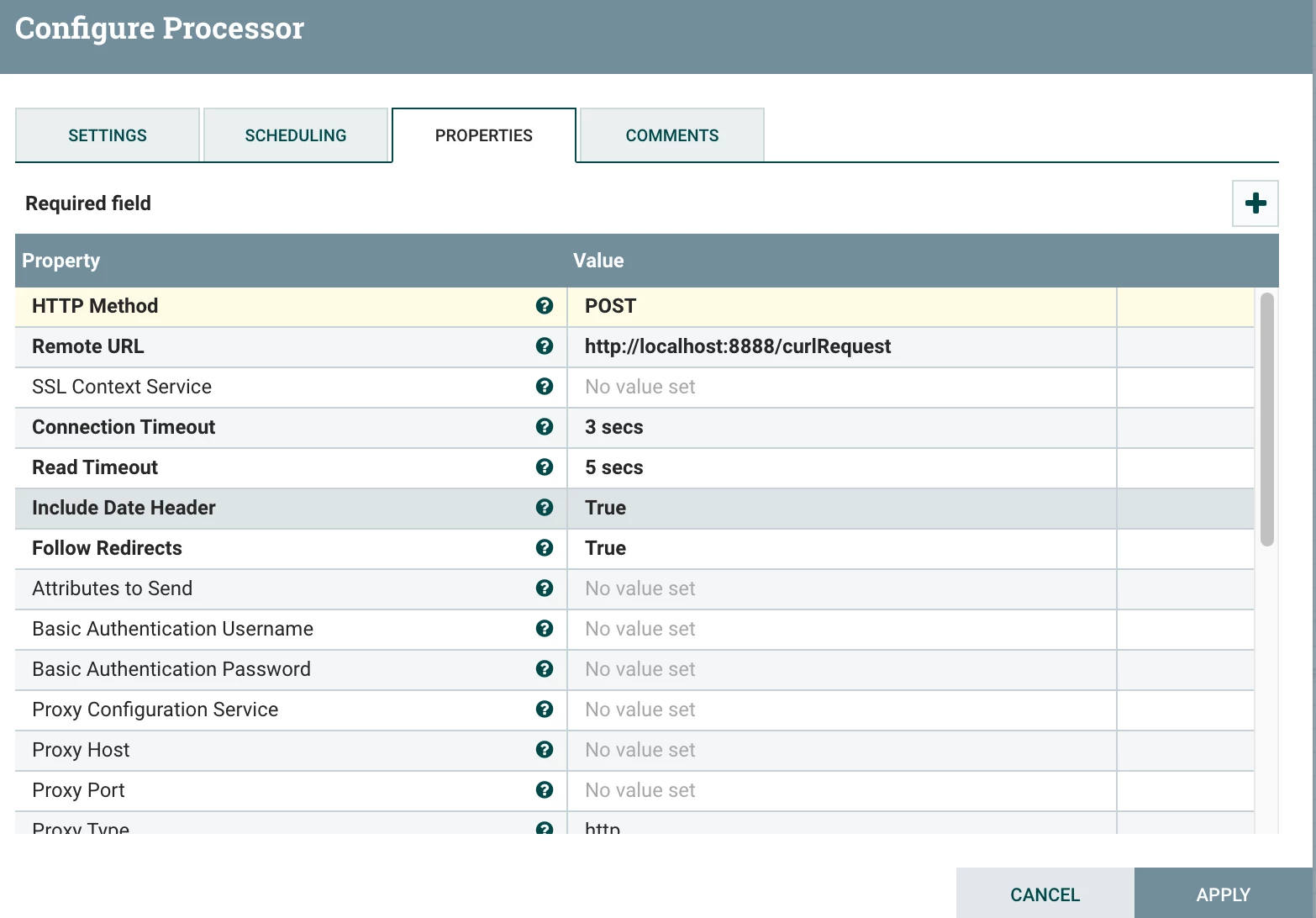
Instead of curl command I have invoked above listener with another NiFi processor (which you can consider as client)
InvokeHttp processor with target end point as above HandleHTTPRequest host & port.
I am using host as localhost as I am invoking form Nifi (local) only.
For curl command form outside, you need to use your nifi host name instead of 'localhost'.
So that would be 'http://<hostname>':8888/curlRequest

Screenshot 2020-06-03 at 9.45.54 PM.png


All together - Screenshot 2020-06-03 at 9.49.06 PM.png


Please ACCEPT the solution if it helps/resolves your problem.


Thanks

Mahendra

6 replies

hegdemahendra
Gold ⭐️⭐️
June 3, 2020

Hi @renuu ,


You can use'HandleHttpRequest' to listen for incoming GET/POST request on specific port and respond back using 'HandleHttpResponse' processor.
Add one Http Context Map controller service and use the same in both processor to map request to response, thats it.

Take a look at the below sample configurations.

This HandleHTTPRequest listens for http requests on port 8888 & specifi path i.e /curlRequest.
'Allowed path' is optional, if you just want listen for any request then you ca remove that value.


HandleHTTPRequest processorHandleHTTPRequest processor


HandleHTTPResponse responds to client with 201 response code and any content which is flowfile content.


HandleHTTPResponse processorHandleHTTPResponse processor


Instead of curl command I have invoked above listener with another NiFi processor (which you can consider as client)
InvokeHttp processor with target end point as above HandleHTTPRequest host & port.
I am using host as localhost as I am invoking form Nifi (local) only.
For curl command form outside, you need to use your nifi host name instead of 'localhost'.
So that would be 'http://<hostname>':8888/curlRequest

Screenshot 2020-06-03 at 9.45.54 PM.png


All together - Screenshot 2020-06-03 at 9.49.06 PM.png


Please ACCEPT the solution if it helps/resolves your problem.


Thanks

Mahendra

Translate
renuu
renuuAuthor
Silver ⭐️⭐️⭐️
June 4, 2020

@hegdemahendra thanks for solution...but I really want to know listenhttp processor configuration....and your explanation method is awesome with flow and configuration. Thank alot ....

Translate
hegdemahendra
Gold ⭐️⭐️
June 4, 2020

Hi @renuu 


ListenHTTP also works same way -
Find below sample configuration and how to invoke using curl.

ListenHTTP listens on a specific port (in my case 8889) and a base path ('/curlRequestListener')

Screenshot 2020-06-04 at 2.17.45 PM.png


Screenshot 2020-06-04 at 2.17.55 PM.png


Using below curl command from terminal you can post data -

curl -d 'my request data'  http://<nifihostname>:8889/curlRequestListener


'my request data' is the sample data which I am posting to the ListenHTTP processor and same is received in processors and queued as flowfile. 


Received request Flowfile content -

Screenshot 2020-06-04 at 2.18.29 PM.png

Translate