DataD
Bronze ⭐️⭐️⭐️
Nov 16, 2019 1:10 PM UTC
Solved

How to convert two arrays to key value with Jolt?

I have some JSON that contains two arrays that I would like to convert to key/value pairs. I've already create a spec to convert my input data into the format below.


Input


{
"rows" : [ {
"row" : [ "row1", "row2", "row3" ],
"header" : [ "header1", "header2", "header3" ]
}, {
"row" : [ "row4", "row5", "row6" ],
"header" : [ "header1", "header2", "header3" ]
} ]
}


Is it possible to convert it again with Jolt to something like:


{
"header1" : "row1",
"header2" : "row2",
"header3" : "row3",
"header1" : "row4",
"header2" : "row5",
"header3" : "row6"
}


Any guidance would be highly appreciated 🙂

marcusmattson
Gold ⭐️
Nov 16, 2019 10:19 PM UTC

If the original input data (before your Jolt transform) looks something like this...

{
"headers": [
"header1",
"header2",
"header3"
],
"rows": [
[
"row1",
"row2",
"row3"
],
[
"row4",
"row5",
"row6"
]
]
}


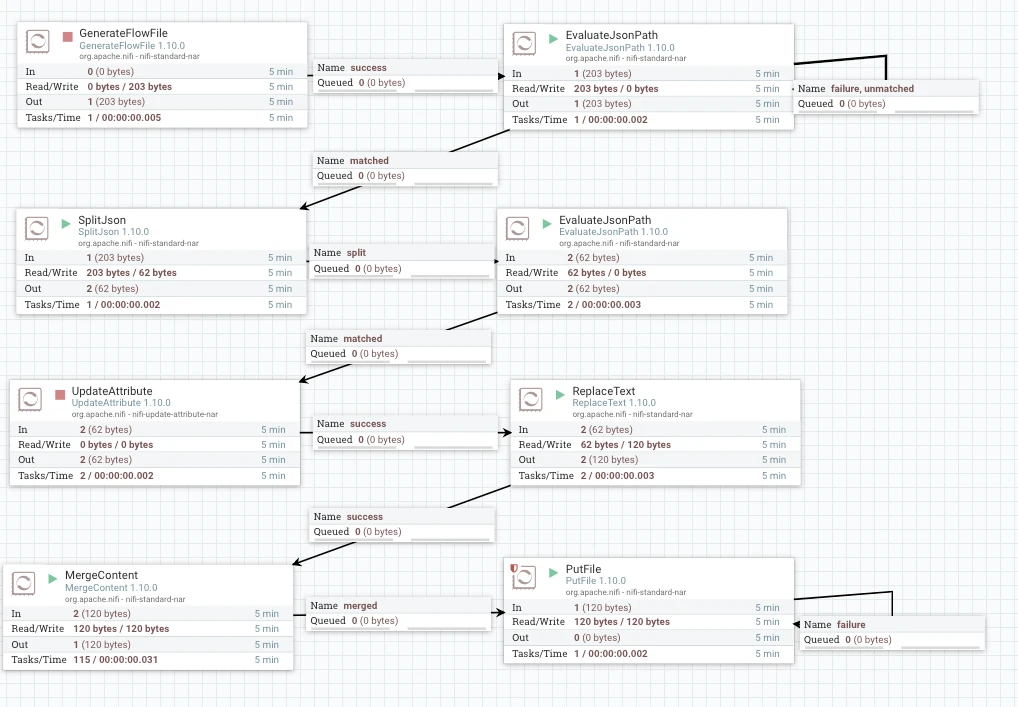
...then it may be easier using SplitJSON and EvaluateJSONPath processors in this scenario.


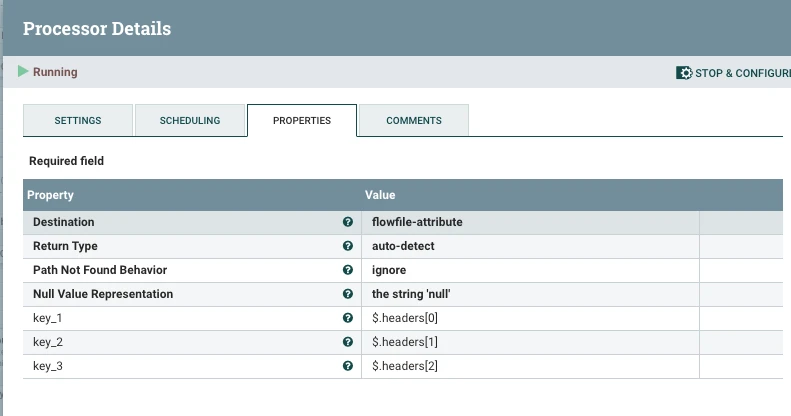
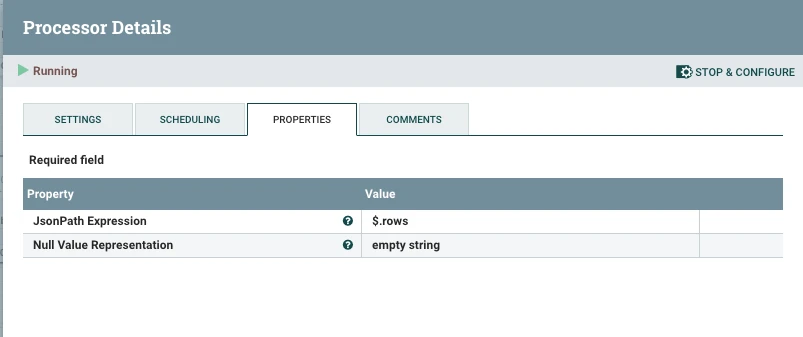
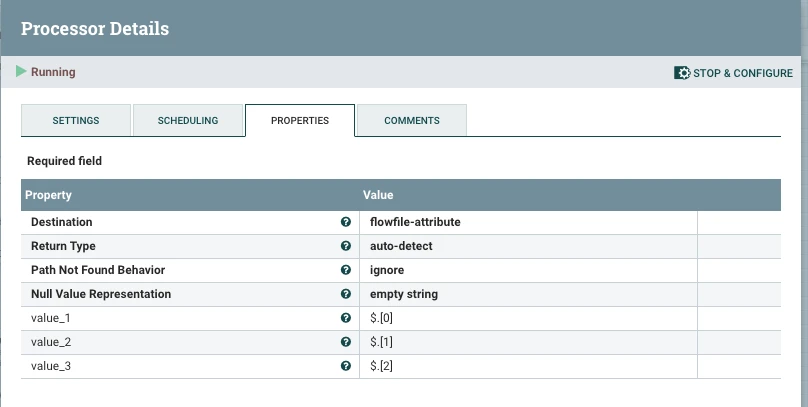
The GenerateFlowFile processor has some sample data that matches the above format using books as the example. The result will be a separate JSON file for each array within "rows". You can configure the MergeContent to bundle the JSON records as needed.


Screen Shot 2019-11-16 at 5.08.14 PM.png


EvaluateJSONPath

Screen Shot 2019-11-16 at 5.13.45 PM.png


SplitJSON

Screen Shot 2019-11-16 at 5.14.49 PM.png


EvaluateJSONPath

Screen Shot 2019-11-16 at 5.14.59 PM.png


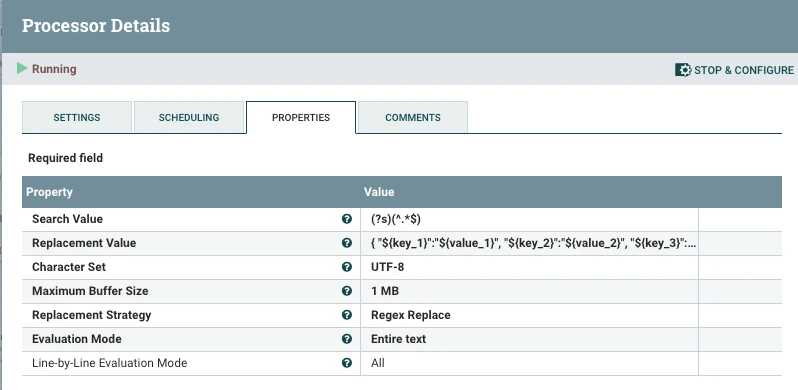
ReplaceText

Screen Shot 2019-11-16 at 5.15.09 PM.png


2 replies

marcusmattson
Gold ⭐️
Gold ⭐️
Nov 16, 2019 10:19 PM UTC

If the original input data (before your Jolt transform) looks something like this...

{
"headers": [
"header1",
"header2",
"header3"
],
"rows": [
[
"row1",
"row2",
"row3"
],
[
"row4",
"row5",
"row6"
]
]
}


...then it may be easier using SplitJSON and EvaluateJSONPath processors in this scenario.


The GenerateFlowFile processor has some sample data that matches the above format using books as the example. The result will be a separate JSON file for each array within "rows". You can configure the MergeContent to bundle the JSON records as needed.


Screen Shot 2019-11-16 at 5.08.14 PM.png


EvaluateJSONPath

Screen Shot 2019-11-16 at 5.13.45 PM.png


SplitJSON

Screen Shot 2019-11-16 at 5.14.49 PM.png


EvaluateJSONPath

Screen Shot 2019-11-16 at 5.14.59 PM.png


ReplaceText

Screen Shot 2019-11-16 at 5.15.09 PM.png


Translate
PVVK
Gold ⭐️
Sep 30, 2020 6:25 PM UTC

Hi @DataD,

Please find the below spec:

[
{
"operation": "shift",
"spec": {
"rows": {
"*": {
"row": {
"*": {
"@": "[&3].@(3,header[&1])"
}
}
}
}
}
}
]

This will give the output as:

[ {
"header1" : "row1",
"header2" : "row2",
"header3" : "row3"
}, {
"header1" : "row4",
"header2" : "row5",
"header3" : "row6"
} ]

I didn't convert it to 

{
"header1" : "row1",
"header2" : "row2",
"header3" : "row3",
"header1" : "row4",
"header2" : "row5",
"header3" : "row6"
}

because that is not a valid json as header1,2 and 3 are repeated keys in the same level of the json.

Translate