

Hae
Gold ⭐️⭐️
October 19, 2023
Solved

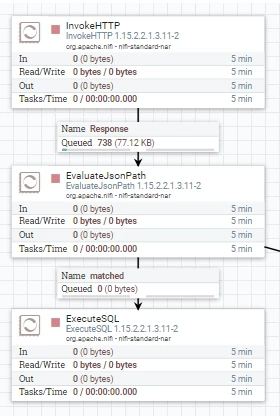
how to insert values in queue of nifi

Hae_4-1697689052890.png

In case of imgae, only one single value(number) in second queue(name: matched).
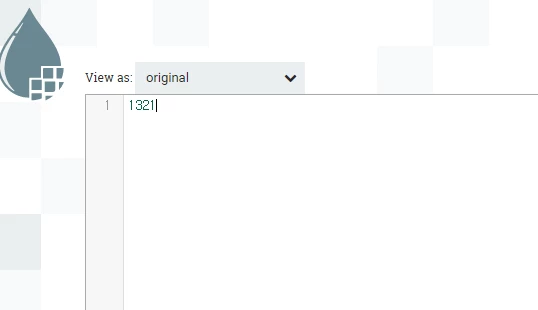
 
Hae_5-1697689096837.png


How can I insert data(value in queue) into table use SQL?

"insert into table values ( queue )"

I want insert 1321 into table in this case.

I mean i want make like as "insert into table values (1321)"

Which variable or parameter can I use?

insert into table values ( ${???????})

Thank you for your answer.

VidyaSargur
Community Manager
October 19, 2023

@Hae, Welcome to our community! To help you get the best possible answer, I have tagged in our NiFi experts @cotopaul @SAMSAL @MattWho @steven-matison @TimothySpann  who may be able to assist you further.

Please feel free to provide any additional information or details about your query, and we hope that you will find a satisfactory solution to your question.

Regards, Vidya Sargur, Community Manager Was your question answered? Make sure to mark the answer as the accepted solution. If you find a reply useful, say thanks by clicking on the thumbs up button.

4 replies

VidyaSargur
Community Manager
Community Manager
October 19, 2023

@Hae, Welcome to our community! To help you get the best possible answer, I have tagged in our NiFi experts @cotopaul @SAMSAL @MattWho @steven-matison @TimothySpann  who may be able to assist you further.

Please feel free to provide any additional information or details about your query, and we hope that you will find a satisfactory solution to your question.

Translate
Regards, Vidya Sargur, Community Manager Was your question answered? Make sure to mark the answer as the accepted solution. If you find a reply useful, say thanks by clicking on the thumbs up button.
Hae
HaeAuthor
Gold ⭐️⭐️
October 19, 2023

What should I do??

Translate
cotopaul
Platinum ⭐️
October 19, 2023

@Hae,

Well if you are going to use ExecuteSQL to execute the INSERT Statement based on the content of the file, from my point of view you should first extract the value of your content as an Attribute to your FlowFile.

To do that, you add an ExtractText Processor, where you define a new property named "what_you_want_to_have_it_called" and assign it the value ".*". This will extract the content of your flow file and store it in the attribute you defined as a property.
NOTE: if you are going to have lots of information stored in the content of the flowfile, you will encounter so many issues doing the above mentioned. Take into consideration that this is going to work properly if working with small flowfiles, exactly like you described in your post 🙂

Next, using ExecuteSQL, you are going to execute the insert like: "insert into table value(${what_you_want_to_have_it_called}).

Another option which might not involve all these steps would be to use and PutDatabaseRecord Processor, in which you can define directly the action you are trying to perform and it will handle everything for you.
NOTE: this is going to work ok for larger flowfiles, as you no longer need to extract the content as attributes and NiFi will handle everything on its own. The only single downside is that you will have to configure an Record Reader.

Translate
Hae
HaeAuthor
Gold ⭐️⭐️
October 19, 2023

It works via extracting text. 

Thank you

Translate

