

Ghilani
Silver ⭐️⭐️⭐️
Jun 16, 2022 9:55 AM UTC
Solved

How to load json record to postgres as json datatype ?

I have a list of json records : [{}, {},{},{}]

I splitted them to get : {},{},{},{}
i need to load them to postgres as json datatype

the result in postgres should be like that 
|                data                               |

|---------------------------------------|

| { "name":"alex", "surname":"rolfi"}|
| { "name":"rolf", "surname":"syon"}|
| { "name":"med", "surname":"akil"}|

i did that with the following processors :
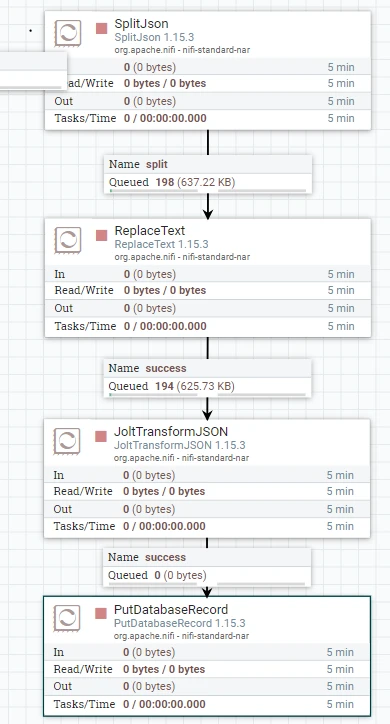
Ghilani_0-1655373269238.png


but Putdatabaserecord did not solve the problem

SAMSAL
SAMSALAnswer
Platinum ⭐️⭐️⭐️
Jun 16, 2022 1:29 PM UTC

The way PutDatabaseRecord works is basically once it reads the json , it will try to match the json keys to the DB columns hence the error you are getting if not being able to map fields to columns, in your case it will be looking for columns: name & surename to store their values, so it wont store the whole json in one field. I had similar situation where I needed to store json and the only way I can think of is first load the json into an attribute using the ExtractText Processor, then use PutSQL processor and write the insert statement to the target table where the column is the Data and the value is the attribute contain the json value for example ${JsonDataAttribute}. You have to be careful how big your json is, if its too big then you have to figure out another way, but if its small then no harm from saving into an attribute.

7 replies

SAMSAL
Platinum ⭐️⭐️⭐️
Jun 16, 2022 12:55 PM UTC

Hi,


Can you explain what happen when you use the PutDatabaseRecrod Processor?

Translate
Ghilani
GhilaniAuthor
Silver ⭐️⭐️⭐️
Jun 16, 2022 1:07 PM UTC

Ghilani_0-1655384841812.png


Translate
SAMSAL
SAMSALAnswer
Platinum ⭐️⭐️⭐️
Jun 16, 2022 1:29 PM UTC

The way PutDatabaseRecord works is basically once it reads the json , it will try to match the json keys to the DB columns hence the error you are getting if not being able to map fields to columns, in your case it will be looking for columns: name & surename to store their values, so it wont store the whole json in one field. I had similar situation where I needed to store json and the only way I can think of is first load the json into an attribute using the ExtractText Processor, then use PutSQL processor and write the insert statement to the target table where the column is the Data and the value is the attribute contain the json value for example ${JsonDataAttribute}. You have to be careful how big your json is, if its too big then you have to figure out another way, but if its small then no harm from saving into an attribute.

Translate
Ghilani
GhilaniAuthor
Silver ⭐️⭐️⭐️
Jun 16, 2022 1:40 PM UTC

Can you please explain in more detail how to do this.
i tried this solution but i think i missed something in the configuration

Ghilani_0-1655386690579.png


Extract text 
is it correct how i loaded the text to the variable data

Ghilani_1-1655386716586.png


then PUTSQL 

Ghilani_2-1655386819733.png


Translate
SAMSAL
Platinum ⭐️⭐️⭐️
Jun 16, 2022 2:04 PM UTC

Im not familiar with the postgress sql but should not be like this:

INSERT INTO table(column1, column2, …)
VALUES
(value1, value2, …);


Also for the value you need to provide the attribute name , so it should be something like this:

INSERT INTO table(jsonDataColumn) VALUES(${data});


Translate
Ghilani
GhilaniAuthor
Silver ⭐️⭐️⭐️
Jun 16, 2022 2:18 PM UTC

Ghilani_0-1655389023138.png

i did that , PutSQL accepts as you see the flowfile but it gives no output, also no data inserted to the DB

Translate
SAMSAL
Platinum ⭐️⭐️⭐️
Jun 16, 2022 2:24 PM UTC

Sorry I forgot to mention that in the PutSql processor set the Batch Size property to 1

Translate

