

FediMannoubi
Gold ⭐️
Jun 21, 2022 1:56 PM UTC
Solved

How to select schema in postgresql with NIFI

Hello

I'm using Postgresql with NIFI, how can I specify the schema I want to use from Postgresql
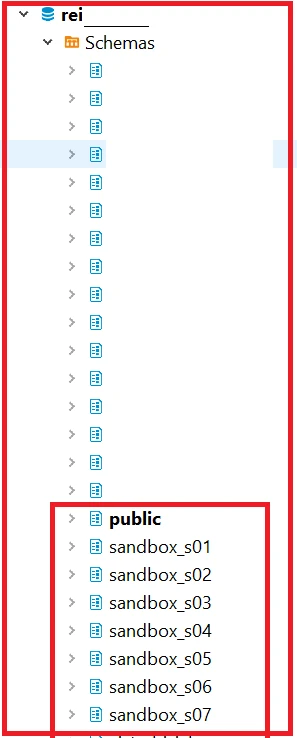
 

FediMannoubi_0-1655819229599.png


There is no option for the schema in the DBCPConnectionPoll.
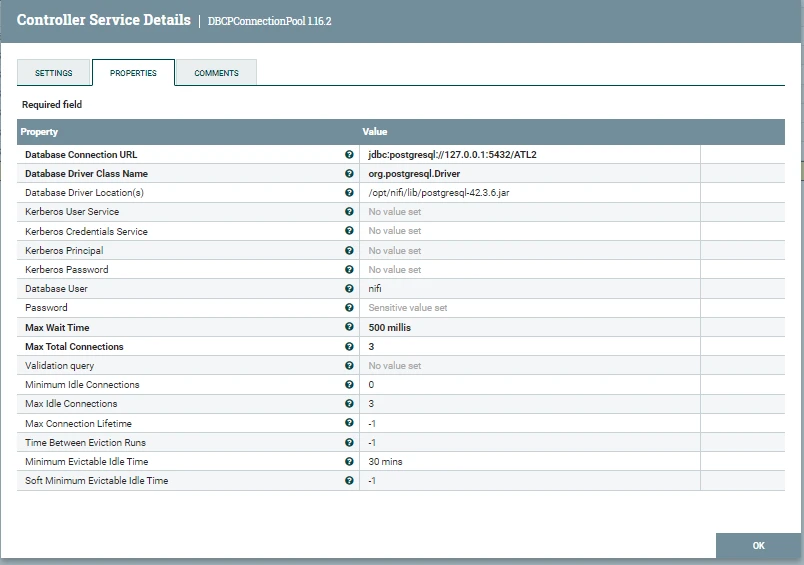
 

FediMannoubi_1-1655819846571.png


and there is no option for schema also in the lookup service 
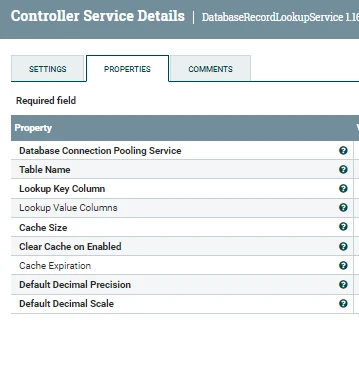
 

FediMannoubi_2-1655820010899.png


FediMannoubi
Gold ⭐️
Jul 6, 2022 1:23 PM UTC

Thank you all for your replays, The fix was so simple:

All I need to do to specify from which database schema I want to work with or have the lookup service connected to I just added the schema name before the table name like this :
sandbox_s01.table_name

4 replies

ckumar
Platinum ⭐️
Platinum ⭐️
Jun 21, 2022 3:01 PM UTC

DBCPConnectionPool provides Database Connection Pooling Service. Connections can be asked from pool and returned after usage by SQL processor which are responsible to run the SQL queries .

You can useListDatabaseTables processor along withDBCPConnectionPool controller to get the table metadata 


If you found this response assisted with your issue, please take a moment to login and click on "Accept as Solution" below this post.

Thank you,

Chandan 


Translate
ask_bill_brooks
Platinum ⭐️
Platinum ⭐️
Jun 22, 2022 12:12 AM UTC

p>Hi @FediMannoubi I want to add a bit here and add on to what @ckumar wrote earlier in the thread.


What tool did you capture the first screen shot from? Does that tool connect to the Postgresql database server via JDBC and using this Database Connection URL?


jdbc:postgresql://127.0.0.1:5432/ATL2


I ask because if you had, that would validate that the connection string you are using is indeed valid. I strongly recommend that you carefully read the documentation for Connecting to the Database, as it has detailed information on how a valid JDBC connection string should be formed. Comparing the available forms described on that page, and comparing the options to the string that you have captured in your page shot, the relevant option for the PostgreSQL JDBC string in this case appears to me at least to be the following form:


jdbc:postgresql://host:port/database


If the string you've already entered into the Database Connection URL property works, then you can proceed assuming that the final characters are the "database" and so in your case the database would be ATL2 The first screen shot appears to indicate that the database is named rei. I don't know what to make of that difference.


Translate
Bill Brooks, Community Moderator Was your question answered? Make sure to mark the answer as the accepted solution. If you find a reply useful, say thanks by clicking on the thumbs up button.
VidyaSargur
Community Manager
Community Manager
Jun 23, 2022 10:52 AM UTC

@FediMannoubi, Has the reply helped resolve your issue? If so, please mark the appropriate reply as the solution, as it will make it easier for others to find the answer in the future. 

Translate
Regards, Vidya Sargur Madabhushi| Senior Community Manager | Was your question answered? Make sure to mark the answer as the Best Answer. If you find a reply useful, say thanks by clicking on the thumbs up button.
FediMannoubi
FediMannoubiAuthorAnswer
Gold ⭐️
Jul 6, 2022 1:23 PM UTC

Thank you all for your replays, The fix was so simple:

All I need to do to specify from which database schema I want to work with or have the lookup service connected to I just added the schema name before the table name like this :
sandbox_s01.table_name

Translate

