michalLi
Gold ⭐️
August 24, 2022
Solved

How to set up authentication for spark history server?

Hi Guys,


I would like to know how to set up authentication for spark history server, so that unauthorized users cannot view the spark history server web ui, any help would be appreciated, thanks!


1. I do notice there are below statements in the official spark document:“Enabling authentication for the Web UIs is done using javax servlet filters. You will need a filter that implements the authentication method you want to deploy. Spark does not provide any built-in authentication filters.”

 2. There is also a thread on stackoverflow regardig this : “You re-use Hadoop's jetty authentication filter for Kerberos/SPNEGO: spark.ui.filters=org.apache.hadoop.security.authentication.server.AuthenticationFilter and spark.org.apache.hadoop.security.authentication.server.AuthenticationFilter.params=type=kerberos,kerberos.principal=${spnego_principal_name},kerberos.keytab=${spnego_keytab_path}”.


with kerberos authentication enabled in CDH6.3, I followed the instructions in the above stackoverflow thread, but is unable to acheive the expected results, any user can view the spark history server web ui.


Thanks,

Michael
michalLi
michalLiAnswer
Gold ⭐️
November 10, 2022

Just an update, this is resolved.


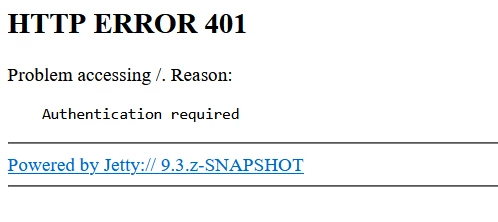
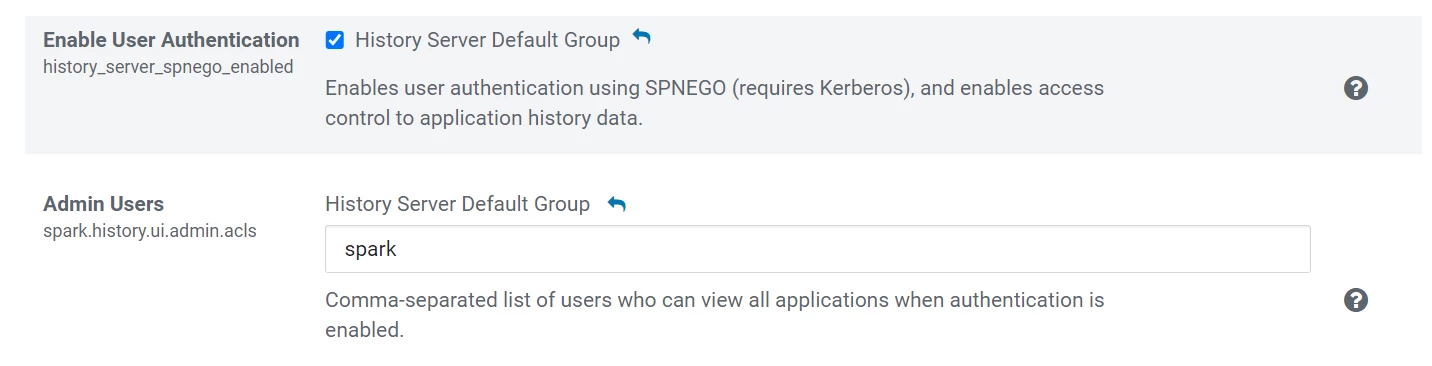
1. With kerberos authentication enabled, you can go to the spark service's configuration tab and turn on "history_server_spnego_enabled", which will "Enables user authentication using SPNEGO (requires Kerberos), and enables access control to application history data.", and after the restart, the shs webui will be authenticated, as below screenshot shows:

michalLi_0-1668051212950.png


michalLi_1-1668051365660.png


Underneath, the shs is restarted with below configuration:

spark.history.kerberos.enabled=true
spark.history.kerberos.principal=xx
spark.history.kerberos.keytab=xxx
spark.org.apache.hadoop.security.authentication.server.AuthenticationFilter.param.type=kerberos
spark.org.apache.hadoop.security.authentication.server.AuthenticationFilter.param.kerberos.principal=xx
spark.org.apache.hadoop.security.authentication.server.AuthenticationFilter.param.kerberos.keytab=xx
spark.org.apache.hadoop.security.authentication.server.AuthenticationFilter.param.kerberos.name.rules=xxx
spark.history.ui.acls.enable=true
spark.ui.filters=org.apache.spark.deploy.yarn.YarnProxyRedirectFilter,org.apache.hadoop.security.authentication.server.AuthenticationFilter


2. If kerberos is not enabled, you have to implement your own authentication filter and configure below parameters:

spark.ui.filters=org.apache.spark.deploy.yarn.YarnProxyRedirectFilter,your-authentication-filter-name

spark.your-authentication-filter-name.param.parm-name=parm-value

spark.history.ui.acls.enable

spark.history.ui.admin.acls

spark.history.ui.admin.acls.groups


2 replies

michalLi
michalLiAuthorAnswer
Gold ⭐️
November 10, 2022

Just an update, this is resolved.


1. With kerberos authentication enabled, you can go to the spark service's configuration tab and turn on "history_server_spnego_enabled", which will "Enables user authentication using SPNEGO (requires Kerberos), and enables access control to application history data.", and after the restart, the shs webui will be authenticated, as below screenshot shows:

michalLi_0-1668051212950.png


michalLi_1-1668051365660.png


Underneath, the shs is restarted with below configuration:

spark.history.kerberos.enabled=true
spark.history.kerberos.principal=xx
spark.history.kerberos.keytab=xxx
spark.org.apache.hadoop.security.authentication.server.AuthenticationFilter.param.type=kerberos
spark.org.apache.hadoop.security.authentication.server.AuthenticationFilter.param.kerberos.principal=xx
spark.org.apache.hadoop.security.authentication.server.AuthenticationFilter.param.kerberos.keytab=xx
spark.org.apache.hadoop.security.authentication.server.AuthenticationFilter.param.kerberos.name.rules=xxx
spark.history.ui.acls.enable=true
spark.ui.filters=org.apache.spark.deploy.yarn.YarnProxyRedirectFilter,org.apache.hadoop.security.authentication.server.AuthenticationFilter


2. If kerberos is not enabled, you have to implement your own authentication filter and configure below parameters:

spark.ui.filters=org.apache.spark.deploy.yarn.YarnProxyRedirectFilter,your-authentication-filter-name

spark.your-authentication-filter-name.param.parm-name=parm-value

spark.history.ui.acls.enable

spark.history.ui.admin.acls

spark.history.ui.admin.acls.groups


Translate
Majeti
Gold ⭐️
Gold ⭐️
December 21, 2023

Hi @michalLi ,

 I have been trying this in CDP PvC now but does not seem to work . Here is the behavior i see for spark history server web ui (7.1.7.2000)

TLS enabled and kerberos enabled : without keytab https://172.25.42.2:18088 works fine
TLS disabled and kerberos enabled : with/without keytab http://172.25.42.2:18088 is failing for 401 Auth in Mac OS/Chrome


Translate