

rahul_loke
Silver ⭐️
February 17, 2023
Solved

How to split large json file into multiple json files in Nifi?

We have a large json file which is more than 100GB and we want to split this json file into multiple files. We used Split Text processor to split this json file into mutliple files by specifying Line Split Count. Is there any way we can pass attribute/variable in Line Split Count and then split the records based on the attribute/variable as currently Line Split Count does not support attributes/variables.

Kindly suggest if there is another approach to split these json files based on attribute/variables
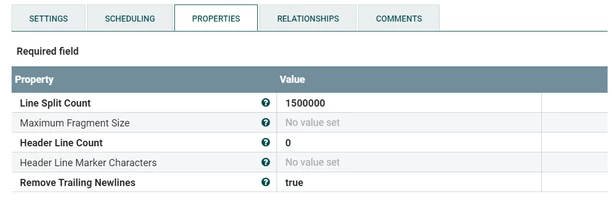
rahul_loke_0-1676654464405.png


Sample Json File 

{"name": "John","lastName": "Wick","phoneNumber": "123123123"}
{"name": "Paul","lastName": "Jackson","phoneNumber": "123123123"}


 

DigitalPlumber
Gold ⭐️
February 27, 2023

Yes SplitRecord is what you should use.
Attached is a flow definition as an example.

Note that I had to rename the file with a "txt" extension once you download it rename it to a .json extension

You can then drag a processor group and it gives you an option to upload the flow definition.


That example generates a file with 102 records and on SlitRecord we use a JsontTreeReader that will split by 3 records and writes the flowfiles out, In this case per 3 per flowFile generating 34 FlowFiles.

1-2 / 3 = 34


In your case and based on your screenshot I would change split count to be 1500000 ( or another number based on your needs )

4 replies

SAMSAL
Platinum ⭐️⭐️⭐️
February 19, 2023

Hi,

Try to look into QueryRecord or PartitionRecord Processors. Those might help.

Thanks

Translate
rahul_loke
Silver ⭐️
February 23, 2023

Both QueryRecord and PartitionRecord do not fit this use case, I have tried it. Can SplitRecord processor be used this purpose, is yes can you provide an example based on the above sample records?

Translate
DigitalPlumber
Gold ⭐️
Gold ⭐️
February 27, 2023

Yes SplitRecord is what you should use.
Attached is a flow definition as an example.

Note that I had to rename the file with a "txt" extension once you download it rename it to a .json extension

You can then drag a processor group and it gives you an option to upload the flow definition.


That example generates a file with 102 records and on SlitRecord we use a JsontTreeReader that will split by 3 records and writes the flowfiles out, In this case per 3 per flowFile generating 34 FlowFiles.

1-2 / 3 = 34


In your case and based on your screenshot I would change split count to be 1500000 ( or another number based on your needs )

Translate
DianaTorres
Community Manager
Community Manager
March 2, 2023

@rahul_loke Has the reply helped resolve your issue? If so, please mark the appropriate reply as the solution, as it will make it easier for others to find the answer in the future. Thanks

Translate
Regards, Diana Torres, Senior Community Moderator
