

vidanimegh
Gold ⭐️
April 9, 2021
Solved

How to use distcp editor of HUE?

Hello Everyone,


Has anyone tested the Distcp editor available in HUE with CDP 7.1.5?


Currently I see the below screen: distcp screenshot.PNG
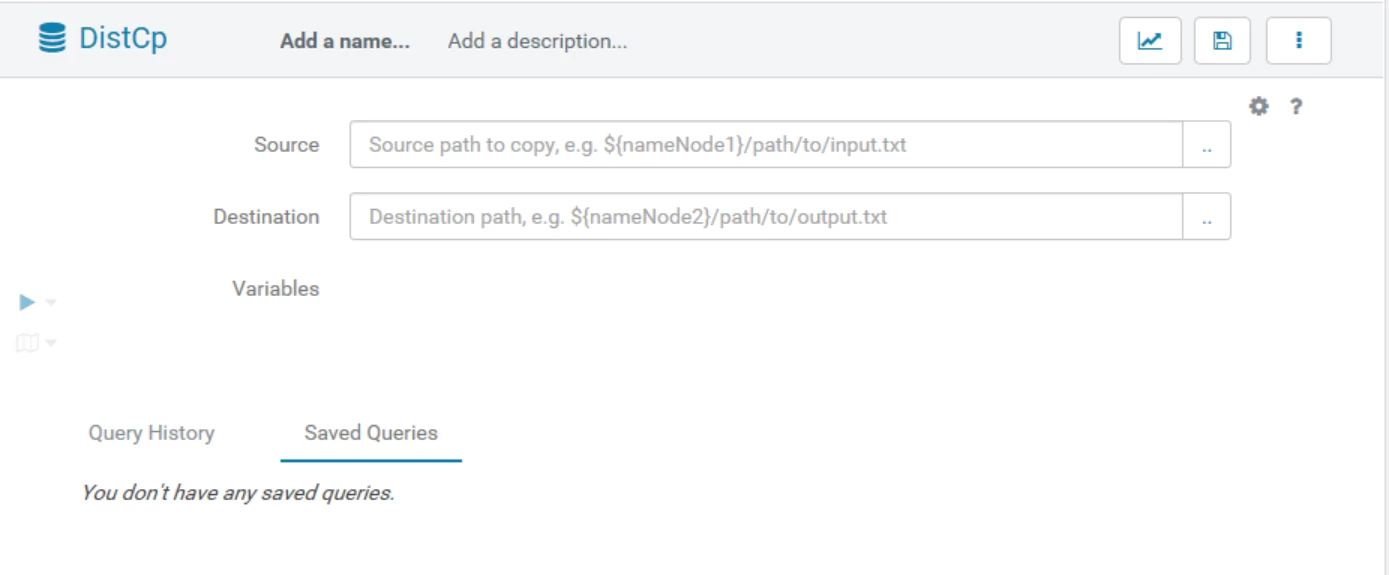
 

In this, I'm not able to manually enter the source cluster path. As soon as I click on the source path text box, it opens a dialog box to select the path from the current cluster HDFS.


Has anybody tested pulling data from another cluster? What config changes are required for getting this to work?


Thanks,

Megh

vidanimegh
Gold ⭐️
April 30, 2021

In my case, though DistCp editor didn't work out, this same thing could be achieved within HUE by using DistCp action in Oozie.


Designed a simple oozie workflow with DistCp action and managed to get it working.


Thanks,

Megh

9 replies

Daming Xue
Gold ⭐️
Gold ⭐️
April 10, 2021

Hello


This HUE distcp editor is designed to replicate data within the cluster and/or with the object store

You can click on the "..." button next to the input box to see what are the directories you account has access to, but within the current cluster scope


For data replication between two clusters, use Cloudera Manager/Replication Manager

https://docs.cloudera.com/cdp/latest/data-migration/topics/rm-dc-data-replication.html


Translate
vidanimegh
Gold ⭐️
April 10, 2021

Hi @Daming Xue ,


Thanks for your reply.


The other cluster I have is HDP, so as far as I understand, using replication from CM won't work.


In any case, I think the actual purpose of DistCp is for copying Data between different clusters. The reason I'm exploring a UI based alternative is that I don't want to give terminal access to users for distcp. Any other possibility?


Thanks,

Megh

Translate
Daming Xue
Gold ⭐️
Gold ⭐️
April 10, 2021

Hello @vidanimegh 


In that case, you probably have to run the distcp command to replicate the data 


Here are some examples: 

https://docs.cloudera.com/runtime/7.2.2/scaling-namespaces/topics/hdfs-using-distcp.html

Translate
vidanimegh
vidanimeghAuthorAnswer
Gold ⭐️
April 30, 2021

In my case, though DistCp editor didn't work out, this same thing could be achieved within HUE by using DistCp action in Oozie.


Designed a simple oozie workflow with DistCp action and managed to get it working.


Thanks,

Megh

Translate
