
Rikk
Silver ⭐️
Oct 6, 2021 6:11 PM UTC
Question

How to use putSQL in nifi

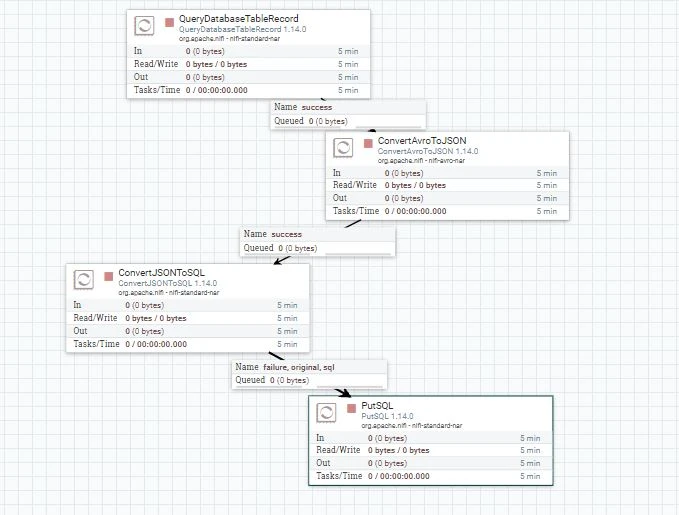
Hi all I am absolute beginner in apache nifi as well as in DWH field, I want to create replica of my database table, using nifi. I am taking Mysql table data using QueryDatabaseTableRecord processor. Now I want this data to be inserted into another mysql database table which I have created. I was trying using the putSQL processor but that didn't worked I got no record inside of my table.

I tried things which I could think of myself, but that was not enough. Please help me !!!

Here is the screenshot of my flow,Capture.JPG
3 replies

SAMSAL
Platinum ⭐️⭐️⭐️
Oct 6, 2021 8:44 PM UTC

Hi,


You seem to be having the correct processors and sequence. Can you share screenshot with the configuration of the put SQL. Have you configured the PUTSQL with the correct DB connection? Also are you seeing data (FlowFiles) flowing into it from the above processors. It could be that you are not getting any data to begin with or your configuration in the putSQL is incorrect. By the way why are you connecting failuer,original, sql relationship from the ConvertJsonTOSQL to the PUT SQL? you will get an error this way, you need to just connect the sql releationship. Another thing , the SQL property in the PUTSQL needs to be empty so that it process the sql received from the convert processor, if you have anything in there it will not take the sql insert from the convert processor

Translate
Rikk
RikkAuthor
Silver ⭐️
Oct 7, 2021 4:52 AM UTC

Hi thanks for the reply, I have set the db connection pool, and both are working I believe. I am getting the data from the source database it is available in the queue,

the ss of my process - 

Capture2.JPGMysqlPut configuration - 

 Capture3.JPG

Where I did this wrong ?

Translate
SAMSAL
Platinum ⭐️⭐️⭐️
Oct 7, 2021 4:32 PM UTC

I think I know what is the problem. Since you are not doing any fragmentation -like in using split processor- try setting the Support Fragmented Transaction to False in the PUTSQL. Also remove the original \ failure connection from the Convert processor. you can mute those relationship in the convert setting table by checking the box.

Translate

