ashsskum
Gold ⭐️
November 1, 2016
Solved

How to View FlowFile Attributes and Values in Apache NiFi Queues

How do I view the flowfile attributes names/values once it processor completes processing and move it to queue. Wanted to be able to see the flow file attribute/name values available, such that they can be used in subsequent processor expressions.

jstraub
jstraubAnswer
Gold ⭐️
November 1, 2016

You can view the content of a flowfile as well as its attributes.

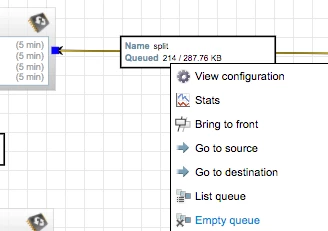
For example, RC on a queue and press "List Queue"

9031-screen-shot-2016-11-01-at-90309-am.png

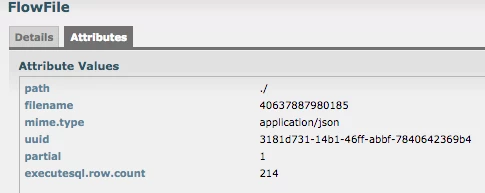
Afterwards, you can view the details (i-icon, first column) of the individual flow files.

9032-screen-shot-2016-11-01-at-90342-am.png

9033-screen-shot-2016-11-01-at-90336-am.png

2 replies

jstraub
jstraubAnswer
Gold ⭐️
November 1, 2016

You can view the content of a flowfile as well as its attributes.

For example, RC on a queue and press "List Queue"

9031-screen-shot-2016-11-01-at-90309-am.png

Afterwards, you can view the details (i-icon, first column) of the individual flow files.

9032-screen-shot-2016-11-01-at-90342-am.png

9033-screen-shot-2016-11-01-at-90336-am.png

Translate
vincentvanouden
Gold ⭐️
March 14, 2018

Is there a way that one can inspect the FlowFile once it has already passed through the queues? I'm trying your recommended method of inspecting the attributes of a FlowFile but the queue finished too quick and thus end up with "The queue has no FlowFiles" instead of the output that you have displayed.

Translate