

georg
Silver ⭐️
February 18, 2022
Question

Invoke HTTP Processor PUT Method

I'm currently new with Nifi but I have a task to achieve. My task is to insert a data in a Database via InvokeHTTP Processor. But I don't know where can I insert the json format, I tried to insert it inside the Put Response Body In Attribute field and Changed the Send Message Body to "true". 
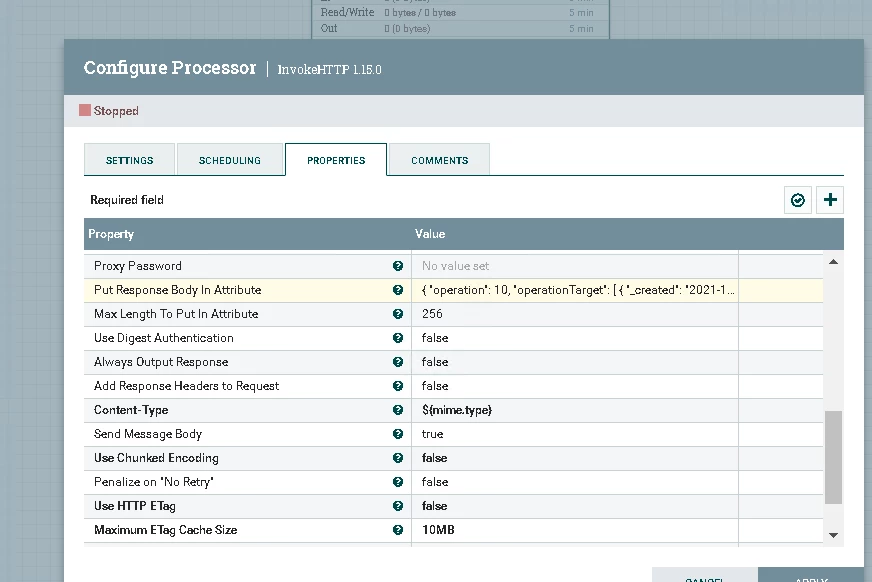
georg_0-1645173010934.png 

But when I tried to start it, It doesn't proceed to the queue or even sends an error. 
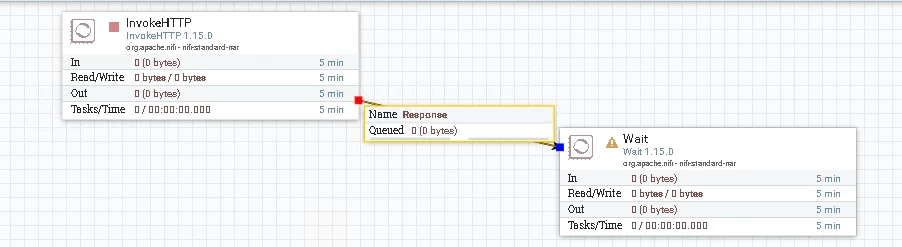
georg_1-1645173151940.png


4 replies

araujo
Platinum ⭐️⭐️⭐️
Platinum ⭐️⭐️⭐️
February 21, 2022

Hi @georg ,


If you want to send content in the body of a POST or PUT call using InvokeHTTP, you typically create a flowfile with the content that you want to send and feed that to the InvokeHTTP processor, setting its "Send Message Body" attribute to "true" (default).


The InvokeHTTP will sent the content of the incoming flowfile as the body of the HTTP request.


Cheers,

André


Translate
-- Was your question answered? Please take some time to click on "Accept as Solution" below this post. If you find a reply useful, say thanks by clicking on the thumbs up button.
georg
georgAuthor
Silver ⭐️
February 21, 2022

Hi @araujo  Can you give me an example on how to post/put data using request body? or an example on creating a flowfile to send to the Invoke HTTP processor

Translate
araujo
Platinum ⭐️⭐️⭐️
Platinum ⭐️⭐️⭐️
February 21, 2022

Hi, @georg ,


You can, for example, use the GenerateFlowFile processor to create a new flowfile from scratch with the content that you need to send. If you already have a flowfile that you are in the middle of processing, you could, for example, use ReplaceText to modify the content of that flowfile so that it conforms with what your PUT request needs to send.


Regards,

André


Translate
-- Was your question answered? Please take some time to click on "Accept as Solution" below this post. If you find a reply useful, say thanks by clicking on the thumbs up button.

