

bibibo
Gold ⭐️
March 21, 2024
Solved

Issue with PutSplunkHTTP - The requested URL was not found on this server

Hello everyone,

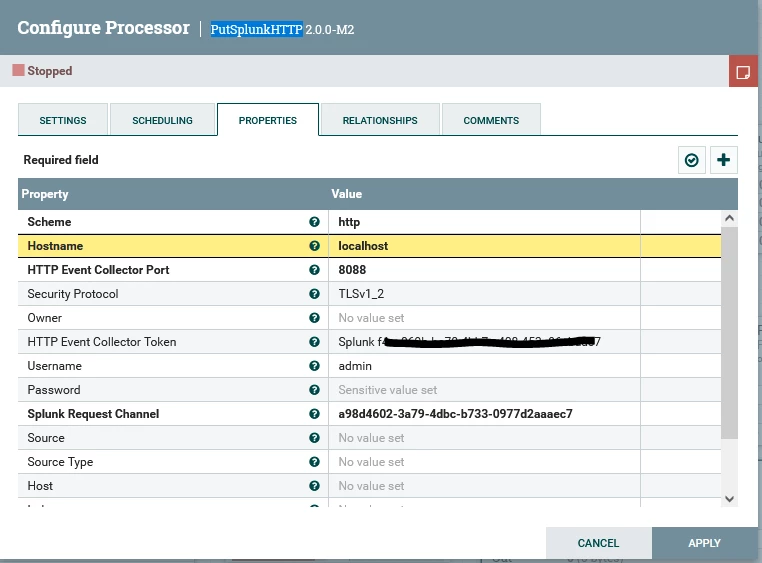
I have an issue with PutSplunkHTTP processor trying to push some Sysmon logs to my Splunk Indexer.

Both NiFi and Splunk are in the same system (Windows).

I keep receiving an error:
"Error 404 - The requested URL was not found on this server"

I use curl from a Linux box and event is added:

curl -k http://ipaddress:8088/services/collector/raw?=a98d4602-3a79-4dbc-b733-0977d2aaaec7 -H "Authorization: Splunk <token>" -d '{"event": "Hello, world!", "sourcetype": "manual"}'


hec.PNGcurl.PNGputsplunkhttp_conf.PNG

Using latest NiFi 2.0.0-M2 Release and Splunk

Any help would be appreciated.

Thank you.

bibibo
bibiboAnswer
Gold ⭐️
March 22, 2024

Hello,

Issue was resolved in NiFi's Slack Channel. Apparently I filled in username/password for Splunk in PutSplunkHTTP processor which are also passed in the final URL and are actually not needed. They were removed and now data go to Splunk via HEC.

Thanks

2 replies

DianaTorres
Community Manager
Community Manager
March 21, 2024

@bibibo Welcome to the Cloudera Community!

To help you get the best possible solution, I have tagged our NiFi experts @SAMSAL @MattWho  who may be able to assist you further.

Please keep us updated on your post, and we hope you find a satisfactory solution to your query.

Translate
Regards, Diana Torres, Senior Community Moderator
bibibo
bibiboAuthorAnswer
Gold ⭐️
March 22, 2024

Hello,

Issue was resolved in NiFi's Slack Channel. Apparently I filled in username/password for Splunk in PutSplunkHTTP processor which are also passed in the final URL and are actually not needed. They were removed and now data go to Splunk via HEC.

Thanks

Translate
