
carange
Silver ⭐️⭐️
September 12, 2025
Solved

Issues Install and Unistall Apache Minifi - Windows Server.

Greetings to the community,

I've recently joined as we're currently implementing EFM (Edge Flow Manager) and encountering issues with the installation of the MiNiFi agent on several Windows Server machines. These installation problems are preventing us from integrating the servers into the platform.

Moreover, we're unable to uninstall the application either — in both installation and uninstallation attempts, we receive the same error message, which is blocking further progress.

Any insights or recommendations from those who have faced similar challenges would be greatly appreciated.

please check image attached to check the message.
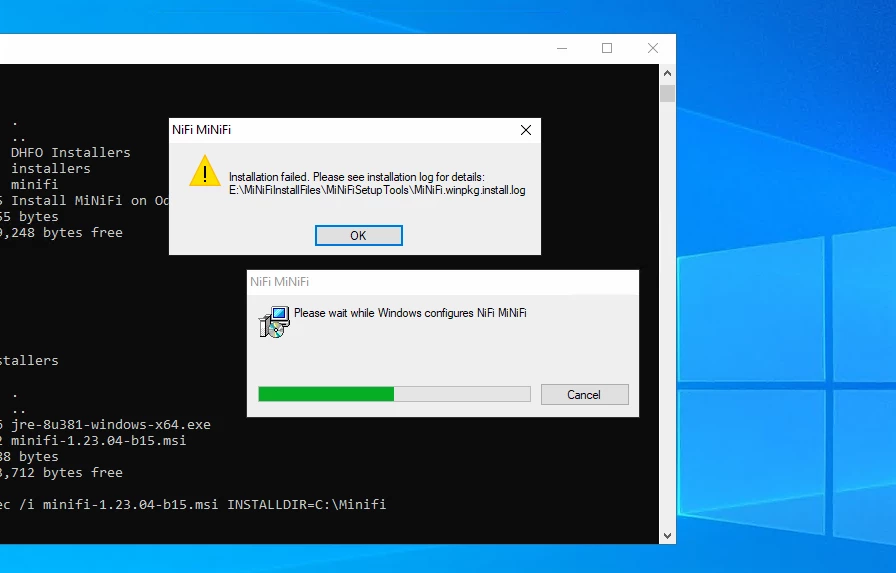

Image20250912085238.png
DianaTorres
Community Manager
September 24, 2025

@carange I sent you a DM with next steps to help you resolve this issue, thanks!

Regards, Diana Torres, Senior Community Moderator

4 replies

carange
carangeAuthor
Silver ⭐️⭐️
September 12, 2025

there is a way to open a TAC case or something similar to get support on this?

Translate
MattWho
Titanium ⭐️⭐️⭐️
Titanium ⭐️⭐️⭐️
September 12, 2025

@carange 

Welcome to the Cloudera Community.

Opening a community questions exposes your query to anyone who access the Cloudera community site and is a great place to ask very specific issue questions or how-to type questions.  Responses may come from any community member (may or may not be a Cloudera employee).  For more in depth issues or time sensitive issues where sharing logs or sensitive information would be very helpful, creating a support case is the best option.  Or if the suggestions and answers provided in the community are not completely solving your issue.  Only individuals with a Cloudera product license can create support cases.

With a Cloudera license you are able to raise support cases from MyCloudera that will get assigned to the appropriate support specialist for your issue.

Simply open a browser to https://lighthouse.cloudera.com/s/ and login with your Cloudera credential via the following icon:

MattWho_0-1757691691472.png

You can then float over the "Support" option and select "cases". This will take you to a new page where you will see an option to "Create A Case": 

MattWho_1-1757691869383.png

Select a "Technical assistance" case type and follow the prompts to provide the necessary information to submit your case details.  You'll have the ability to upload images, logs, etc to your new case. 

If you have issues creating a case, please reach out to your Cloudera Account owner.

Please help our community grow. If you found any of the suggestions/solutions provided helped you with solving your issue or answering your question, please take a moment to login and click "Accept as Solution" on one or more of them that helped.

Thank you,
Matt


Translate
carange
carangeAuthor
Silver ⭐️⭐️
September 12, 2025

Thanks MattWho, but unfortunately, I couldn't create a case maybe my account doesn't have privileges.


error.png
Translate
DianaTorres
Community Manager
Community Manager
September 24, 2025

@carange I sent you a DM with next steps to help you resolve this issue, thanks!

Translate
Regards, Diana Torres, Senior Community Moderator