

rizalt
Silver ⭐️⭐️⭐️
Jun 4, 2024 6:42 AM UTC
Question

[KERBEROS] Failed to kinit as the KDC administrator user, admin/admin@HADOOP.COM

Hallo,

When to enable Kerberos via ambari, I am facing the following window popup at the time of Testing client after client installation saying
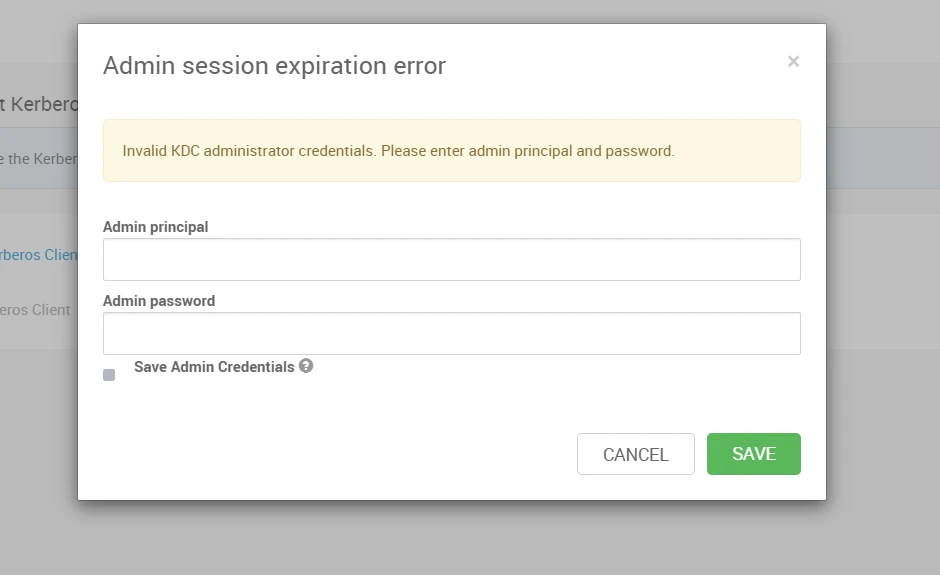
rizalt_0-1717483147659.png

in my log ambari-server listed below

2024-06-04 06:27:43,380  WARN [agent-report-processor-2] ActionManager:162 - The task 76 is not in progress, ignoring update
2024-06-04 06:27:43,861 INFO [ambari-client-thread-6248] AmbariManagementControllerImpl:4086 - Received action execution request, clusterName=hadoop, request=isCommand :true, action :null, command :KERBEROS_SERVICE_CHECK, inputs :{HAS_RESOURCE_FILTERS=true}, resourceFilters: [RequestResourceFilter{serviceName='KERBEROS', componentName='null', hostNames=[]}], exclusive: false, clusterName :hadoop
2024-06-04 06:27:44,149 WARN [ambari-client-thread-6248] KDCKerberosOperationHandler:329 - Failed to kinit as the KDC administrator user, admin/admin@HADOOP.COM:
ExitCode: 1
STDOUT:
STDERR: kinit: Server not found in Kerberos database while getting initial credentials

2024-06-04 06:27:44,151 ERROR [ambari-client-thread-6248] KerberosHelperImpl:2507 - Cannot validate credentials: org.apache.ambari.server.serveraction.kerberos.KerberosAdminAuthenticationException: Invalid KDC administrator credentials.
The KDC administrator credentials must be set as a persisted or temporary credential resource.This may be done by issuing a POST (or PUT for updating) to the /api/v1/clusters/:clusterName/credentials/kdc.admin.credential API entry point with the following payload:
{
"Credential" : {
"principal" : "(PRINCIPAL)", "key" : "(PASSWORD)", "type" : "(persisted|temporary)"}
}
}
2024-06-04 06:27:44,152 ERROR [ambari-client-thread-6248] CreateHandler:80 - Bad request received: Invalid KDC administrator credentials.
The KDC administrator credentials must be set as a persisted or temporary credential resource.This may be done by issuing a POST (or PUT for updating) to the /api/v1/clusters/:clusterName/credentials/kdc.admin.credential API entry point with the following payload:
{
"Credential" : {
"principal" : "(PRINCIPAL)", "key" : "(PASSWORD)", "type" : "(persisted|temporary)"}
}
}
2024-06-04 06:27:44,578 WARN [agent-report-processor-1] ActionManager:162 - The task 75 is not in progress, ignoring update

can anyone help me, please..

 

13 replies

Majeti
Gold ⭐️
Gold ⭐️
Jun 5, 2024 6:57 AM UTC

Hi @rizalt , Have you tried logging in with "kinit admin/admin@HADOOP.COM" from one of your cluster nodes or ambari server to see if krb5.conf is fine and can find this user/principal in the KDC server with the given password?


Translate
rizalt
rizaltAuthor
Silver ⭐️⭐️⭐️
Jun 5, 2024 7:23 AM UTC

@Former Member  im my cluster master1,slave1 & slave2 kinit logged in fine without errors, listed below

root@master1:~# kinit admin/admin@HADOOP.COM
Password for admin/admin@HADOOP.COM:
root@master1:~# klist
Ticket cache: FILE:/tmp/krb5cc_0
Default principal: admin/admin@HADOOP.COM

Valid starting Expires Service principal
06/05/2024 07:17:16 06/05/2024 17:17:16 krbtgt/HADOOP.COM@HADOOP.COM
renew until 06/05/2024 07:17:16
root@master1:~#
root@slave1:~# kinit admin/admin@HADOOP.COM
Password for admin/admin@HADOOP.COM:
root@slave1:~# klist
Ticket cache: FILE:/tmp/krb5cc_0
Default principal: admin/admin@HADOOP.COM

Valid starting Expires Service principal
06/05/2024 07:19:26 06/05/2024 17:19:26 krbtgt/HADOOP.COM@HADOOP.COM
renew until 06/05/2024 07:19:26
root@slave1:~#
root@slave2:~# kinit admin/admin@HADOOP.COM
Password for admin/admin@HADOOP.COM:
root@slave2:~# klist
Ticket cache: FILE:/tmp/krb5cc_0
Default principal: admin/admin@HADOOP.COM

Valid starting Expires Service principal
06/05/2024 07:20:19 06/05/2024 17:20:19 krbtgt/HADOOP.COM@HADOOP.COM
renew until 06/05/2024 07:20:19
root@slave2:~#


Translate
Shelton
Gold ⭐️⭐️⭐️
Jun 5, 2024 7:51 AM UTC

@rizalt 

There are a couple of things to validate.
Step 1 Pre-requisites

  • Kerberos Server: Ensure you have a Kerberos Key Distribution Center (KDC) and an administrative server set up.
  • DNS: Proper DNS setup is required for both forward and reverse lookups.
    NTP: Time synchronization across all nodes using Network Time Protocol (NTP).
  • HDP Cluster: A running Hortonworks Data Platform (HDP) cluster.

Step 2:  Check your /etc/host file ensure your KDC host is assigned the domain HADOOP.COM to match your KDC credentials

Spoiler
# hostname -f

Step 3: Once that matches then edit the Kerberos configuration file (/etc/krb5.conf) on all nodes to point to your KDC you can scramble the sensitive info and share


Spoiler

[libdefaults]
default_realm = HADOOP.COM
dns_lookup_realm = false
dns_lookup_kdc = false

[realms]
HADOOP.COM = {
kdc = kdc.hadoop.com
admin_server = admin.hadoop.com
}

[domain_realm]
.hadoop.com = HADOOP.COM
hadoop.com = HADOOP.COM


Step 4: Locate your kadm5.acl file and ensure it looks like this

Spoiler
*/admin@HADOOP.COM *

Step 5: Restart the KDC and admin servers as root or with sudo


Spoiler

# systemctl restart krb5kdc

# systemctl restart kadmin


Step 6: Check Kerberos Ticket: Ensure that the Kerberos ticket is obtained correctly.

Spoiler
kinit -kt /etc/security/keytabs/hdfs.keytab hdfs/hostname@HADOOP.COM
klist

If your setup is correct you will see an output like below 


Spoiler

Ticket cache: FILE:/tmp/krb5cc_1000
Default principal: hdfs/hostname@HADOOP.COM

Valid starting Expires Service principal
06/05/2024 09:50:21 06/06/2024 09:50:21 krbtgt/HADOOP.COM@HADOOP.COM
renew until 06/05/2024 09:50:21
06/05/2024 09:50:22 06/06/2024 09:50:21 HTTP/hostname@HADOOP.COM
renew until 06/05/2024 09:50:21


Hope that helps 


Translate
rizalt
rizaltAuthor
Silver ⭐️⭐️⭐️
Jun 5, 2024 8:06 AM UTC

@Shelton 
/etc/host

Spoiler
root@master1:~# hostname -f
master1.hadoop.com

/etc/hosts

Spoiler


127.0.0.1 localhost
192.168.122.10 master1.hadoop.com
192.168.122.11 slave1.hadoop.com
192.168.122.12 slave2.hadoop.com
# The following lines are desirable for IPv6 capable hosts
::1 ip6-localhost ip6-loopback
fe00::0 ip6-localnet
ff00::0 ip6-mcastprefix
ff02::1 ip6-allnodes
ff02::2 ip6-allrouters


/etc/krb5.conf

Spoiler

[libdefaults]
renew_lifetime = 7d
forwardable = true
default_realm = HADOOP.COM
ticket_lifetime = 24h
dns_lookup_realm = false
dns_lookup_kdc = false
default_ccache_name = /tmp/krb5cc_%{uid}
#default_tgs_enctypes = aes des3-cbc-sha1 rc4 des-cbc-md5
#default_tkt_enctypes = aes des3-cbc-sha1 rc4 des-cbc-md5

[logging]
default = FILE:/var/log/krb5kdc.log
admin_server = FILE:/var/log/kadmind.log
kdc = FILE:/var/log/krb5kdc.log

[realms]
HADOOP.COM = {
admin_server = master1.hadoop.com
kdc = master1.hadoop.com
}

kadm5.acl

Spoiler
*/admin@HADOOP.COM *

event create ticket show error


root@master1:~# systemctl restart krb5-kdc
root@master1:~# systemctl restart krb5-admin-server
root@master1:~# kinit -kt /etc/security/keytabs/hdfs.keytab hdfs/master1.hadoop.com@HADOOP.COM
kinit: Client 'hdfs/master1.hadoop.com@HADOOP.COM' not found in Kerberos database while getting initial credentials


Translate
Majeti
Gold ⭐️
Gold ⭐️
Jun 5, 2024 11:33 AM UTC

Hi @rizalt , You want to verify if the principal exists in the KDC admin database ? 

kadmin: listprincs hdfs*


Translate
rizalt
rizaltAuthor
Silver ⭐️⭐️⭐️
Jun 7, 2024 3:45 AM UTC

@Shelton @Majeti 

I found in the kdf.conf for "admin_keytab" path /etc/krb5kdc/kadm5.keytab not found, where i can create kadm5.keyab? please see below

rizalt_0-1717731855188.png

any suggestions?


Translate
Shelton
Gold ⭐️⭐️⭐️
Jun 7, 2024 11:38 AM UTC

@rizalt 
Can you share the OS ,OS version and HDP version you are trying to Kerberize? I don't have a dump of HDP binaries though. I would like to reproduce and share the steps.?

I suggest starting afresh so delete/destroy the current KDC as the root user or sudo the following steps are specific to  ubuntu  re-adapt for appropriate OS

# sudo  kdb5_util -r HADOOP.COM destroy

Accept with a "Yes"

Now create a new Kerberos database

Complete remove Kerberos

$ sudo apt purge -y krb5-kdc krb5-admin-server krb5-config krb5-locales krb5-user krb5.conf 
$ sudo rm -rf /var/lib/krb5kdc

Do a refresh installation

First, get the FQDN of your kdc server for this example

# hostanme -f 
test.hadoop.com

Use the above output for a later set up

# apt install krb5-kdc krb5-admin-server krb5-config

Proceed as follow

At the prompt for the Kerberos Realm = HADOOP.COM
Kerberos server hostname = test.hadoop.com
Administrative server for Kerberos REALM = test.hadoop.com

Configuring krb5 Admin Server

# krb5_newrealm

Open /etc/krb5kdc/kadm5.acl it should contain a line like this

*/admin@HADOOP.COM *

The kdc.conf should be adjusted to look like this

[kdcdefaults]
 kdc_ports = 88
 kdc_tcp_ports = 88

[realms]
 HADOOP.COM = {
  #master_key_type = aes256-cts
  acl_file = /var/kerberos/krb5kdc/kadm5.acl
  dict_file = /usr/share/dict/words
  admin_keytab = /var/kerberos/krb5kdc/kadm5.keytab
  supported_enctypes = aes256-cts:normal aes128-cts:normal des3-hmac-sha1:normal arcfour-hmac:normal camellia256-cts:normal camellia128-cts:normal des-hmac-sha1:normal des-cbc-md5:normal des-cbc-crc:normal
}


The krb5.conf should look like this if you are on a multi-node cluster this is the fines you will copy to all other hosts, notice the entry under domain_realm?

[libdefaults]
  renew_lifetime = 7d
  forwardable = true
  default_realm = HADOOP.COM
  ticket_lifetime = 24h
  dns_lookup_realm = false
  dns_lookup_kdc = false
  default_ccache_name = /tmp/krb5cc_%{uid}
  #default_tgs_enctypes = aes des3-cbc-sha1 rc4 des-cbc-md5
  #default_tkt_enctypes = aes des3-cbc-sha1 rc4 des-cbc-md5

[domain_realm]
  .hadoop.com = HADOOP.COM
  hadoop.com = HADOOP.COM

[logging]
  default = FILE:/var/log/krb5kdc.log
  admin_server = FILE:/var/log/kadmind.log
  kdc = FILE:/var/log/krb5kdc.log

[realms]
  HADOOP.COM = {
    admin_server = test.hadoop.com
    kdc = test.hadoop.com
  }

 Restart the Kerberos kdc daemons and kerberos admin servers:

# for script in /etc/init.d/krb5*; do $script restart; done

 Don't manually create any principle like the "ambari_hdfs-050819@HADOOP.COM"

Go to the ambari kerberos wizard for the domain notice the . (dot) 

kdc host = test.hadoop.com
Real Name = HADOOP.COM
Domains = .hadoop.com ,hadoop.com
-----
kadmin host = test.hadoop.com
Admin principal = admin/admin@HADOOP.COM
Admin  password = password set during the creation of kdc database

Now from here just accept the default the keytabs should generate successfully. 

Translate
rizalt
rizaltAuthor
Silver ⭐️⭐️⭐️
Jun 7, 2024 11:07 PM UTC

@Shelton   I'm using Ubuntu 22.04 & using ODP (https://clemlabs.s3.eu-west-3.amazonaws.com/ubuntu22/odp-release/1.2.2.0-46/ODP)

Translate
