

ambari275
Silver ⭐️⭐️⭐️
July 22, 2021
Solved

Kerberos issue while setting up with Ambari 2.7.5

Failing at 38% 


NAMENODE : AMBARI server 
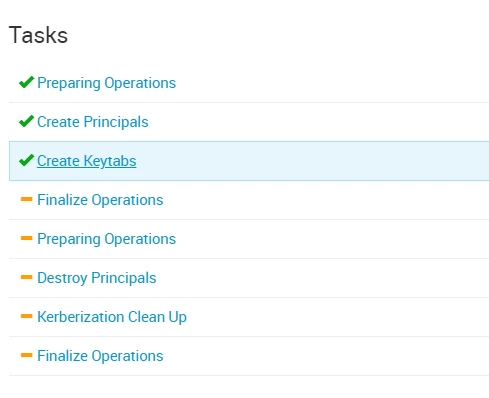
ambari275_0-1626963571271.png


NAMENODE : AMBARI server 

stderr:   errors-440.txt


stdout:   output-440.txt


2021-07-22 09:41:36,191 - Processing identities...
2021-07-22 09:41:36,222 - Creating keytab file for hdpcluster-072221@ on host myserver.com
2021-07-22 09:41:36,230 - Processing identities completed.


DATANODE : HDP CLUSTER 
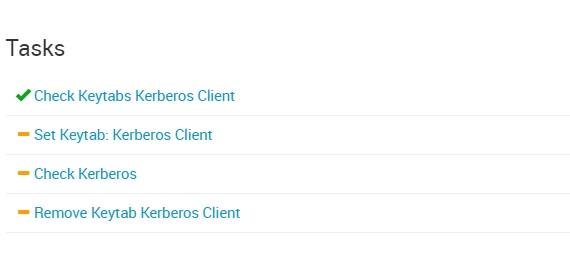
ambari275_1-1626963681824.png


DATANODE : HDP CLUSTER 

stdout:   /var/lib/ambari-agent/data/output-438.txt


2021-07-22 09:41:34,474 - Missing keytabs:
Keytab: /etc/security/keytabs/kerberos.service_check.072221.keytab Principal: hdpcluster-072221

Command completed successfully!


This is the krb5.conf file placed in ambari server (name node) and hdpcluster 3.1.5 (datanode) 

# Configuration snippets may be placed in this directory as well
includedir /etc/krb5.conf.d/

# output settings
[logging]
default = FILE:/tmp/krb5libs.log
kdc = FILE:/tmp/krb5kdc.log
admin_server = FILE:/tmp/kadmind.log

#Connection default configuration
[libdefaults]
dns_lookup_realm = false
ticket_lifetime = 24h
renew_lifetime = 7d
forwardable = true
rdns = false
default_realm = EXAMPLE.COM
default_ccache_name = KEYRING:persistent:%{uid}
udp_preference_limit= 1

[realms]
EXAMPLE.COM = {
kdc = myserver.com:88
admin_server = myserver.com
}

# domain to realm relationship (optional)
[domain_realm]
.example.com = EXAMPLE.COM
example.com = EXAMPLE.COM


 

@Shelton 

Shelton
SheltonAnswer
Gold ⭐️⭐️⭐️
July 26, 2021

@ambari275 
These are the steps to follow see below

Assumptions
logged as root
clustername=test
REALM= DOMAIN.COM
Hostname = host1

logged in as root

[root@host1]#

Switch to user HDFS the HDFS superuser

[root@host1]# su - hdfs

Check the HDFS associated keytab generated

[hdfs@host1 ~]$ cd /etc/security/keytabs/
[hdfs@host1 keytabs]$ ls

Sample output

atlas.service.keytab hdfs.headless.keytab knox.service.keytab oozie.service.keytab

Now use the hdfs.headless.keytab to get the associated principal

[hdfs@host1 keytabs]$ klist -kt /etc/security/keytabs/hdfs.headless.keytab

Expected output

Keytab name: FILE:/etc/security/keytabs/hdfs.headless.keytab
KVNO Timestamp Principal
---- ------------------- ------------------------------------------------------
1 07/26/2021 00:34:03 hdfs-test@DOMAIN.COM

Grab a Kerberos ticket by using the keytab+ principal like username/pèassword to authenticate to KDC

[hdfs@host1 keytabs]$ kinit -kt /etc/security/keytabs/hdfs.headless.keytab hdfs-test@DOMAIN.COM

Check you no have a valid Kerberos ticket

[hdfs@host1 keytabs]$ klist

Sample output 

Ticket cache: FILE:/tmp/krb5cc_1013
Default principal: hdfs-test@DOMAIN.COM
Valid starting Expires Service principal
07/26/2021 10:03:17 07/27/2021 10:03:17 krbtgt/DOMAIN.COM@DOMAIN.COM

Now you can list successfully  the HDFS directories, remember to -ls it seems you forgot it in your earlier command

[hdfs@host1 keytabs]$ hdfs dfs -ls /
Found 9 items
drwxrwxrwx - yarn hadoop 0 2018-09-24 00:31 /app-logs
drwxr-xr-x - hdfs hdfs 0 2018-09-24 00:22 /apps
drwxr-xr-x - yarn hadoop 0 2018-09-24 00:12 /ats
drwxr-xr-x - hdfs hdfs 0 2018-09-24 00:12 /hdp
drwxr-xr-x - mapred hdfs 0 2018-09-24 00:12 /mapred
drwxrwxrwx - mapred hadoop 0 2018-09-24 00:12 /mr-history
drwxrwxrwx - spark hadoop 0 2021-07-26 10:04 /spark2-history
drwxrwxrwx - hdfs hdfs 0 2021-07-26 00:57 /tmp
drwxr-xr-x - hdfs hdfs 0 2018-09-24 00:23 /user

Voila happy hadooping and remember to accept the best response so other users could reference it

15 replies

Shelton
Gold ⭐️⭐️⭐️
July 22, 2021

@ambari275 

From the onset, I see you left the defaults and I doubt whether that really maps to your cluster.
Here is a list of outputs I need to validate

$ hostname -f [Where you installed the kerberos server]
/etc/hosts
/var/kerberos/krb5kdc/kadm5.acl
/var/kerberos/krb5kdc/kdc.conf

On the Kerberos server can you run

# kadmin.local

Then

list_principals

q to quit

The hostname -f output on the Kerberos server should replace kdc and admin_server in krb5.conf

Here is an example

OS: Centos 7

Cluster Realm

HOTEL.COM

My hosts entry is for a class C network so yours could be different but your host name must be resolved by DNS

[root@test ~]# cat /etc/hosts

127.0.0.1 localhost localhost.localdomain localhost4 localhost4.localdomain4
::1 localhost localhost.localdomain localhost6 localhost6.localdomain6
192.168.0.153 test.hotel.com test

[root@test ~]# hostname -f

test.hotel.com

[root@test ~]# cat /var/kerberos/krb5kdc/kadm5.acl

*/admin@HOTEL.COM *

[root@test ~]# cat /etc/krb5.conf

# Configuration snippets may be placed in this directory as well
includedir /etc/krb5.conf.d/
[logging]
default = FILE:/var/log/krb5libs.log
kdc = FILE:/var/log/krb5kdc.log
admin_server = FILE:/var/log/kadmind.log
[libdefaults]
dns_lookup_realm = false
ticket_lifetime = 24h
renew_lifetime = 7d
forwardable = true
rdns = false
default_realm = HOTEL.COM
default_ccache_name = KEYRING:persistent:%{uid}
[realms]
HOTEL.COM = {
kdc = test.hotel.com
admin_server =test.hotel.com
}
[domain_realm]
.hotel.com = HOTEL.COM
hotel.com = HOTEL.COM

[root@test ~]# cat /var/kerberos/krb5kdc/kdc.conf

[kdcdefaults]
kdc_ports = 88
kdc_tcp_ports = 88
[realms]
HOTEL.COM = {
#master_key_type = aes256-cts
acl_file = /var/kerberos/krb5kdc/kadm5.acl
dict_file = /usr/share/dict/words
admin_keytab = /var/kerberos/krb5kdc/kadm5.keytab
supported_enctypes = aes256-cts:normal aes128-cts:normal des3-hmac-sha1:normal arcfour-hmac:normal camellia256-cts:normal camellia128-cts:normal des-hmac-sha1:normal des-cbc-md5:normal des-cbc-crc:normal
}
[realms]
HOTEL.COM = {
master_key_type = des-cbc-crc
database_name = /var/kerberos/krb5kdc/principal
admin_keytab = /var/kerberos/krb5kdc/kadm5.keytab
supported_enctypes = des-cbc-crc:normal des3-cbc-raw:normal des3-cbc-sha1:norm
al des-cbc-crc:v4 des-cbc-crc:afs3
kadmind_port = 749
acl_file = /var/kerberos/krb5kdc/kadm5.acl
dict_file = /usr/dict/words
}

Once you share the above then I could figure out where the issue could be.

Happy hadooping


Translate
ambari275
ambari275Author
Silver ⭐️⭐️⭐️
July 23, 2021

(I setup kerberos in different server , not on namenode or datanode !! )

Is this a good practice!!! 


After changing the krb5.config and kdbc.conf , tried to enable kerberos in ambari GUI by providing admin credentials and stuck at same place . 


logs from ambari-server : 

2021-07-23 02:15:18,218 WARN [ambari-action-scheduler] ActionScheduler:353 - Exception received
org.apache.ambari.server.AmbariException: Could not inject keytab into command
at org.apache.ambari.server.events.publishers.AgentCommandsPublisher.populateExecutionCommandsClusters(AgentCommandsPublisher.java:134)
at org.apache.ambari.server.events.publishers.AgentCommandsPublisher.sendAgentCommand(AgentCommandsPublisher.java:92)
at org.apache.ambari.server.actionmanager.ActionScheduler.doWork(ActionScheduler.java:557)
at org.apache.ambari.server.actionmanager.ActionScheduler.run(ActionScheduler.java:347)
at java.lang.Thread.run(Thread.java:745)
Caused by: org.apache.ambari.server.AmbariException: Could not inject keytabs to enable kerberos
at org.apache.ambari.server.events.publishers.AgentCommandsPublisher$KerberosCommandParameterProcessor.process(AgentCommandsPublisher.java:261)
at org.apache.ambari.server.events.publishers.AgentCommandsPublisher.injectKeytab(AgentCommandsPublisher.java:184)
at org.apache.ambari.server.events.publishers.AgentCommandsPublisher.populateExecutionCommandsClusters(AgentCommandsPublisher.java:132)
... 4 more
2021-07-23 02:15:31,409 WARN [ambari-client-thread-194] Errors:173 - The following warnings have been detected with resource and/or provider classes:
WARNING: A HTTP GET method, public javax.ws.rs.core.Response org.apache.ambari.server.api.services.TaskService.getComponents(java.lang.String,javax.ws.rs.core.HttpHeaders,javax.ws.rs.core.UriInfo), should not consume any entity.
WARNING: A HTTP GET method, public javax.ws.rs.core.Response org.apache.ambari.server.api.services.TaskService.getTask(java.lang.String,javax.ws.rs.core.HttpHeaders,javax.ws.rs.core.UriInfo,java.lang.String), should not consume any entity.
2021-07-23 02:15:31,409 WARN [ambari-client-thread-194] Errors:173 - The following warnings have been detected with resource and/or provider classes:
WARNING: A HTTP GET method, public javax.ws.rs.core.Response org.apache.ambari.server.api.services.TaskService.getComponents(java.lang.String,javax.ws.rs.core.HttpHeaders,javax.ws.rs.core.UriInfo), should not consume any entity.
WARNING: A HTTP GET method, public javax.ws.rs.core.Response org.apache.ambari.server.api.services.TaskService.getTask(java.lang.String,javax.ws.rs.core.HttpHeaders,javax.ws.rs.core.UriInfo,java.lang.String), should not consume any entity.
2021-07-23 02:15:34,388 INFO [Thread-20] AbstractPoolBackedDataSource:212 - Initializing c3p0 pool... com.mchange.v2.c3p0.ComboPooledDataSource [ acquireIncrement -> 3, acquireRetryAttempts -> 30, acquireRetryDelay -> 1000, autoCommitOnClose -> false, automaticTestTable -> null, breakAfterAcquireFailure -> false, checkoutTimeout -> 0, connectionCustomizerClassName -> null, connectionTesterClassName -> com.mchange.v2.c3p0.impl.DefaultConnectionTester, contextClassLoaderSource -> caller, dataSourceName -> 2wkjnfai1m9lw9qg7p0r4|1f15d346, debugUnreturnedConnectionStackTraces -> false, description -> null, driverClass -> org.postgresql.Driver, extensions -> {}, factoryClassLocation -> null, forceIgnoreUnresolvedTransactions -> false, forceSynchronousCheckins -> false, forceUseNamedDriverClass -> false, identityToken -> 2wkjnfai1m9lw9qg7p0r4|1f15d346, idleConnectionTestPeriod -> 50, initialPoolSize -> 3, jdbcUrl -> jdbc:postgresql://localhost/ambari, maxAdministrativeTaskTime -> 0, maxConnectionAge -> 0, maxIdleTime -> 0, maxIdleTimeExcessConnections -> 0, maxPoolSize -> 5, maxStatements -> 0, maxStatementsPerConnection -> 120, minPoolSize -> 1, numHelperThreads -> 3, preferredTestQuery -> select 0, privilegeSpawnedThreads -> false, properties -> {user=******, password=******}, propertyCycle -> 0, statementCacheNumDeferredCloseThreads -> 0, testConnectionOnCheckin -> true, testConnectionOnCheckout -> false, unreturnedConnectionTimeout -> 0, userOverrides -> {}, usesTraditionalReflectiveProxies -> false ]
2021-07-23 02:15:34,452 INFO [Thread-20] JobStoreTX:866 - Freed 0 triggers from 'acquired' / 'blocked' state.
2021-07-23 02:15:34,462 INFO [Thread-20] JobStoreTX:876 - Recovering 0 jobs that were in-progress at the time of the last shut-down.
2021-07-23 02:15:34,462 INFO [Thread-20] JobStoreTX:889 - Recovery complete.
2021-07-23 02:15:34,463 INFO [Thread-20] JobStoreTX:896 - Removed 0 'complete' triggers.
2021-07-23 02:15:34,464 INFO [Thread-20] JobStoreTX:901 - Removed 0 stale fired job entries.
2021-07-23 02:15:34,465 INFO [Thread-20] QuartzScheduler:547 - Scheduler ExecutionScheduler_$_NON_CLUSTERED started.


NAMENODE : 


ambari275_0-1627021578316.png


DATANODE: 


ambari275_1-1627021621873.png

kadmin.local:  list_principals 

HTTP/datanode.example.com@EXAMPLE.COM

HTTP/namenode.example.com@EXAMPLE.COM

K/M@EXAMPLE.COM

activity_analyzer/datanode.example.com@EXAMPLE.COM

activity_explorer/datanode.example.com@EXAMPLE.COM

admin/admin@EXAMPLE.COM

ambari-qa-hdpcluster@EXAMPLE.COM

ambari-server-hdpcluster@EXAMPLE.COM

amshbase/datanode.example.com@EXAMPLE.COM

amsmon/datanode.example.com@EXAMPLE.COM

amszk/datanode.example.com@EXAMPLE.COM

atlas/datanode.example.com@EXAMPLE.COM

dn/datanode.example.com@EXAMPLE.COM

hbase-hdpcluster@EXAMPLE.COM

hbase/datanode.example.com@EXAMPLE.COM

hdfs-hdpcluster@EXAMPLE.COM

hdpcluster-072221@EXAMPLE.COM

hdpcluster-072321@EXAMPLE.COM

hive/datanode.example.com@EXAMPLE.COM

infra-solr/datanode.example.com@EXAMPLE.COM

jhs/datanode.example.com@EXAMPLE.COM

kadmin/admin@EXAMPLE.COM

kadmin/changepw@EXAMPLE.COM

kadmin/np-devops-inventory.example.com@EXAMPLE.COM

kafka/datanode.example.com@EXAMPLE.COM

kiprop/np-devops-inventory.example.com@EXAMPLE.COM

krbtgt/EXAMPLE.COM@EXAMPLE.COM

nm/datanode.example.com@EXAMPLE.COM

nn/datanode.example.com@EXAMPLE.COM

rm/datanode.example.com@EXAMPLE.COM

root/admin@EXAMPLE.COM

spark-hdpcluster@EXAMPLE.COM

spark/datanode.example.com@EXAMPLE.COM

spark_atlas@EXAMPLE.COM

yarn-ats-hbase/datanode.example.com@EXAMPLE.COM

yarn-ats-hdpcluster@EXAMPLE.COM

yarn/datanode.example.com@EXAMPLE.COM

zookeeper/datanode.example.com@EXAMPLE.COM

Translate
Shelton
Gold ⭐️⭐️⭐️
July 23, 2021

@ambari275 

You can set up the kerberos server anywhere on the network provided it can be accessed by the hosts in your cluster. I suspect there is d^something wrong with yor Ambari server. Can you share your /var/log/ambari-server/ambari-server.log

I asked for a couple of files but you only shared the krb5.conf. I will need the rest of the files to be able to understand and determine what could be the issue.

Can describe your setup? Number of Nodes,network, OS etc

Translate
kguan
Silver ⭐️
September 24, 2021

For reference, I resolve exactly the same issue by starting ambari-agent on the Ambari server node: 

# ambari-agent start


 IIRC, ambari-agent is not required to be running to enable Kerberos with Ambari 2.7.4. Don't know why it's required on 2.7.5.


------

Some further DEBUG info in ambari-server.log: 

1. the keytabs were generated on ambari-server tmp directory /var/lib/ambari-server/data/tmp/ but failed to copy to /etc/security/keytabs/ on ambari-agent nodes:

2021-09-22 11:02:10,443 DEBUG [process-identity-task-110-thread-0] KerberosKeytabDAO:111 - Loading keytabs by principal name and host took 0ms
2021-09-22 11:02:10,443 INFO [process-identity-task-110-thread-0] CreateKeytabFilesServerAction:198 - Creating keytab file for hdp31-092221@EXAMPLE.COM on host node2.example.com
2021-09-22 11:02:10,444 DEBUG [process-identity-task-110-thread-0] CreateKeytabFilesServerAction:325 - Creating keytab for hdp31-092221@EXAMPLE.COM with kvno 0
2021-09-22 11:02:10,444 INFO [process-identity-task-110-thread-0] CreateKeytabFilesServerAction:257 - Successfully created keytab file for hdp31-092221@EXAMPLE.COM at /var/lib/ambari-server/data/tmp/.ambari_1632322925100-0.d/node2.example.com/6988997fbb62486a193d1de07e235fd23ffad1eb2b68837a6167409156b44444


2. "Could not inject keytab into command" error then encountered due to "Missing keytabs" on ambari-agent nodes:

......
2021-09-22 11:02:11,406 INFO [ambari-action-scheduler] AgentCommandsPublisher:124 - AgentCommandsPublisher.sendCommands: sending ExecutionCommand for host node1.example.com, role KERBEROS_CLIENT, roleCommand CUSTOM_COMMAND, and command ID 6-4, task ID 111
2021-09-22 11:02:11,406 INFO [ambari-action-scheduler] AgentCommandsPublisher:130 - SET_KEYTAB called
2021-09-22 11:02:11,412 DEBUG [ambari-action-scheduler] ActionScheduler:575 - Scheduler finished work.
2021-09-22 11:02:11,413 WARN [ambari-action-scheduler] ActionScheduler:353 - Exception received
org.apache.ambari.server.AmbariException: Could not inject keytab into command
at org.apache.ambari.server.events.publishers.AgentCommandsPublisher.populateExecutionCommandsClusters(AgentCommandsPublisher.java:134)
at org.apache.ambari.server.events.publishers.AgentCommandsPublisher.sendAgentCommand(AgentCommandsPublisher.java:92)
at org.apache.ambari.server.actionmanager.ActionScheduler.doWork(ActionScheduler.java:557)
at org.apache.ambari.server.actionmanager.ActionScheduler.run(ActionScheduler.java:347)
at java.lang.Thread.run(Thread.java:745)
Caused by: org.apache.ambari.server.AmbariException: Could not inject keytabs to enable kerberos
at org.apache.ambari.server.events.publishers.AgentCommandsPublisher$KerberosCommandParameterProcessor.process(AgentCommandsPublisher.java:261)
at org.apache.ambari.server.events.publishers.AgentCommandsPublisher.injectKeytab(AgentCommandsPublisher.java:184)
at org.apache.ambari.server.events.publishers.AgentCommandsPublisher.populateExecutionCommandsClusters(AgentCommandsPublisher.java:132)
... 4 more


Translate
