Lewis_King
Gold ⭐️
July 13, 2022
Solved

Logging Executed SQL Commands

Hello! 


Attached below is a flow I have created to perform a simple sorting task with a given CSV file 화면 캡처 2022-07-13 170027.png
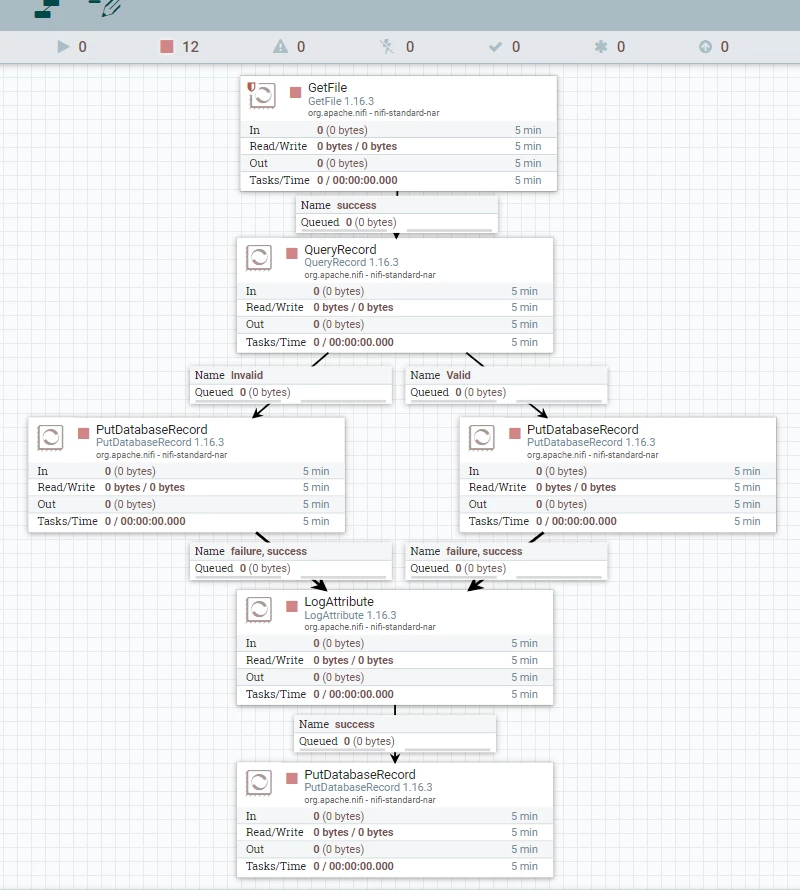
1. Getfile processor brings the target CSV file into the flow 

2. QueryRecord processor executes SQL commands and send the flowfile two ways

3. Each flow file is saved into Postgresql database with PutDatabaseRecord processors. 


What I am trying to do is. 

1. Keep a log of all SQL commands that are executed on Queryrecord processor and keep timestamp (When they were executed) of them 

2. Save the log into a Postgresql table named 'validation_log" that has 3 columns. (CSV file name, SQL command, Timestamp)


How can I make this work? 

araujo
araujoAnswer
Platinum ⭐️⭐️⭐️
July 14, 2022

@Lewis_King ,


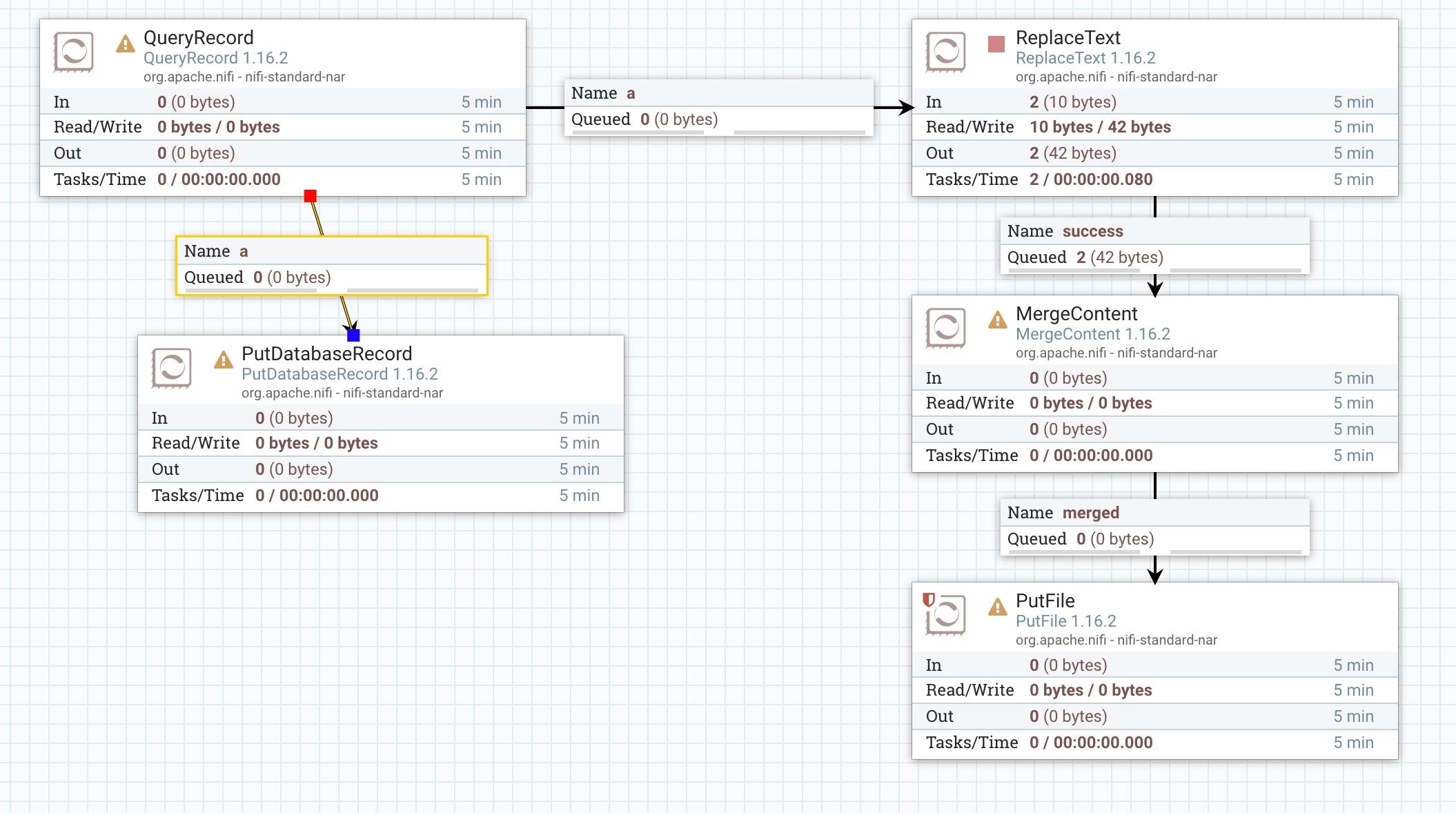
Here's an idea. You can fork the "a" output of the QueryRecord processor and send it to a sequence of processors as shown below:

araujo_0-1657779304024.png

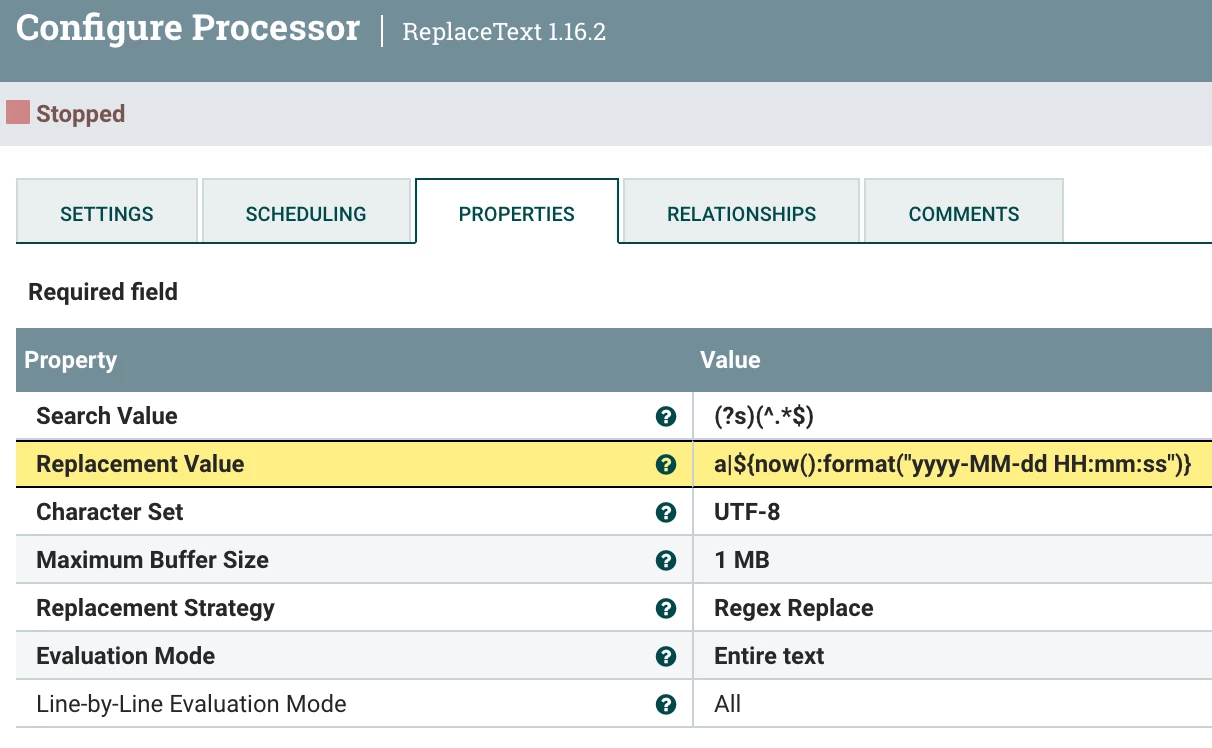
The ReplaceText processor will simply replace the entire contents of the flowfile with the information you want to register in the log. For example:

araujo_1-1657779389864.png

This will produce one row per flow file with the source type ("a") and the timestamp.


You can them send these to a MergeRecord to avoid saving to many small log files and them to a PutFile to persist the log.


You can process the "b" output in a similar way.


Cheers,

André


-- Was your question answered? Please take some time to click on "Accept as Solution" below this post. If you find a reply useful, say thanks by clicking on the thumbs up button.

8 replies

SAMSAL
Platinum ⭐️⭐️⭐️
July 13, 2022

Hi,

If I understood you correctly you want to log some information when the QueryRecord is executed, in this case you can use the Original relationship coming out of the QueryRecord where you can log the information like filename,timestamp...etc.

Translate
Lewis_King
Gold ⭐️
July 13, 2022

Thank you for the reply !. Can you suggest a processor that will perform the task you mentioned? Would LogAttribute do ?

Translate
araujo
Platinum ⭐️⭐️⭐️
Platinum ⭐️⭐️⭐️
July 14, 2022

@Lewis_King ,


> Keep a log of all SQL commands...


What do you mean by the above? The QueryRecord processor always executes the same SQL query, which you configure in the processor as a relationship. The SQL query doesn't change; what changes are the flowfiles that go through the processor.


Cheers,

André


Translate
-- Was your question answered? Please take some time to click on "Accept as Solution" below this post. If you find a reply useful, say thanks by clicking on the thumbs up button.
Lewis_King
Gold ⭐️
July 14, 2022

Oh I guess I didnt make my question clear here.

for example , when I have 2 SQL queries (a, b) set on my Queryrecord Processor,

I want to find out if I can keep a log like 


SQL query     |      Timestamp (Time of the query execution)

a                    |        20220714, 12:00

b                    |        20220714 , 12:00

Translate
araujo
Platinum ⭐️⭐️⭐️
Platinum ⭐️⭐️⭐️
July 14, 2022

@Lewis_King ,


Do you want to append one row for each flowfile or one row for each processed record to this log?


André

Translate
-- Was your question answered? Please take some time to click on "Accept as Solution" below this post. If you find a reply useful, say thanks by clicking on the thumbs up button.
Lewis_King
Gold ⭐️
July 14, 2022

One row for each flowfile would do ! 

Translate
araujo
Platinum ⭐️⭐️⭐️
araujoAnswer
Platinum ⭐️⭐️⭐️
July 14, 2022

@Lewis_King ,


Here's an idea. You can fork the "a" output of the QueryRecord processor and send it to a sequence of processors as shown below:

araujo_0-1657779304024.png

The ReplaceText processor will simply replace the entire contents of the flowfile with the information you want to register in the log. For example:

araujo_1-1657779389864.png

This will produce one row per flow file with the source type ("a") and the timestamp.


You can them send these to a MergeRecord to avoid saving to many small log files and them to a PutFile to persist the log.


You can process the "b" output in a similar way.


Cheers,

André


Translate
-- Was your question answered? Please take some time to click on "Accept as Solution" below this post. If you find a reply useful, say thanks by clicking on the thumbs up button.