

Juanes
Gold ⭐️
March 2, 2022
Solved

Manage CM using Rest API

Hello,

I recently discovered the CM Rest API and how I can restart services and obtain some information just using the Linux console and not using the CM UI.

I'm looking for some examples to delete and create the Impala Catalog Server and State Store (in a diferent node) by only using this feature. 

I did not find any information about it in the internet, just some poor youtube videos to do simple actions.

I'm using

CDP 7.1.6

CM 7.3.1

API v43

This is the Cloudera documentation I could get from my installation

http://my-CMhost.com:7180/static/apidocs/resource_RolesResource.html
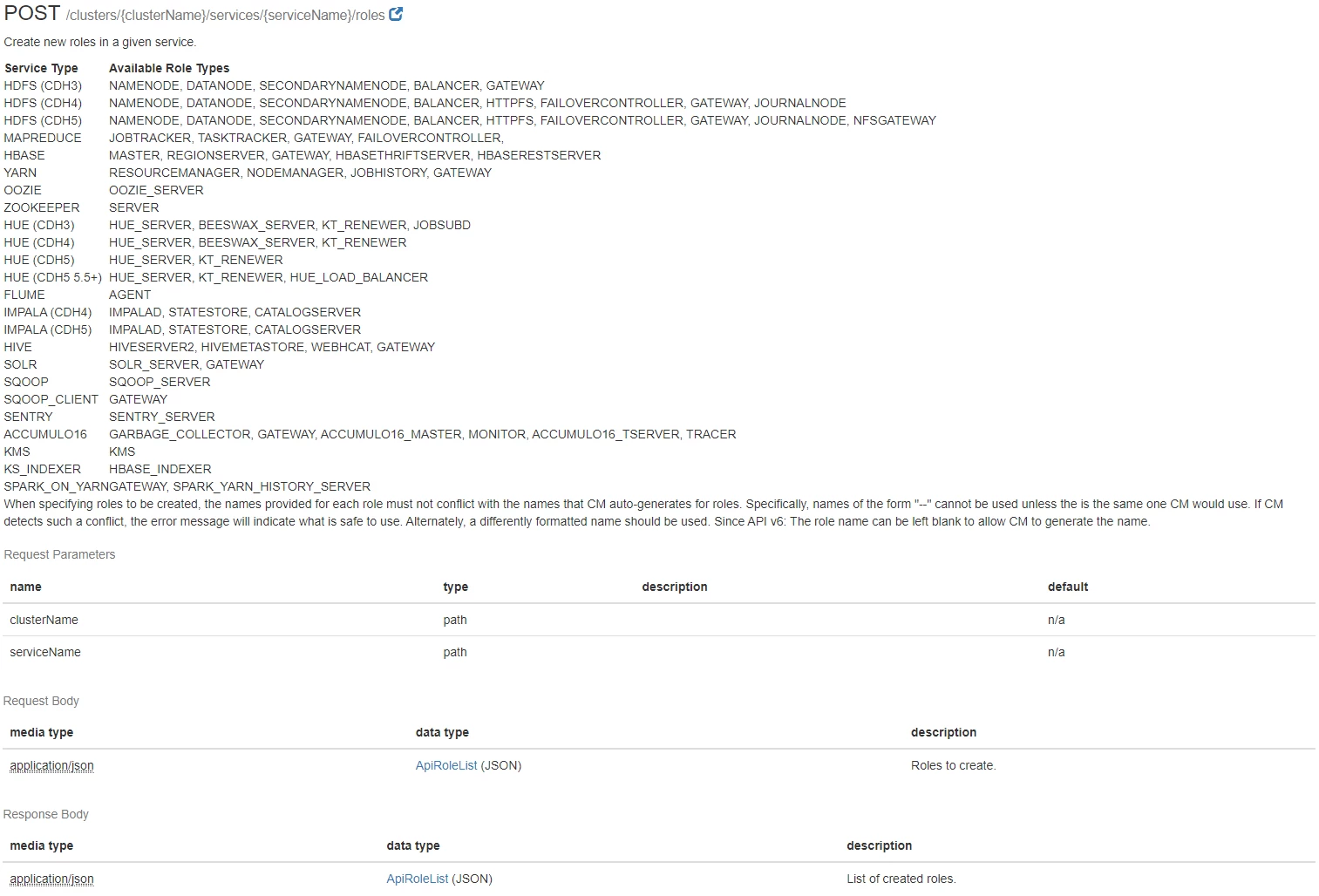
Untitled.png


I would really appreciate if anyone used this and could share some examples 🙂

 

araujo
araujoAnswer
Platinum ⭐️⭐️⭐️
March 2, 2022

Hi @Juanes ,


Here are a couple of examples:


To delete a role:

curl \
-u admin:admin \
-X DELETE \
"http://cm-host:7180/api/v45/clusters/cluster1/services/impala1/roles/impala-CATALOGSERVER-3b111e1a47149ce566f7225d1120cf85"

To create a role for a service in a particular host:

❯ cat role.json
{
"items": [
{
"name" : "impala-CATALOGSERVER-myrole",
"type" : "CATALOGSERVER",
"serviceRef" : {
"clusterName" : "cluster1",
"serviceName" : "impala1",
"serviceDisplayName" : "Impala",
"serviceType" : "IMPALA"
},
"hostRef" : {
"hostId" : "21fd5c51-0fd2-4eb6-97d2-0e498639eb07",
"hostname" : "host-2"
}
}
]
}

❯ curl \
-u admin:admin \
-X POST \
"http://cm-host:7180/api/v45/clusters/cluster1/services/impala1/roles" \
-H 'Content-Type: application/json' \
-d @role.json


Cheers,

André


-- Was your question answered? Please take some time to click on "Accept as Solution" below this post. If you find a reply useful, say thanks by clicking on the thumbs up button.

2 replies

araujo
Platinum ⭐️⭐️⭐️
araujoAnswer
Platinum ⭐️⭐️⭐️
March 2, 2022

Hi @Juanes ,


Here are a couple of examples:


To delete a role:

curl \
-u admin:admin \
-X DELETE \
"http://cm-host:7180/api/v45/clusters/cluster1/services/impala1/roles/impala-CATALOGSERVER-3b111e1a47149ce566f7225d1120cf85"

To create a role for a service in a particular host:

❯ cat role.json
{
"items": [
{
"name" : "impala-CATALOGSERVER-myrole",
"type" : "CATALOGSERVER",
"serviceRef" : {
"clusterName" : "cluster1",
"serviceName" : "impala1",
"serviceDisplayName" : "Impala",
"serviceType" : "IMPALA"
},
"hostRef" : {
"hostId" : "21fd5c51-0fd2-4eb6-97d2-0e498639eb07",
"hostname" : "host-2"
}
}
]
}

❯ curl \
-u admin:admin \
-X POST \
"http://cm-host:7180/api/v45/clusters/cluster1/services/impala1/roles" \
-H 'Content-Type: application/json' \
-d @role.json


Cheers,

André


Translate
-- Was your question answered? Please take some time to click on "Accept as Solution" below this post. If you find a reply useful, say thanks by clicking on the thumbs up button.
Juanes
JuanesAuthor
Gold ⭐️
March 2, 2022

Whow, this worked perfect!

You make my day, my best wishes to you my friend! 😎

Translate

