@forest lin
Backpressure is not used to control data rate in your dataflow. The intent of the backpressure setting on connections is to control the amount of allowed queued data. Both Back pressure settings are "soft" limits. Once backpressure kicks in on a connection, the processor feeding that connection will no longer be allowed to run.
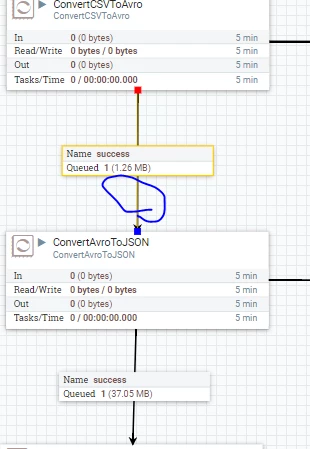
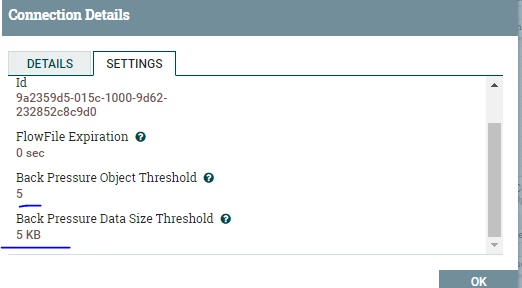
So in you case above, you have backpressure set to 5 Objects (FlowFiles) or 5 KB of content. Since your queue is empty, no backpressure was being applied when the 37.05 MB FlowFile arrived at your ConvertCSVToAvro processor, so that processor was allowed to run. That 1 FlowFile was processed through and placed on the outbound connection. It is at that time back pressure kicked in because you exceeded one of your backpressure settings. The ConvertCSVToAvro processor will now be prevented from running until that backpressure drops below 5 FlowFiles or 5 KB of queued data again. If all your processor are processing FlowFiles rapidly, back pressure will be very sparsely applied. Also keep in mind for efficiency some processors work on batches of FlowFiles. You may see for example with a backpressure object threshold of 5 a queue with more then 5 FlowFiles. The batch of FlowFiles are placed on an outbound queue. That processor who did the batch processing will then not be allowed to run again until that outbound connection drops again below 5 FlowFiles.
The ControlRate processor allows you to actually control the throughput of a dataflow. It does not slow the processing. The ControlRate processor will allow data to queue in its input side and based on its configured setting only allow x number of FlowFiles through over y amount of time. lets say it is configured to let 5 KB of data through every 1 minute. If you feed it a 37 MB file, it does not transfer just pieces of that FlowFile. It will feed through the entire 37 MB FlowFile and then not allow another FlowFile through until the average data per 1 minute is 5 KB.
Because of how the above works, data could continue to queue in front of ControlRate. This is where backpressure settings become important to stop upstream processor from running. You can set backpressure all the way upstream to your data ingest processors so they stop accepting new FlowFiles.
Thanks,
Matt