maykiwogno
Silver ⭐️⭐️⭐️
Oct 25, 2016 9:47 PM UTC
Solved

Managing Connection-Level Access Policies and Permissions in Apache NiFi

Hi all,

In the WEB UI NFI, I can find where modifie the policies to have permission to list/empty queue

thanks for help.

MattWho
MattWhoAnswer
Titanium ⭐️⭐️
Oct 25, 2016 10:04 PM UTC
@mayki wogno

In order to list a queue you need the "view the data" policy.

in order to empty a queue you need the "modify the data" policy.

If you are working with a NiFi cluster, all your nodes in the cluster will also need to be granted these policies as well.

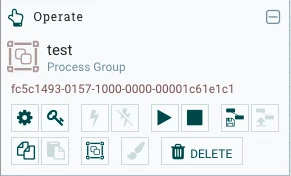
Click on the key in the "operate" window to the left of the Canvas:

8872-screen-shot-2016-10-25-at-110236-am.png

Then select the two policies listed above (Click override if you want to create a new policy and not edit the parent policy that is inherited). Add the Cluster node users and any other users you want to have those abilities.

Thanks,

Matt

12 replies

bbende
Gold ⭐️
Gold ⭐️
Oct 25, 2016 10:03 PM UTC

I believe that "List Queue" would be a "View Data" policy on the source, and "Empty Queue" would be a "Modify Data" on the source component. Also keep in mind that if you are clustered, all of the nodes in the cluster also need to be part of this policy because all entities (users + machines) involved in the request need to be authorized for the data.

Translate
Sanaz_janbakhsh
Gold ⭐️
Jul 25, 2017 4:34 AM UTC

Hi Bryan,

What Ranger's policy should be added for the "list queue" and "empty queue"? I tried /ViewData, /flowfile-queues, /View_Data but none of them works.

Thanks, SJ

Translate
MattWho
Titanium ⭐️⭐️
Titanium ⭐️⭐️
Jul 25, 2017 8:04 PM UTC

@Sanaz Janbakhsh

This question revolves around setting the correct file based authorizer permissions for listing and emptying queues.

Since you are using Ranger , I suggest starting a new question so as not add confusion as process is different.

Thanks,

Matt

Translate
MattWho
Titanium ⭐️⭐️
MattWhoAnswer
Titanium ⭐️⭐️
Oct 25, 2016 10:04 PM UTC
@mayki wogno

In order to list a queue you need the "view the data" policy.

in order to empty a queue you need the "modify the data" policy.

If you are working with a NiFi cluster, all your nodes in the cluster will also need to be granted these policies as well.

Click on the key in the "operate" window to the left of the Canvas:

8872-screen-shot-2016-10-25-at-110236-am.png

Then select the two policies listed above (Click override if you want to create a new policy and not edit the parent policy that is inherited). Add the Cluster node users and any other users you want to have those abilities.

Thanks,

Matt

Translate
semika
Silver ⭐️
Nov 8, 2020 7:07 PM UTC

Thank you.

Translate
maykiwogno
Silver ⭐️⭐️⭐️
Oct 26, 2016 4:21 PM UTC

Hi all

I've set 'admin nifi' in "view the data"

It's not work, I always permissions denied.

Admin Nifi contains my user, and all nifi nodes (nifi001..nifi004)

8886-viewthedata.jpg

Translate
MattWho
Titanium ⭐️⭐️
Titanium ⭐️⭐️
Oct 26, 2016 7:31 PM UTC

@mayki wogno

view the data will give you the ability to list the queue, but will not give you the ability to empty the queue. You need to give yoru nodes and the user making teh request teh ability to "modify teh data" as well.

Translate
maykiwogno
Silver ⭐️⭐️⭐️
Oct 26, 2016 7:56 PM UTC

@mclark : I've only this message

2016-10-26 14:53:13,685 INFO [NiFi Web Server-8190] o.a.n.w.a.c.AccessDeniedExceptionMapper user2@domain.net does not have permission to access the requested resource. Returning Forbidden response.
2016-10-26 14:53:13,733 INFO [NiFi Web Server-8202] o.a.n.w.s.NiFiAuthenticationFilter Attempting request for (<user2@domain.net><CN=nifi011, OU=NIFI><CN=nifi012, OU=NIFI>) POST https://nifi011:80/nifi-api/flowfile-queues/f7135017-0157-1000-0000-000041926053/drop-requests (source ip: 10.234.217.16)
2016-10-26 14:53:13,733 INFO [NiFi Web Server-8202] o.a.n.w.s.NiFiAuthenticationFilter Authentication success for user2@domain.net

Translate
MattWho
Titanium ⭐️⭐️
Titanium ⭐️⭐️
Oct 26, 2016 9:17 PM UTC

Is user2@domain.net part of your "Admin NiFi" user group?

Did you grant "Admin Group" the "modify the data" policy?

You can set DEBUG in you logback.xml file for the following line to get more output in your nifi-users.log:

<logger name="org.apache.nifi.web.api.config" level="INFO" additivity="false">

No nifi restarts are needed for any changes to the logback.xml file to take affect.

Matt

Translate
obaid_salikeen
Gold ⭐️
Nov 29, 2016 2:37 PM UTC

Following what Bryan Bende mentioned (in the case of a cluster),

You need to make sure all cluster nodes are a part of the policy. In my case, I created a new Group 'Cluster' and added all the nodes in this group. Then I went ahead and added this Group to a processor group (added this group for pilicies: view the data and modify the data)

Translate