Heeya8876
Silver ⭐️⭐️
December 29, 2023
Solved

Nifi 2.0.0 M1 Installation error with python

Hello!

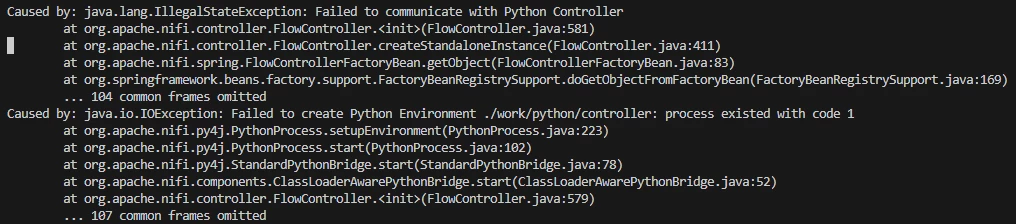
I am trying to install Nifi 2.0.0 M1 on Ubuntu 20.04. I downloaded Nifi from the official website and removed all HTTPS-related configurations. When I run Nifi with Python disabled, it works fine.

However, when I enable Python, the following error occurs, and I'm not sure how to fix it. 😟 Does anyone have any knowledge or experience with this? (Python 3.10 is installed.)


Heeya8876_3-1703827210177.png


Heeya8876_2-1703827194050.png

Heeya8876_1-1703827185934.png

Heeya8876_0-1703827176410.png

SAMSAL
SAMSALAnswer
Platinum ⭐️⭐️⭐️
December 29, 2023

Hi @Heeya8876 ,


I ran into the same situation , what worked for me is changing the setting in the

nifi.properties

from

nifi.python.command=pythons

to

nifi.python.command=python

Also make sure the python venv package is installed on your machine :


python -m venv

If that helps please accept solution

Thanks


5 replies

SAMSAL
SAMSALAnswer
Platinum ⭐️⭐️⭐️
December 29, 2023

Hi @Heeya8876 ,


I ran into the same situation , what worked for me is changing the setting in the

nifi.properties

from

nifi.python.command=pythons

to

nifi.python.command=python

Also make sure the python venv package is installed on your machine :


python -m venv

If that helps please accept solution

Thanks


Translate
Heeya8876
Heeya8876Author
Silver ⭐️⭐️
January 13, 2024

Oh, I successfully managed to integrate and run NiFi 2.0 with Python on Windows using the method you suggested. Thank you so much!

Translate
joseomjr
Gold ⭐️⭐️
December 29, 2023

@Heeya8876 , both @SAMSAL and I have recently gone through the adventures of getting 2.0.0-M1 to run with the Python extension enabled.  Here are some findings so far on the Linux side of things.

  1. Java 21 is required (any platform)
  2. Python 3.9+ (any platform) is required (I believe @SAMSAL, correct me if I'm wrong, said Python 3.12 did NOT work, but we both got 3.11 to run)
  3. If it's installed, make sure it's the default set with "sudo update-alternatives java"
  4. Make sure your environment has JAVA_HOME defined with the path for Java 21
  5. Make sure Python3.9+ is the default prior to running NiFi with "sudo update-alternatives --config python3"
  6. Executing python3 --version should show whichever version you set as your default and it should be 3.9~3.11
  7. You can see what version was copied by NiFi in the directory "./work/python/controller/bin/python3 --version"
  8. If this is showing anything <3.9 then delete the work folder, follow the steps above, and try again.
  9. If you build a processor from scratch the Developer guide says to use this for your __init__

    def __init__(self, **kwargs):
    super().__init__(**kwargs)

  10. You'll get an error...replace super().__init__(**kwargs) with pass like the examples that come with the install.
  11. Changes to your Python extensions are not immediate....NiFi polls the directory periodically to detect changes, download dependencies, and load the updated processors. Sometimes I had to restart NiFi to get it to detect my changes if my previous code update made it really unhappy.
  12. ./logs/nifi-python.log will be your friend for Python extension related issues
  13. If your Python extension has dependencies and it fails to download them you can see the command it attempted in nifi-python.log; I manually ran the commands in the logs and it downloaded the modules into the correct place and worked...perhaps there's a timeout for module downloads? (just a guess since the module had a ton of large dependencies)
  14. I don't think I saw it in the Developer's Guide but did notice while building a custom FlowFileTransform Python extension, the "content" data returned with the  FlowFileTransformResult should be a string or byte array.

@SAMSAL has additional insight on getting it to start up on Windows

Translate
Heeya8876
Heeya8876Author
Silver ⭐️⭐️
January 13, 2024

Hello! I followed the instructions you provided, and the problem has been resolved. Thank you so much for your help

Translate
DianaTorres
Community Manager
Community Manager
January 9, 2024

@Heeya8876 Has the reply helped resolve your issue? If so, please mark the appropriate reply as the solution, as it will make it easier for others to find the answer in the future.  Thanks.

Translate
Regards, Diana Torres, Senior Community Moderator