

MaarufB
Silver ⭐️⭐️⭐️
November 21, 2022
Question

nifi-app.log is exceeding the maxFileSize

NiFi Version: 1.16.1

Java 11


I noticed the logback.xml is the setting for the nifi logs. However, the file size of the nifi-app.log is exceeding the maxFileSize set on logback.xml. 


This is my logback.xm file:
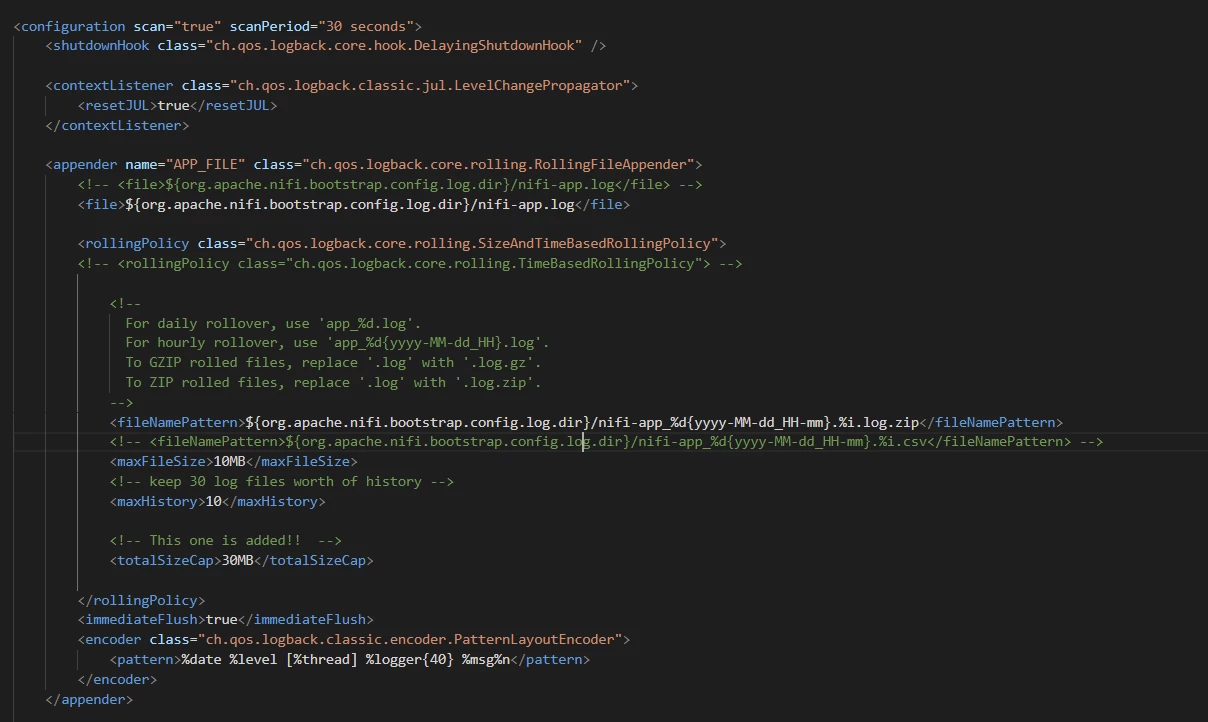


logback.PNG

1 reply

MattWho
Titanium ⭐️⭐️⭐️
Titanium ⭐️⭐️⭐️
December 13, 2022

@MaarufB 
You must have a lot of logging enabled that you expect multiple 10MB app.log files per minute.
Was NiFi ever rolling files?
Check your NiFi app.log for any Out of Memory (OOM) exceptions.  Does not matter what class is throwing the OOM(s), once the NiFi process is having memory issues, it impacts everything within that service.  If this is the case, you'll need to make changes to your dataflow(s) or increase the NiFi heap memory.

Secondly, check to make sure you have sufficient file handles for your NiFi process user.
For example;
- If your NiFi service is owned by the "nifi" user, make sure the open file limit is set to a very large value for this user (999999).   
A restart of the NiFi service before the change to file handles will be applied.

If you found that the provided solution(s) assisted you with your query, please take a moment to login and click Accept as Solution below each response that helped.

Thank you,

Matt

Translate

