

VijaySankar
Silver ⭐️⭐️
January 8, 2020
Solved

Nifi - HandleHttpRequest processor throwing "Failed to Initialize the server" exception

Nifi - HandleHttpRequest processor throwing an exception saying "Failed to Initialize the server". Functionality wise it is working fine but I always see the below error message. 


Will be able to post the request using curl command to this processor and it is accepting the request without any issue.


Please help me to get rid of this error? Thanks.


Error message:

13:42:37 EST- hostname:port - ERROR

HandleHttpRequest[id=123] failed to process session due to failed to initialize the server: org.apache.nifi.processor.exception.ProcessException: Failed to Initialize the server.


Configuration:
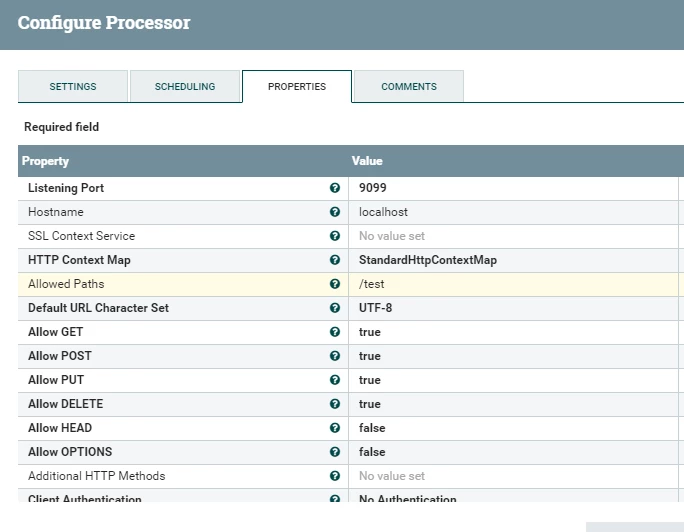
config.PNG

stevenmatison
Platinum ⭐️⭐️
January 8, 2020

Is the port able to be open?   If something is blocking port (firewall, iptables, etc), this will cause an issue.


Also remove "localhost" in Hostname.  Out of the box this should work on all NiFi node(s) with the Hostname box empty (No Value Set).


5 replies

stevenmatison
Platinum ⭐️⭐️
January 8, 2020

Is the port able to be open?   If something is blocking port (firewall, iptables, etc), this will cause an issue.


Also remove "localhost" in Hostname.  Out of the box this should work on all NiFi node(s) with the Hostname box empty (No Value Set).


Translate
VijaySankar
Silver ⭐️⭐️
January 13, 2020

Thanks Steven, I removed the hostname and it started working after I set hostname box empty.

Translate
MattWho
Titanium ⭐️⭐️⭐️
Titanium ⭐️⭐️⭐️
January 9, 2020

@VijaySankar 


Is there a full stack trace that follows the error message in the actual nifi-app.log?

Is this a multi-node NiFi cluster that perhaps has multiple Nodes installed and running on the same server?
If so, when you start the processor only one node is going to be able to bind to the configured port and the other nodes will throw the exception.  Since both nodes are on the same host, the processor will appear as though it is working because the node that did bind will receive the requests. 

It is also possible that port 9099 is not unused on every host in your NiFi cluster.  Since the bulletin you are sharing indicates a specific hostname:port, it is possible that port 9099 is already in use by some other process on that one host.  But on your other host(s) it is not in use and binds successfully allowing those host(s) to receive request fine.

I recommend stopping the HandleHttpRequest processor and then from command line check to see if there is anything still listening on port 9099.  If so, you'll need to use another port that is available on all your NiFi nodes.

Hope this helps,
Matt

Translate
arunak
Gold ⭐️⭐️⭐️
January 9, 2020

Hi Matt, 
The case was bit different than in the screenshot. This was a multi node cluster and instead of "localhost" @VijaySankar had one of the hostnames configured in the hostname field. The processor was however configured to run on all nodes. This was causing the Error messages. Cleared off the hostname field so that the processor is able to spin up a HTTP service on each host:port and the error doesn't occur anymore.  

Translate
stevenmatison
Platinum ⭐️⭐️
January 10, 2020

@VijaySankar can you accept my answer (remove localhost) as the solution?

Translate


