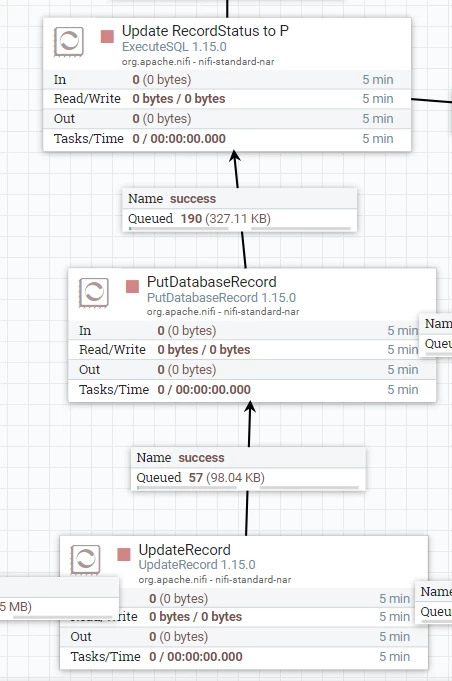
@glad1
Based on what you shared, you may be able to accomplish what you are trying to do using a couple additional processors and a Child Process Group that utilizes "Process Group FlowFile Concurrency" settings.
So your use case involves:
For each 1 FlowFile output by your ExecuteSQLRecord processor you want to do ALL the following before the next FlowFile produced by ExecuteSQL record is processed:
1. Split the FlowFIle into X number of FlowFiles using SplitJson.
2. Modify each one of the produced Split FlowFiles using UpdateRecord.
3. Write all those modified FlowFiles ot another Database using PutDatabaseRecord
4. ExecuteSQL only once to update Record that all splits were processed.
Then repeat above for next produce FlowFile
If this is correct, here is what you might want to try:
1. create a Process Group that you will insert in teh middle of this flow as shown in the following image:
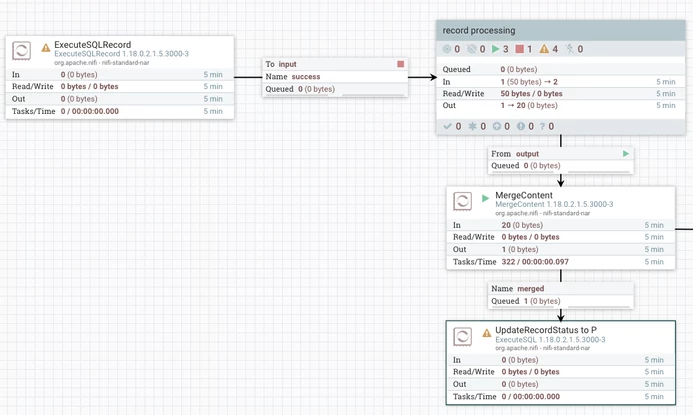
2. Configure that Process group as follows:
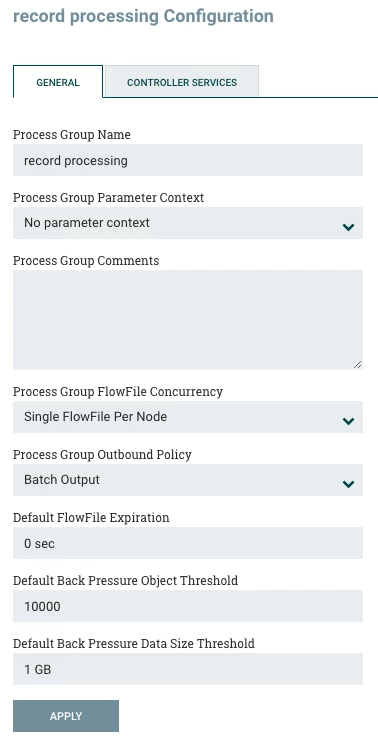
Important properties to set here are:
- Process Group FlowFile Concurrency = Single FlowFile Per Node
- Process Group Outbound Policy = Batch Output
What this does is allow only one FlowFile (per node in multi-node NiFi) to enter this PG at any given time. Inside this Process group you will have handle the processing of this FlowFile (split, update, putDB). The outbound policy will not release any of the Produced Splits from teh PG until all are queued at the output port.
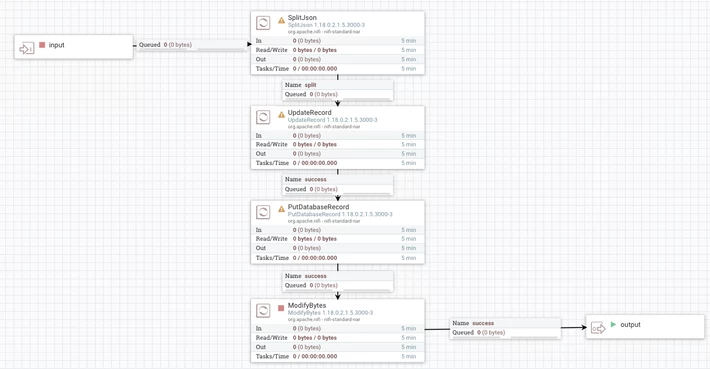
You'll notice I added one additional optional processor ModifyBytes to your dataflow (configured with "Remove all Content = true). This will zero out the content on the FlowFiles after they were written using the PutDatabaseRecord processor. Then those FlowFiles with no content now are sent to connection feeding output port where they are held until all splits produced are queued. They will then all be released at once from the PG to the next new processor MergeContent. The MergeContent processor will merge all those FlowFiles into a single FlowFile that feeds your ExecuteSQL (UpdateRecordStatus toP) processor. Now you have a single notification for the original FlowFile that was split and processed. Additionally you have created separation between each source FlowFile processed at start of dataflow.
If you found any of the suggestions/solutions provided helped you with your issue, please take a moment to login and click "Accept as Solution" on one or more of them that helped.
Thank you,
Matt