

yamaga
Gold ⭐️
December 22, 2022
Solved

Nifi Unable to convert CSV to Excel using POI API

I want to convert csv flowfile content into XLS file usin groovy script + POI API

I m using ivy to grab POI dependencies and it seems work well.

please find more details below:


This is my Nifi flow:
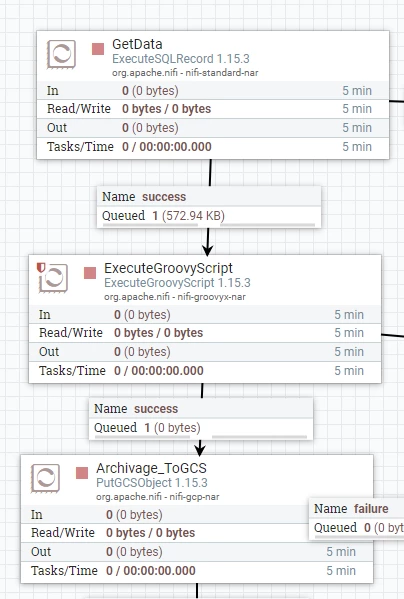


a9wjm.png


This is my script

@Grapes(@Grab(group='org.apache.poi', module='poi-ooxml', version='3.9'))
import org.apache.poi.ss.usermodel.*
import org.apache.poi.hssf.usermodel.*
import org.apache.poi.xssf.usermodel.*
import org.apache.poi.ss.util.*
import org.apache.poi.ss.usermodel.*
import org.apache.poi.hssf.extractor.*
import java.nio.charset.*
import java.io.*
import org.apache.commons.io.IOUtils

def flowFile = session.get()
def date = new Date()

if(!flowFile) return

flowFile = session.write(flowFile, {inputStream, outputStream ->
try {

Workbook wb = WorkbookFactory.create(inputStream,);
Sheet mySheet = wb.getSheetAt(0);


def record = IOUtils.toString(inputStream, StandardCharsets.UTF_8)
outputStream.write(record.getBytes(StandardCharsets.UTF_8))

wb.close();

} catch(e) {
log.error("Error during processing", e)
session.transfer(flowFile, REL_FAILURE)
}
} as StreamCallback)


def filename = flowFile.getAttribute('filename')+'.xlsx'
flowFile = session.putAttribute(flowFile, 'filename', filename)

session.transfer(flowFile, REL_SUCCESS)

I get this error 
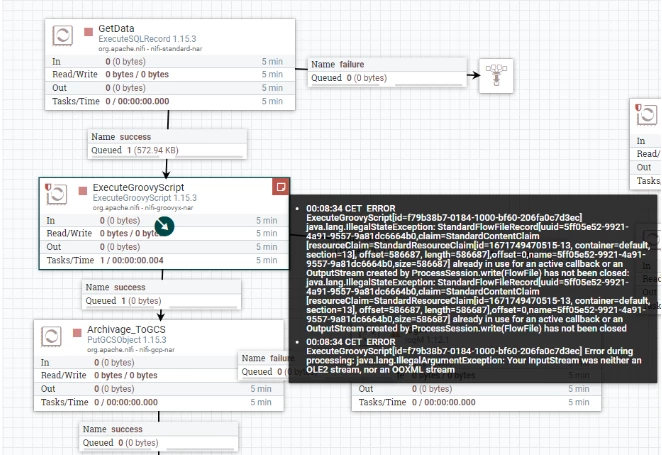
 

yamaga_0-1671751139553.png


Any idea about this error ?

yamaga
yamagaAnswer
Gold ⭐️
January 3, 2023

I found a solution, this is my worked scripr:


@Grapes(@Grab(group='org.apache.poi', module='poi-ooxml', version='3.9'))
import com.opencsv.CSVReader
@Grapes(@Grab(group='com.opencsv', module='opencsv', version='4.2'))
import org.apache.poi.ss.usermodel.*
import org.apache.poi.xssf.streaming.*
import org.apache.poi.hssf.usermodel.*
import org.apache.poi.xssf.usermodel.*
import org.apache.poi.ss.util.*
import org.apache.poi.ss.usermodel.*
import org.apache.poi.hssf.extractor.*
import java.nio.charset.*
import java.io.*
import org.apache.commons.io.IOUtils

def flowFile = session.get()
def date = new Date()

if(!flowFile) return


flowFile = session.write(flowFile, {inputStream, outputStream ->
SXSSFSheet sheet1 = null;
CSVReader reader = null;
Workbook wb = null;
String generatedXlsFilePath = "/home/";
FileOutputStream fileOutputStream = null;

def filename = flowFile.getAttribute('filename')
def path = flowFile.getAttribute('path')

def nextLine = ''
reader = new CSVReader(new FileReader(path+filename), ',');

//Workbook wb = WorkbookFactory.create(inputStream,);
//Sheet sheet1 = wb.createSheet("Feuille");

wb = new SXSSFWorkbook(inputStream);
sheet1 = (SXSSFSheet) wb.createSheet('Sheet');

def rowNum = 0;
while((nextLine = reader.readNext()) != null) {
Row currentRow = sheet1.createRow(rowNum++);
for(int i=0; i < nextLine.length; i++) {
if(NumberUtils.isDigits(nextLine[i])) {
currentRow.createCell(i).setCellValue(Integer.parseInt(nextLine[i]));
} else if (NumberUtils.isNumber(nextLine[i])) {
currentRow.createCell(i).setCellValue(Double.parseDouble(nextLine[i]));
} else {
currentRow.createCell(i).setCellValue(nextLine[i]);
}
}
}


//fileOutputStream = new FileOutputStream(generatedXlsFilePath.trim());
//wb.write(fileOutputStream);
generatedXlsFilePath = generatedXlsFilePath + 'SAISIE_MAGASING.XLS'
outputStream = new FileOutputStream(generatedXlsFilePath.trim());

wb.write(outputStream);

wb.close();
//fileOutputStream.close();
outputStream.close();
reader.close();
//outputStream.close();
inputStream.close();


} as StreamCallback)


flowFile = session.putAttribute(flowFile, 'filename', filename)

1 reply

yamaga
yamagaAuthorAnswer
Gold ⭐️
January 3, 2023

I found a solution, this is my worked scripr:


@Grapes(@Grab(group='org.apache.poi', module='poi-ooxml', version='3.9'))
import com.opencsv.CSVReader
@Grapes(@Grab(group='com.opencsv', module='opencsv', version='4.2'))
import org.apache.poi.ss.usermodel.*
import org.apache.poi.xssf.streaming.*
import org.apache.poi.hssf.usermodel.*
import org.apache.poi.xssf.usermodel.*
import org.apache.poi.ss.util.*
import org.apache.poi.ss.usermodel.*
import org.apache.poi.hssf.extractor.*
import java.nio.charset.*
import java.io.*
import org.apache.commons.io.IOUtils

def flowFile = session.get()
def date = new Date()

if(!flowFile) return


flowFile = session.write(flowFile, {inputStream, outputStream ->
SXSSFSheet sheet1 = null;
CSVReader reader = null;
Workbook wb = null;
String generatedXlsFilePath = "/home/";
FileOutputStream fileOutputStream = null;

def filename = flowFile.getAttribute('filename')
def path = flowFile.getAttribute('path')

def nextLine = ''
reader = new CSVReader(new FileReader(path+filename), ',');

//Workbook wb = WorkbookFactory.create(inputStream,);
//Sheet sheet1 = wb.createSheet("Feuille");

wb = new SXSSFWorkbook(inputStream);
sheet1 = (SXSSFSheet) wb.createSheet('Sheet');

def rowNum = 0;
while((nextLine = reader.readNext()) != null) {
Row currentRow = sheet1.createRow(rowNum++);
for(int i=0; i < nextLine.length; i++) {
if(NumberUtils.isDigits(nextLine[i])) {
currentRow.createCell(i).setCellValue(Integer.parseInt(nextLine[i]));
} else if (NumberUtils.isNumber(nextLine[i])) {
currentRow.createCell(i).setCellValue(Double.parseDouble(nextLine[i]));
} else {
currentRow.createCell(i).setCellValue(nextLine[i]);
}
}
}


//fileOutputStream = new FileOutputStream(generatedXlsFilePath.trim());
//wb.write(fileOutputStream);
generatedXlsFilePath = generatedXlsFilePath + 'SAISIE_MAGASING.XLS'
outputStream = new FileOutputStream(generatedXlsFilePath.trim());

wb.write(outputStream);

wb.close();
//fileOutputStream.close();
outputStream.close();
reader.close();
//outputStream.close();
inputStream.close();


} as StreamCallback)


flowFile = session.putAttribute(flowFile, 'filename', filename)

Translate

