

Armel316
Silver ⭐️⭐️⭐️
November 13, 2024
Question

No available buckets after secure Nifi connected to secure Nifi registry
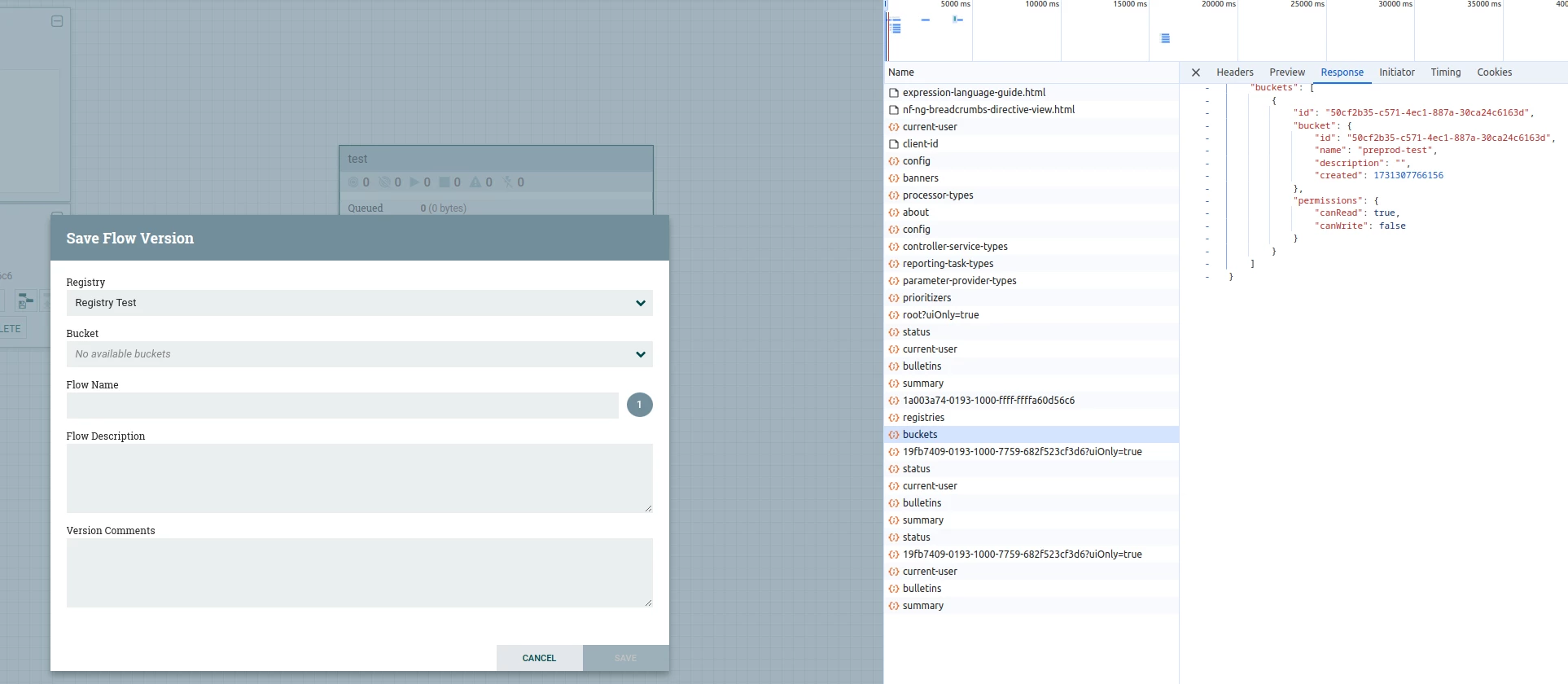
Capture d’écran du 2024-11-13 08-24-23.pngHello,

I have deployed Apache NiFi and NiFi Registry on a Kubernetes cluster, but I am unable to retrieve the buckets in the NiFi interface. However, when I set the buckets to "public", I can see them in the "Network" tab of the browser’s developer tools.

I have been troubleshooting this issue for over a month without success. If anyone has encountered a similar situation or has any suggestions on what might be causing this, I would greatly appreciate any help or advice.

Thank you in advance for your assistance!

@MattWho 

13 replies

VidyaSargur
Community Manager
Community Manager
November 13, 2024

@Armel316, Welcome to our community! To help you get the best possible answer, I have tagged in our NiFi experts @MattWho @SAMSAL who may be able to assist you further.

Please feel free to provide any additional information or details about your query, and we hope that you will find a satisfactory solution to your question.

Translate
Regards, Vidya Sargur, Community Manager Was your question answered? Make sure to mark the answer as the accepted solution. If you find a reply useful, say thanks by clicking on the thumbs up button.
satz
Gold ⭐️
Gold ⭐️
November 13, 2024

@Armel316 Does the Nifi Registry setup with Authorisation, probably we may need to refer this doc: https://docs.cloudera.com/cfm/2.1.7/cfm-security/topics/cdf-datahub-nifi-security-predefined-nifiregistry-policies.html


Translate
Thanks, Satz
Armel316
Armel316Author
Silver ⭐️⭐️⭐️
November 13, 2024

@satz I’m not sure I fully understand what you mean regarding the Nifi Registry authorization setup. Could you please clarify and provide more details?Capture d’écran du 2024-11-13 16-08-43.png

Translate
MattWho
Titanium ⭐️⭐️⭐️
Titanium ⭐️⭐️⭐️
November 13, 2024

@Armel316 

Lets discuss first what needs to happen successfully when a secured NiFi is connecting with a secured NiFi-Registry.

When NiFi connects to NiFi-Registry client URL, it does so using the either the keystore and truststore configured in the NiFi-Registry Client's StandardRestrictedSSLContextService setup within NiFi  or using the keystore and truststore setup in the nifi.properties when no StandardRestrictedSSLContextService was setup in the NiFi-Registry Client.  A mutualTLS handshake will be attempted between NiFi and NiFi-Registry.  NiFi-Registry will "WANT" the client (NiFi) to provide clientAuth certificate.  If one is not provided, NiFi-Registry will proceed using the anonymous user (Anonymous user only has read on public buckets which align with what you shared from developer tools).  So an unsuccessful  mutualTLS handshake is most likely your issue currently.

To answer the possible next question.... If It shows "read" on the bucket in developer tools, why does NiFi UI does not show the bucket?

  • This is because the UI opened was for starting version control on an process group on the NiFi canvas.  This UI will only show buckets for which the user identity currently authenticated into NiFi is authorized read and write on.

Next question: My NiFi user is authorized read and write on the bucket in NiFi-Registry, so why is bucket not showing?

  • NiFi authenticates with NiFi-Registry via a mutualTLS handshake.  The client/user identity derived form the clientAuth certificate DN for the NIFi node is used as the identity passed to NiFi-Registry.  Assuming the MutualTLS handshake is successful, the node user identity must be authorized "read" on all buckets and "read, write, and delete" on proxy user requests.  This allows the node to proxy request on behalf of the user authenticated in NiFi.  So only the buckets for which the authenticated user identity in NiFi has been authorized read, write, and delete on within NiFi-Registry will be shown in the list.

Please help our community thrive. If you found any of the suggestions/solutions provided helped you with solving your issue or answering your question, please take a moment to login and click "Accept as Solution" on one or more of them that helped.

Thank you,
Matt

Translate
Armel316
Armel316Author
Silver ⭐️⭐️⭐️
November 14, 2024
Here is one of the configurations of authorizers.xml for the NiFi nodes :

<?xml version="1.0" encoding="UTF-8" standalone="yes"?>
<authorizers>
<userGroupProvider>
<identifier>file-user-group-provider</identifier>
<class>org.apache.nifi.authorization.FileUserGroupProvider</class>
<property name="Users File">./conf/users.xml</property>
<property name="Legacy Authorized Users File"></property>
<property name="Initial Admin Identity">initial_admin_identity</property>
<property name="Initial User Identity 1">CN=nifi0, OU=NIFI</property>
<property name="Initial User Identity 2">CN=nifi1, OU=NIFI</property>
<property name="Initial User Identity 3">CN=nifi2, OU=NIFI</property>
</userGroupProvider>
<userGroupProvider>
<identifier>ldap-user-group-provider</identifier>
<class>org.apache.nifi.ldap.tenants.LdapUserGroupProvider</class>
<property name="Authentication Strategy">SIMPLE</property>

<property name="Manager DN">ldap_manager_dn</property>
<property name="Manager Password">ldap_manager_password</property>

<property name="TLS - Keystore">/opt/certs/nifi0/keystore.jks</property>
<property name="TLS - Keystore Password">xxx</property>
<property name="TLS - Keystore Type">JKS</property>
<property name="TLS - Truststore">/opt/certs/nifi0/truststore.jks</property>
<property name="TLS - Truststore Password">xxx</property>
<property name="TLS - Truststore Type">JKS</property>
<property name="TLS - Client Auth">NONE</property>
<property name="TLS - Protocol"></property>
<property name="TLS - Shutdown Gracefully"></property>

<property name="Referral Strategy">FOLLOW</property>
<property name="Connect Timeout">10 secs</property>
<property name="Read Timeout">10 secs</property>

<property name="Url">ldap_url</property>
<property name="Sync Interval">30 mins</property>
<property name="Group Membership - Enforce Case Sensitivity">false</property>

<property name="User Search Base">ldap_user_search_base</property>
<property name="User Object Class">person</property>
<property name="User Search Scope">SUBTREE</property>
<property name="User Search Filter">ldap_user_search_filter_authorizers</property>
<property name="User Identity Attribute">sAMAccountName</property>
<property name="User Group Name Attribute">memberof</property>
<property name="User Group Name Attribute - Referenced Group Attribute"></property>
<property name="Identity Strategy">USE_USERNAME</property>

<property name="Group Search Base">ldap_group_search_base</property>
<property name="Group Object Class">group</property>
<property name="Group Search Scope">ONE_LEVEL</property>
<property name="Group Search Filter">(objectClass=group)</property>
<property name="Group Name Attribute">cn</property>
<property name="Group Member Attribute">member</property>
<property name="Group Member Attribute - Referenced User Attribute">sAMAccountName</property>
</userGroupProvider>
<userGroupProvider>
<identifier>composite-user-group-provider</identifier>
<class>org.apache.nifi.authorization.CompositeUserGroupProvider</class>
<property name="User Group Provider 1">file-user-group-provider</property>
<property name="User Group Provider 2">ldap-user-group-provider</property>
</userGroupProvider>
<accessPolicyProvider>
<identifier>file-access-policy-provider</identifier>
<class>org.apache.nifi.authorization.FileAccessPolicyProvider</class>
<property name="User Group Provider">composite-user-group-provider</property>
<property name="Authorizations File">./conf/authorizations.xml</property>
<property name="Initial Admin Identity">initial_admin_identity</property>
<property name="Legacy Authorized Users File"></property>
<property name="Node Identity 1">CN=nifi0, OU=NIFI</property>
<property name="Node Identity 2">CN=nifi1, OU=NIFI</property>
<property name="Node Identity 3">CN=nifi2, OU=NIFI</property>
<property name="Node Group"></property>
</accessPolicyProvider>
<authorizer>
<identifier>managed-authorizer</identifier>
<class>org.apache.nifi.authorization.StandardManagedAuthorizer</class>
<property name="Access Policy Provider">file-access-policy-provider</property>
</authorizer>
<authorizer>
<identifier>single-user-authorizer</identifier>
<class>org.apache.nifi.authorization.single.user.SingleUserAuthorizer</class>
</authorizer>
</authorizers>

And here is my authorizers.xml for the NiFi Registry.

<?xml version="1.0" encoding="UTF-8" standalone="yes"?>
<authorizers>
<userGroupProvider>
<identifier>file-user-group-provider</identifier>
<class>org.apache.nifi.registry.security.authorization.file.FileUserGroupProvider</class>
<property name="Users File">./conf/users.xml</property>
<property name="Initial User Identity 1">initial_admin_identity</property>
<property name="Initial User Identity 2">CN=nifi0, OU=NIFI</property>
<property name="Initial User Identity 3">CN=nifi1, OU=NIFI</property>
<property name="Initial User Identity 4">CN=nifi2, OU=NIFI</property>
</userGroupProvider>
<userGroupProvider>
<identifier>ldap-user-group-provider</identifier>
<class>org.apache.nifi.registry.security.ldap.tenants.LdapUserGroupProvider</class>
<property name="Authentication Strategy">SIMPLE</property>

<property name="Manager DN">ldap_manager_dn</property>
<property name="Manager Password">ldap_manager_password</property>

<property name="TLS - Keystore">/opt/certs/registry/keystore.jks</property>
<property name="TLS - Keystore Password">xxx</property>
<property name="TLS - Keystore Type">JKS</property>
<property name="TLS - Truststore">/opt/certs/registry/truststore.jks</property>
<property name="TLS - Truststore Password">xxx</property>
<property name="TLS - Truststore Type">JKS</property>
<property name="TLS - Client Auth">NONE</property>
<property name="TLS - Protocol"></property>
<property name="TLS - Shutdown Gracefully"></property>

<property name="Referral Strategy">FOLLOW</property>
<property name="Connect Timeout">10 secs</property>
<property name="Read Timeout">10 secs</property>

<property name="Url">ldap_url</property>
<property name="Page Size"></property>
<property name="Sync Interval">30 mins</property>
<property name="Group Membership - Enforce Case Sensitivity">false</property>

<property name="User Search Base">ldap_user_search_base</property>
<property name="User Object Class">person</property>
<property name="User Search Scope">SUBTREE</property>
<property name="User Search Filter">ldap_user_search_filter_authorizers</property>
<property name="User Identity Attribute">sAMAccountName</property>
<property name="User Group Name Attribute">memberof</property>
<property name="User Group Name Attribute - Referenced Group Attribute"></property>
<property name="Identity Strategy">USE_USERNAME</property>

<property name="Group Search Base">ldap_group_search_base</property>
<property name="Group Object Class">group</property>
<property name="Group Search Scope">ONE_LEVEL</property>
<property name="Group Search Filter">(objectClass=group)</property>
<property name="Group Name Attribute">cn</property>
<property name="Group Member Attribute">member</property>
<property name="Group Member Attribute - Referenced User Attribute">sAMAccountName</property>
</userGroupProvider>

<accessPolicyProvider>
<identifier>file-access-policy-provider</identifier>
<class>org.apache.nifi.registry.security.authorization.file.FileAccessPolicyProvider</class>
<property name="User Group Provider">ldap-user-group-provider</property>
<property name="Authorizations File">./conf/authorizations.xml</property>
<property name="Initial Admin Identity">initial_admin_identity</property>
<property name="NiFi Group Name"></property>
</accessPolicyProvider>
<authorizer>
<identifier>managed-authorizer</identifier>
<class>org.apache.nifi.registry.security.authorization.StandardManagedAuthorizer</class>
<property name="Access Policy Provider">file-access-policy-provider</property>
</authorizer>
</authorizers>

The certificates for the nodes and NiFi Registry are generated by the NiFi Toolkit using the following command and then mounted on each NiFi and Registry node :

command:
- "bash"
- "-c"
- "/opt/nifi-toolkit/*/bin/tls-toolkit.sh standalone -o /opt/certs -n nifi[0-2] -P xxx -K xxx -S xxx; /opt/nifi-toolkit/*/bin/tls-toolkit.sh standalone -o /opt/certs -n registry -P xxx -K xxx -S xxx;"
Could you let me know if I missed something or if I made any mistakes in my configuration?
Translate
MattWho
Titanium ⭐️⭐️⭐️
Titanium ⭐️⭐️⭐️
November 14, 2024

@Armel316 

I see the single-user-authorizer in your NiFi authorizers.xml (hope you are not using this and your nifi.properties is configured to use the managed-authorizer.)

Now of course I can not validate yoru configured providers, but can tell you the structure of your NiFi authorizers.xml is valid.

However, the structure of your NiFi-Registry authorizers.xml is not valid.
Best to read it from bottom up starting with the authorizer which you have as the managed-authorizer.    It calls the file-access-policy-provider which in turn references the ldap-user-group-provider.  I see that like your NiFi authorizers, your NiFi-Registry authorizers.xml also has the file-user-group-provider configured in it, but the configuration within NiFi-Registry, the managed-authorizer will never use it.   

Because the file-user-group-provider is not used, it is not possible to setup the authorization policies I mention in my last response which must be setup for the NiFi node identities.

Also make sure that both your nifi.properties and nifi-registry.properties files have the same configured identity.mapping.* properties.  I see you created your node identities using the node full DNs.  The identity mapping patterns if setup might be manipulating/trimming those DNs during a mutualTLS handshake causing them to to not match the full DNs.

I suggest you also tail the nifi-registry-app.log  while you try to start version control to capture what identities are being used to check authorizations against.

You'll also want to validate the contents of your NiFi and NiFi-Registry truststore.jks to make sure mutual trust can be established between the two services using the clientAuth Private keys found in the keystore.jks files on both services.

Please help our community thrive. If you found any of the suggestions/solutions provided helped you with solving your issue or answering your question, please take a moment to login and click "Accept as Solution" on one or more of them that helped.

Thank you,
Matt


Translate
Armel316
Armel316Author
Silver ⭐️⭐️⭐️
November 18, 2024

I have already adjusted the NiFi Registry authorizers.xml configuration as follows: : 

<?xml version="1.0" encoding="UTF-8" standalone="yes"?>
<authorizers>
<userGroupProvider>
<identifier>file-user-group-provider</identifier>
<class>org.apache.nifi.registry.security.authorization.file.FileUserGroupProvider</class>
<property name="Users File">./conf/users.xml</property>
<property name="Legacy Authorized Users File"></property>
<property name="Initial User Identity 1">CN=nifi0, OU=NIFI</property>
<property name="Initial User Identity 2">CN=nifi1, OU=NIFI</property>
<property name="Initial User Identity 3">CN=nifi2, OU=NIFI</property>
<property name="Initial User Identity 4">CN=localhost, OU=NIFI</property>
</userGroupProvider>
<userGroupProvider>
<identifier>ldap-user-group-provider</identifier>
<class>org.apache.nifi.registry.security.ldap.tenants.LdapUserGroupProvider</class>
<property name="Authentication Strategy">SIMPLE</property>

<property name="Manager DN">ldap_manager_dn</property>
<property name="Manager Password">ldap_manager_password</property>

<property name="TLS - Keystore">/opt/certs/registry/keystore.jks</property>
<property name="TLS - Keystore Password">supersecretkeystore</property>
<property name="TLS - Keystore Type">JKS</property>
<property name="TLS - Truststore">/opt/certs/registry/truststore.jks</property>
<property name="TLS - Truststore Password">supersecrettruststore</property>
<property name="TLS - Truststore Type">JKS</property>
<property name="TLS - Client Auth">NONE</property>
<property name="TLS - Protocol"></property>
<property name="TLS - Shutdown Gracefully"></property>

<property name="Referral Strategy">FOLLOW</property>
<property name="Connect Timeout">10 secs</property>
<property name="Read Timeout">10 secs</property>

<property name="Url">ldap_url</property>
<property name="Page Size"></property>
<property name="Sync Interval">30 mins</property>
<property name="Group Membership - Enforce Case Sensitivity">false</property>

<property name="User Search Base">ldap_user_search_base</property>
<property name="User Object Class">person</property>
<property name="User Search Scope">SUBTREE</property>
<property name="User Search Filter">ldap_user_search_filter_authorizers</property>
<property name="User Identity Attribute">sAMAccountName</property>
<property name="User Group Name Attribute">memberof</property>
<property name="User Group Name Attribute - Referenced Group Attribute"></property>
<property name="Identity Strategy">USE_USERNAME</property>

<property name="Group Search Base">ldap_group_search_base</property>
<property name="Group Object Class">group</property>
<property name="Group Search Scope">ONE_LEVEL</property>
<property name="Group Search Filter">(objectClass=group)</property>
<property name="Group Name Attribute">cn</property>
<property name="Group Member Attribute">member</property>
<property name="Group Member Attribute - Referenced User Attribute">sAMAccountName</property>
</userGroupProvider>

<userGroupProvider>
<identifier>composite-user-group-provider</identifier>
<class>org.apache.nifi.registry.security.authorization.CompositeUserGroupProvider</class>
<property name="User Group Provider 1">file-user-group-provider</property>
<property name="User Group Provider 2">ldap-user-group-provider</property>
</userGroupProvider>

<accessPolicyProvider>
<identifier>file-access-policy-provider</identifier>
<class>org.apache.nifi.registry.security.authorization.file.FileAccessPolicyProvider</class>
<property name="User Group Provider">composite-user-group-provider</property>
<property name="Authorizations File">./conf/authorizations.xml</property>
<property name="Initial Admin Identity">initial_admin_identity</property>
<property name="Legacy Authorized Users File"></property>
<property name="Node Identity 1">CN=nifi0, OU=NIFI</property>
<property name="Node Identity 2">CN=nifi1, OU=NIFI</property>
<property name="Node Identity 3">CN=nifi2, OU=NIFI</property>
<property name="Node Group"></property>
</accessPolicyProvider>
<authorizer>
<identifier>managed-authorizer</identifier>
<class>org.apache.nifi.registry.security.authorization.StandardManagedAuthorizer</class>
<property name="Access Policy Provider">file-access-policy-provider</property>
</authorizer>
</authorizers>
 
And i've setup the required policies for NiFi nodes Capture d’écran du 2024-11-18 10-44-35.png
but still no available bucket in nifi
Capture d’écran du 2024-11-18 11-11-02.png
Translate
Armel316
Armel316Author
Silver ⭐️⭐️⭐️
November 19, 2024

is there anyone who can help me please ? 

Translate
MattWho
Titanium ⭐️⭐️⭐️
Titanium ⭐️⭐️⭐️
November 19, 2024

@Armel316 

You used the wrong composite provider "composite-user-group-provider".
Since one of your providers is the "file-user-group-provider" (a configurable provider- meaning one you can add users and groups to via the UI), you need to use the "composite-configurable-user-group-provider".

I see in the Apache NiFi-Registry documentation that the example is wrong.  
https://nifi.apache.org/docs/nifi-registry-docs/html/administration-guide.html#composite-implementations


    <userGroupProvider>
<identifier>composite-configurable-user-group-provider</identifier>
<class>org.apache.nifi.registry.security.authorization.CompositeConfigurableUserGroupProvider</class>
<property name="Configurable User Group Provider">file-user-group-provider</property>
<property name="User Group Provider 1">ldap-user-group-provider</property>
</userGroupProvider>


What do you see in the nifi-registry-app.log when you try to start version control?

What is the output from:
openssl s_client -connect <nifi-registry hostname>:<port> -v
openssl s_client -connect <nifi node hostname>:<port> -v

Above can be checked to verify proper trust exists between NiFi and NiFi-Registry.

What is the exact case sensitive user identity displayed in the upper right corner of your NiFi UI for the user authenticated to NiFi that is attempting to start version control?

Does the same user Identity (case sensitive) exist in your NiFi-Registry and been assigned read, write, and delete on the bucket?

Please help our community thrive. If you found any of the suggestions/solutions provided helped you with solving your issue or answering your question, please take a moment to login and click "Accept as Solution" on one or more of them that helped.

Thank you,
Matt


Translate
Armel316
Armel316Author
Silver ⭐️⭐️⭐️
November 22, 2024

Hello,

I've use composite configurable and i don't remember what change i've done in the nifi registry but now i'm getting this error :  "2024-11-22 10:59:12,704 ERROR [NiFi Registry Web Server-20] o.s.b.w.servlet.support.ErrorPageFilter Forwarding to error page from request [/access] due to exception [Multiple UserGroupProviders claim to provide user xxx]
java.lang.IllegalStateException: Multiple UserGroupProviders claim to provide user xxx"

<?xml version="1.0" encoding="UTF-8" standalone="yes"?>
<authorizers>
<userGroupProvider>
<identifier>file-user-group-provider</identifier>
<class>org.apache.nifi.registry.security.authorization.file.FileUserGroupProvider</class>
<property name="Users File">./conf/users.xml</property>
<property name="Initial User Identity 1">CN=nifi0, OU=NIFI</property>
<property name="Initial User Identity 2">CN=nifi1, OU=NIFI</property>
<property name="Initial User Identity 3">CN=nifi2, OU=NIFI</property>
</userGroupProvider>

<userGroupProvider>
<identifier>ldap-user-group-provider</identifier>
<class>org.apache.nifi.registry.security.ldap.tenants.LdapUserGroupProvider</class>
<property name="Authentication Strategy">SIMPLE</property>

<property name="Manager DN">ldap_manager_dn</property>
<property name="Manager Password">ldap_manager_password</property>

<property name="TLS - Keystore">/opt/certs/registry/keystore.jks</property>
<property name="TLS - Keystore Password">supersecretkeystore</property>
<property name="TLS - Keystore Type">JKS</property>
<property name="TLS - Truststore">/opt/certs/registry/truststore.jks</property>
<property name="TLS - Truststore Password">supersecrettruststore</property>
<property name="TLS - Truststore Type">JKS</property>
<property name="TLS - Client Auth">NONE</property>
<property name="TLS - Protocol"></property>
<property name="TLS - Shutdown Gracefully"></property>

<property name="Referral Strategy">FOLLOW</property>
<property name="Connect Timeout">10 secs</property>
<property name="Read Timeout">10 secs</property>

<property name="Url">ldap_url</property>
<property name="Page Size"></property>
<property name="Sync Interval">30 mins</property>
<property name="Group Membership - Enforce Case Sensitivity">false</property>

<property name="User Search Base">ldap_user_search_base</property>
<property name="User Object Class">person</property>
<property name="User Search Scope">SUBTREE</property>
<property name="User Search Filter">ldap_user_search_filter_authorizers</property>
<property name="User Identity Attribute">sAMAccountName</property>
<property name="User Group Name Attribute">memberof</property>
<property name="User Group Name Attribute - Referenced Group Attribute"></property>
<property name="Identity Strategy">USE_USERNAME</property>

<property name="Group Search Base">ldap_group_search_base</property>
<property name="Group Object Class">group</property>
<property name="Group Search Scope">ONE_LEVEL</property>
<property name="Group Search Filter">(objectClass=group)</property>
<property name="Group Name Attribute">cn</property>
<property name="Group Member Attribute">member</property>
<property name="Group Member Attribute - Referenced User Attribute">sAMAccountName</property>
</userGroupProvider>

<userGroupProvider>
<identifier>composite-configurable-user-group-provider</identifier>
<class>org.apache.nifi.registry.security.authorization.CompositeConfigurableUserGroupProvider</class>
<property name="Configurable User Group Provider">file-user-group-provider</property>
<property name="User Group Provider 1">ldap-user-group-provider</property>
</userGroupProvider>

<accessPolicyProvider>
<identifier>file-access-policy-provider</identifier>
<class>org.apache.nifi.registry.security.authorization.file.FileAccessPolicyProvider</class>
<property name="User Group Provider">composite-configurable-user-group-provider</property>
<property name="Authorizations File">./conf/authorizations.xml</property>
<property name="Initial Admin Identity">initial_admin_identity</property>
<property name="NiFi Group Name"></property>
<property name="Node Identity 1">CN=nifi0, OU=NIFI</property>
<property name="Node Identity 2">CN=nifi1, OU=NIFI</property>
<property name="Node Identity 3">CN=nifi2, OU=NIFI</property>
</accessPolicyProvider>
 
<authorizer>
<identifier>managed-authorizer</identifier>
<class>org.apache.nifi.registry.security.authorization.StandardManagedAuthorizer</class>
<property name="Access Policy Provider">file-access-policy-provider</property>
</authorizer>
</authorizers>
Translate
MattWho
Titanium ⭐️⭐️⭐️
Titanium ⭐️⭐️⭐️
November 22, 2024

@Armel316 

Since you only have two user group providers (ldap and file), that means that both are returning user "xxx".  If the ldap-user-group-provider is returning user "xxx" you don't want to define that same user through the file-user-group-provider.    What this means is that the users.xml file that the file-user-group-provider is loading users from on startup contains user "xxx".   

The file-user-group-provider will ONLY generate a users.xml file if one does not already exist.  If one already exist the file-user-group-provider will NOT make any modifications to an existing users.xml if you modify the provider configuration.  Once a users.xml file exists, the expectation is that all future user/group modification happen via the UI.

NOTE: The users.xml does not contain any users or group being loaded by other providers in to NiFi memory.

So you have two options here:

  1. Rename the current users.xml file so a new one is created on startup with only the 3 defined node-identities.  (this is preferred method)
  2. Manually modify the users.xml to remove all users that are being synced by the ldap-user-group-provider.

Please help our community thrive. If you found any of the suggestions/solutions provided helped you with solving your issue or answering your question, please take a moment to login and click "Accept as Solution" on one or more of them that helped.

Thank you,
Matt

Translate
