

Solved
No enabled components in top toolbar after logging into nifi UI
Hello all,
I am getting issues after starting NIFI (LDAP enabled). I started successfully to log in my NIFI, but all components are disabled as below.
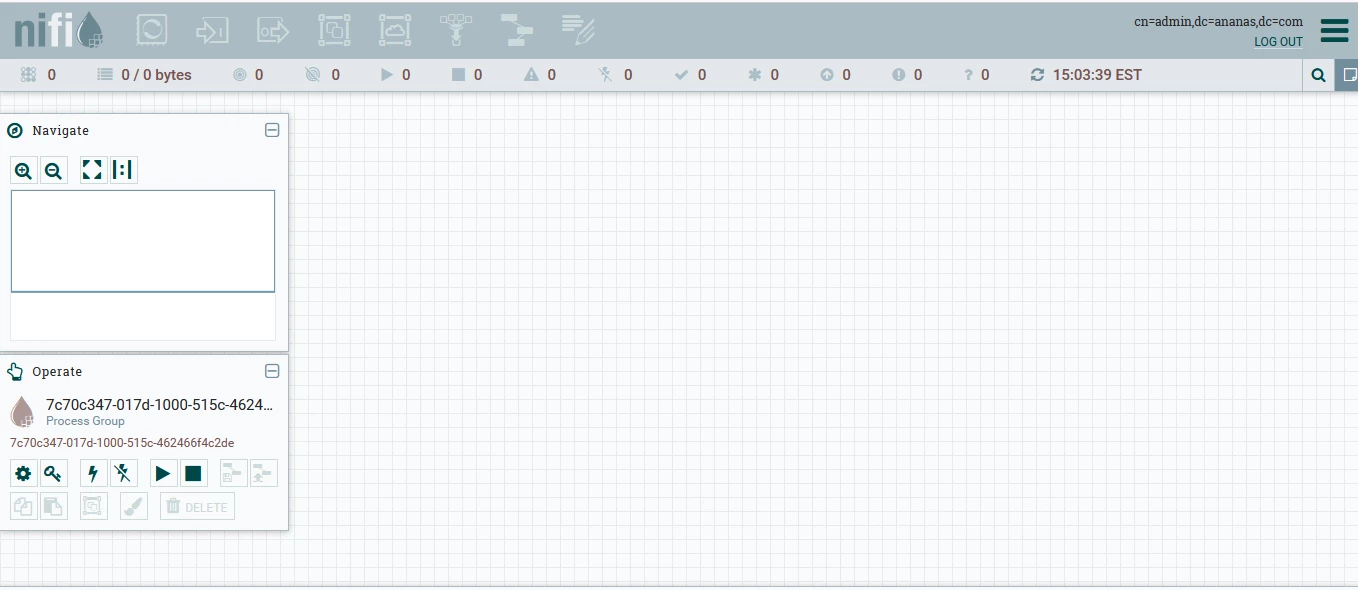
I guess the problem may be in setting at authorizers.xml, but I couldn't find anything from there. Below is my authorizers.xml. Could you please give me any ideas for this issue? Thank you in advance.
<?xml version="1.0" encoding="UTF-8" standalone="yes"?>
<authorizers>
    <userGroupProvider>
        <identifier>file-user-group-provider</identifier>
        <class>org.apache.nifi.authorization.FileUserGroupProvider</class>
        <property name="Users File">./conf/users.xml</property>
        <property name="Legacy Authorized Users File"></property>

        <property name="Initial User Identity 1">cn=admin,dc=ananas,dc=com</property>
    </userGroupProvider>

    <accessPolicyProvider>
        <identifier>file-access-policy-provider</identifier>
        <class>org.apache.nifi.authorization.FileAccessPolicyProvider</class>
        <property name="User Group Provider">file-user-group-provider</property>
        <property name="Authorizations File">./conf/authorizations.xml</property>
        <property name="Initial Admin Identity">cn=admin,dc=ananas,dc=com</property>
        <property name="Legacy Authorized Users File"></property>
        <property name="Node Identity 1"></property>
        <property name="Node Group"></property>
    </accessPolicyProvider>


    <authorizer>
        <identifier>managed-authorizer</identifier>
        <class>org.apache.nifi.authorization.StandardManagedAuthorizer</class>
        <property name="Access Policy Provider">file-access-policy-provider</property>
    </authorizer>


    <authorizer>
        <identifier>file-provider</identifier>
        <class>org.apache.nifi.authorization.FileAuthorizer</class>
        <property name="Authorizations File">./conf/authorizations.xml</property>
        <property name="Users File">./conf/users.xml</property>
        <property name="Initial Admin Identity">cn=admin,dc=ananas,dc=com</property>
        <property name="Legacy Authorized Users File"></property>

        <property name="Node Identity 1"></property>
    </authorizer>

</authorizers>



