Shelton
SheltonAnswer
Gold ⭐️⭐️⭐️
Nov 25, 2019 8:35 PM UTC

@Harisc4y 

Bingooooooooo !  You are trying to install CDH on Operating System that is not certified no wonder all this headache I can now go to sleep.
We NEVER stress enough before embarking on deploying a software HDP or CDH you MUST read the vendor's release notes and most important the compatibility matrix. Not heeding to these pre-requisites always leads to a very bad first experience.  


I downloaded and fired up your VM successfully, I then started form the basics Memory, CPU and networking then I saw a strange UI so checking the version confirmed my fears


Unsupported OS
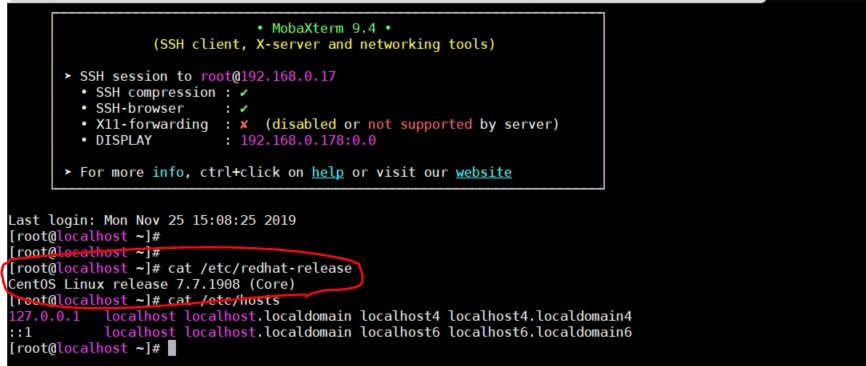
001_Centos7.7b.PNG


Cloudera Compatability Matrix

Reference:

https://docs.cloudera.com/documentation/enterprise/6/release-notes/topics/rg_os_requirements.html#c63_supported_os
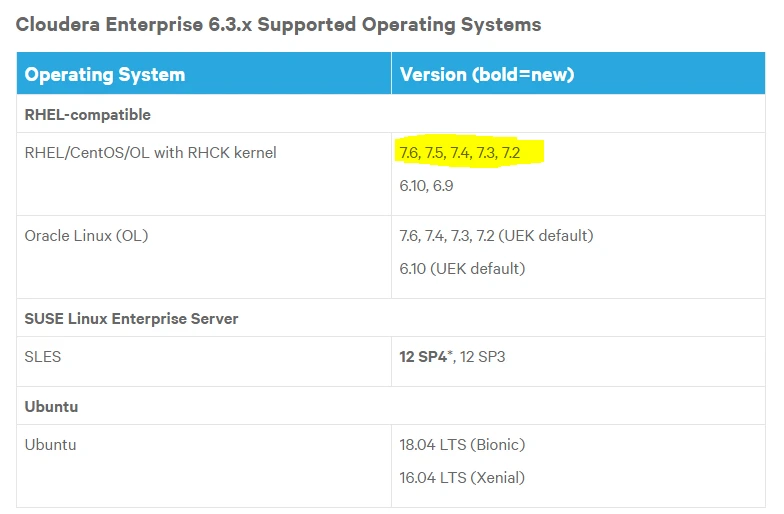
001_Supported OS.PNG

Currently, Centos/RHEL 7.6 is the  latest  compatible version so no need to proceed  further with investigations 

Happy hadooping



6 replies

Shelton
Gold ⭐️⭐️⭐️
Nov 24, 2019 7:36 PM UTC

@Harisc4y 


The prepare database script is delivered by the previous steps 

Step 1: Configure a Repository

Configure  the Repository by running or chose appropriate CDH repos

$ sudo wget https://archive.cloudera.com/cm6/6.3.0/redhat7/yum/cloudera-manager.repo -P /etc/yum.repos.d/

Import the repository signing GPG key for Redhat 7 

sudo rpm --import https://archive.cloudera.com/cm6/6.3.0/redhat7/yum/RPM-GPG-KEY-cloudera


Step 3: Install Cloudera Manager Server for RHEL7 

or choose cm agent
$ sudo yum install cloudera-manager-daemons cloudera-manager-agent cloudera-manager-server

After the above steps, scm_prepare_database.sh  should have been delivered you can check that 


$ ll /opt/cloudera/cm/schema/


Hope that helps

Translate
Harisc4y
Harisc4yAuthor
Silver ⭐️⭐️
Nov 25, 2019 4:08 AM UTC

That did not help, I reinstalled but still no luck

[root@localhost ~]# ll /opt/cloudera/cm/

ls: cannot access /opt/cloudera/cm/: No such file or directory

Translate