Paul Yang
Gold ⭐️
Oct 16, 2016 9:57 AM UTC
Solved

Parallelizing Database Table Extraction Across a NiFi Cluster Using GenerateTableFetch and Remote Process Groups

Hi:

From google :

If you are using NiFi 1.0 you can use the GenerateTableFetch processor. It allows you to choose the "page" (aka partition) size, and will generate SQL statements, each of which will grab one "page" of data. You can route those into ExecuteSQL and it will retrieve smaller sets of results at a time. If you have a NiFi cluster, you can route GenerateTableFetch into a Remote Process Group that points at an Input Port on the same cluster, (which will distribute the SQL statements across the cluster), then the Input Port can be connected to the ExecuteSQL. This allows you to fetch rows from a table in parallel

I have three nodes on my nifi cluster, I follow the post, put GenerateTableFetch on primary node(test01) to execute, and then send to remote process group on the same cluster. then output port to ExecuteSQL.

But the actual behavior is ExecuteSQL was execute just in one node (test02, or test 03, or tes01).

My question is how to fetch rows from a table in parallel(test02, and test 03, and tes01) .

Thanks

MattWho
MattWhoAnswer
Titanium ⭐️⭐️
Nov 3, 2016 2:54 AM UTC

@Paul Yang

1. There is an existing open Jira for being able to adjust the batch size of Site-to-Site. (https://issues.apache.org/jira/browse/NIFI-1202)

2. NiFi does not restrict how many RPGs can be added to the canvas. What is important to understand is that NiFi Nodes do not know about one another. Each runs the dataflow. When using RPGs to pull data from an output port, every node is running that RPG and every node is requesting FlowFiles. When one of those nodes connects the cluster informs that connecting instances that x number of FlowFile are currently queued to that output port and that Node will pull them all. so you get much better load-balance behavior forma push to an input port (yet still done in batches of 100).

3. Two suggestions come to mind:

a. Reduce the configured "partition size" value in your GenerateTableFetch processor so more FlowFiles are generated which should then get better load balanced across you nodes.

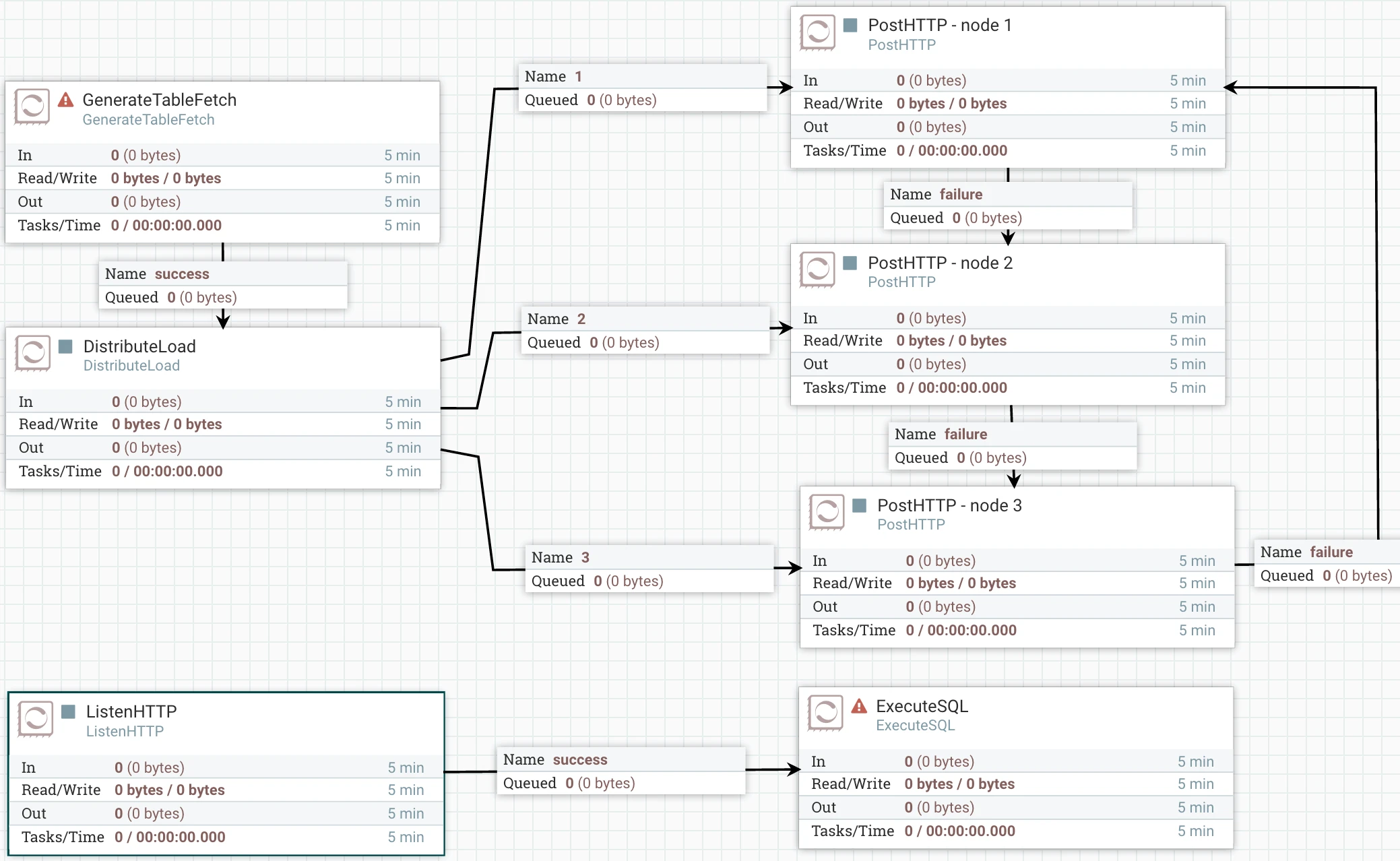
b. Instead of using S2S, build a load-balanced dataflow that is hard-coded to deliver data to each node as follows:

9065-screen-shot-2016-11-02-at-35115-pm.png

10 replies

Paul Yang
Paul YangAuthor
Gold ⭐️
Oct 17, 2016 3:03 PM UTC

Hi

This is very emergency for me.Why should choice the cluster mode If I cannot distribute sql statement to every node in the cluster?

Who can give me any idea?

Thanks in advance!

Translate
MattWho
Titanium ⭐️⭐️
Titanium ⭐️⭐️
Oct 17, 2016 7:53 PM UTC

@Paul Yang

Are you trying to have every node in your cluster execute the same SQL statements? or are you trying to evenly distribute all the generated SQL statements across your cluster so that every node runs different SQL statements?

Translate
Paul Yang
Paul YangAuthor
Gold ⭐️
Oct 18, 2016 8:33 AM UTC
@mclark

Every node distribute run different SQL that meet my requirement.

I do this nifi flow picture.

8638-20161018091525.png

the GenerateTableFetch execute on primary node to keep the sql is not replicate. I try to distribute the sql statements then send it to a remote progress group, But the processor on one node got all sql statements in the queued. So I cant got effect that distribute sql statements to every node.

So, could you give me some advice to implement execute different sql distribute?

Thanks

Translate
MattWho
Titanium ⭐️⭐️
Titanium ⭐️⭐️
Oct 25, 2016 8:18 PM UTC

@Paul Yang

I am a little confused by the screen shot you have provided.

You have your GenerateTableFetch processor connected to a Remote Process Group (RPG) which is feeding that an input port more_table_input_port...

but you also have that same RPG connected to your ExecuteSQL processor.

You flow should look more like this:

8871-screen-shot-2016-10-25-at-91616-am.png

The RPG will distribute data smartly based on reported load on each node in your cluster.

Thanks,

Matt

Translate
Paul Yang
Paul YangAuthor
Gold ⭐️
Oct 26, 2016 5:39 PM UTC

@mclark

Thanks for your reply.

Yes, I follow your picture of nifi data flow. got the load balance smartly of data, But It seem your picture be implement in root flow. Because input port => more_table_ino... must be placed to root process group. the picture will very confused if to do more table ingest . Because the best way for me is every department or every business one process group.

So could you give some advise to avoid the issue?

Thanks,

Paul

Translate
Paul Yang
Paul YangAuthor
Gold ⭐️
Oct 27, 2016 8:29 AM UTC

@mclark

Thanks for your detailed answers.

For us, we expect there are like 2 flow files will be routed to a single Node, and other 2 flow files be routed to another Node. For load balance: This is perfect for handling the execute sql that select 100W records.

To load balance the SQl flow file , the constant of 100 flow files of RPG is so large.

My question

1. how to configure the 100 files to 2 files etc in one node that you mentioned.

2. how many RPG is recommend in one cluster with 3 node?

3. Is there another method to implement load balance of ExecuteSQL ?

Thanks.

Paul

Translate
MattWho
Titanium ⭐️⭐️
MattWhoAnswer
Titanium ⭐️⭐️
Nov 3, 2016 2:54 AM UTC

@Paul Yang

1. There is an existing open Jira for being able to adjust the batch size of Site-to-Site. (https://issues.apache.org/jira/browse/NIFI-1202)

2. NiFi does not restrict how many RPGs can be added to the canvas. What is important to understand is that NiFi Nodes do not know about one another. Each runs the dataflow. When using RPGs to pull data from an output port, every node is running that RPG and every node is requesting FlowFiles. When one of those nodes connects the cluster informs that connecting instances that x number of FlowFile are currently queued to that output port and that Node will pull them all. so you get much better load-balance behavior forma push to an input port (yet still done in batches of 100).

3. Two suggestions come to mind:

a. Reduce the configured "partition size" value in your GenerateTableFetch processor so more FlowFiles are generated which should then get better load balanced across you nodes.

b. Instead of using S2S, build a load-balanced dataflow that is hard-coded to deliver data to each node as follows:

9065-screen-shot-2016-11-02-at-35115-pm.png

Translate
Paul Yang
Paul YangAuthor
Gold ⭐️
Nov 6, 2016 3:09 PM UTC

@mclark

Thanks for your detailed answers.

Paul

Translate