Sadhana21
Silver ⭐️
December 28, 2023
Solved

Preparing nested JSON using SQL in NiFi

Hey there,

I'm trying to create a nested JSON using SQL in NiFi, but the output I'm getting has the nested part as a string. Here's the query I'm using:

SELECT
order_id,
JSON_ARRAYAGG(
JSON_OBJECT(
'order_Item_Seq_Id', order_Item_Seq_Id,
'product_Id', product_Id
)
) as order_item
FROM order_item
GROUP BY order_id;

The output looks like this:

[{
"order_id": "10000",
"order_item": "[{\"product_Id\": \"10007\", \"order_Item_Seq_Id\": \"00101\"}]"
}]

But I want it to be a valid nested JSON like this:

[
{
"order_id": "10000",
"order_item": [
{
"product_Id": "10007",
"order_Item_Seq_Id": "00101"
}
]
}
]

I'm hoping for a solution using Apache NiFi or Jolt.
Any help would be appreciated.

Thank you!

SAMSAL
SAMSALAnswer
Platinum ⭐️⭐️⭐️
December 28, 2023

Hi @Sadhana21 ,

You can do this in two ways that I can think of :

1-  This might take few processors but basically after you get the output:

[{
"order_id": "10000",
"order_item": "[{\"product_Id\": \"10007\", \"order_Item_Seq_Id\": \"00101\"}]"
}]

      1.1  First EvaluateJsonPath to get the  order_id and set the destination to attribute:
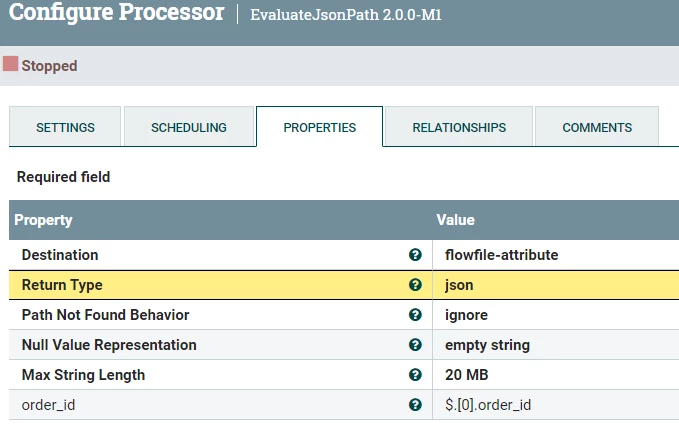
           SAMSAL_0-1703791815125.png

      1.2  2ed EvaluateJsonPath to get the order_item and set the destination to flowfile and the Return Type as Json
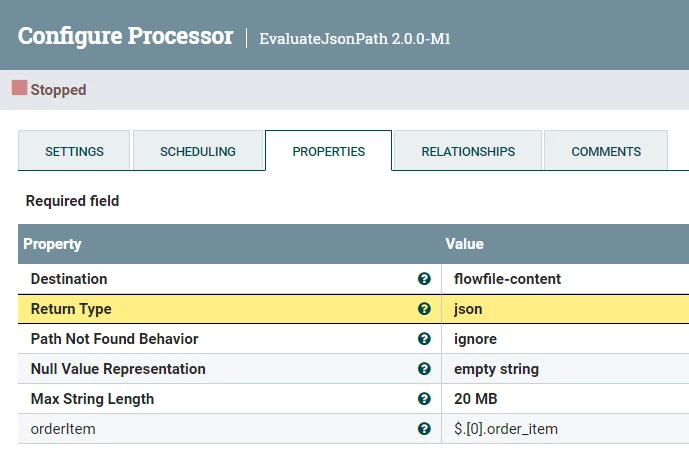
       SAMSAL_1-1703791867077.png

        This will produce the following output:

[{"product_Id": "10007", "order_Item_Seq_Id": "00101"}]

        1.3 Finally you JoltTransformJson with the following spec:

[
{
"operation": "shift",
"spec": {
"*": {
"#${order_id}": "[&1].order_id",
"@": "[&1].order_item[]"
}
}
}
]

    This should give you the needed result

2- Using just UpdateRecord Processor:

I like this option because that is the only processor you need to use. The only caveat is that you need to define JsonRecordReader & JsonRecordSetWriter where in the later you have to define Avro schema for the expected output. In the UpdateRecord you can use the built-in function called "unescapeJson" to read json string and return it as json:

https://nifi.apache.org/docs/nifi-docs/html/record-path-guide.html#unescapejson

UpdateRecord:
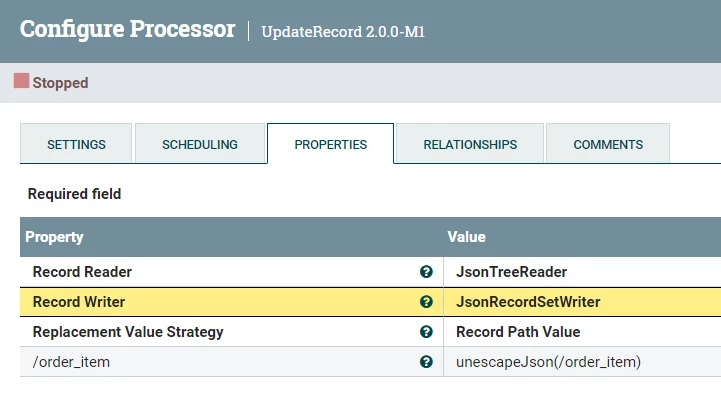
SAMSAL_2-1703792282831.png

  JsonRecordSetWriter:

SAMSAL_3-1703792337746.png

  Avro Scheam in the Schema Text:

{
"name": "nifi",
"type": "record",
"fields": [
{
"name": "order_id",
"type": "string"
},
{
"name": "order_item",
"type": {
"name": "order_item_array",
"type": "array",
"items": {
"name": "order_item",
"type": "record",
"fields": [
{
"name": "product_Id",
"type": "string"
},
{
"name": "order_Item_Seq_Id",
"type": "string"
}
]
}
}
}
]
}

If that helps please accept solution

Thanks

 

4 replies

DianaTorres
Community Manager
Community Manager
December 28, 2023

@Sadhana21 Welcome to the Cloudera Community!

To help you get the best possible solution, I have tagged our NiFi experts @joseomjr @cotopaul  who may be able to assist you further.

Please keep us updated on your post, and we hope you find a satisfactory solution to your query.

Translate
Regards, Diana Torres, Senior Community Moderator
SAMSAL
SAMSALAnswer
Platinum ⭐️⭐️⭐️
December 28, 2023

Hi @Sadhana21 ,

You can do this in two ways that I can think of :

1-  This might take few processors but basically after you get the output:

[{
"order_id": "10000",
"order_item": "[{\"product_Id\": \"10007\", \"order_Item_Seq_Id\": \"00101\"}]"
}]

      1.1  First EvaluateJsonPath to get the  order_id and set the destination to attribute:

           SAMSAL_0-1703791815125.png

      1.2  2ed EvaluateJsonPath to get the order_item and set the destination to flowfile and the Return Type as Json

       SAMSAL_1-1703791867077.png

        This will produce the following output:

[{"product_Id": "10007", "order_Item_Seq_Id": "00101"}]

        1.3 Finally you JoltTransformJson with the following spec:

[
{
"operation": "shift",
"spec": {
"*": {
"#${order_id}": "[&1].order_id",
"@": "[&1].order_item[]"
}
}
}
]

    This should give you the needed result

2- Using just UpdateRecord Processor:

I like this option because that is the only processor you need to use. The only caveat is that you need to define JsonRecordReader & JsonRecordSetWriter where in the later you have to define Avro schema for the expected output. In the UpdateRecord you can use the built-in function called "unescapeJson" to read json string and return it as json:

https://nifi.apache.org/docs/nifi-docs/html/record-path-guide.html#unescapejson

UpdateRecord:

SAMSAL_2-1703792282831.png

  JsonRecordSetWriter:

SAMSAL_3-1703792337746.png

  Avro Scheam in the Schema Text:

{
"name": "nifi",
"type": "record",
"fields": [
{
"name": "order_id",
"type": "string"
},
{
"name": "order_item",
"type": {
"name": "order_item_array",
"type": "array",
"items": {
"name": "order_item",
"type": "record",
"fields": [
{
"name": "product_Id",
"type": "string"
},
{
"name": "order_Item_Seq_Id",
"type": "string"
}
]
}
}
}
]
}

If that helps please accept solution

Thanks

 

Translate
joseomjr
Gold ⭐️⭐️
December 28, 2023

...a 3rd option because I like scripted processors 😂...using ExcecuteGroovyScript


import groovy.json.JsonOutput
import groovy.json.JsonSlurper
import java.nio.charset.StandardCharsets

JsonSlurper jsonSlurper = new JsonSlurper()
JsonOutput jsonOutput = new JsonOutput()

FlowFile flowFile = session.get()
if(!flowFile) return

flowFile = session.write(flowFile, { inputStream, outputStream ->
List<Map> data = jsonSlurper.parse(inputStream)
data.each {
it.order_item = jsonSlurper.parseText(it.order_item)
}
outputStream.write(jsonOutput.toJson(data).getBytes(StandardCharsets.UTF_8))
} as StreamCallback)
session.transfer(flowFile, REL_SUCCESS)


Looks like a lot but this is what takes the string JSON and converts it to JSON:

it.order_item = jsonSlurper.parseText(it.order_item)
Translate
Sadhana21
Sadhana21Author
Silver ⭐️
January 2, 2024

Your input means a lot, and I appreciate your assistance @DianaTorres, @SAMSAL and @joseomjr.

Thank you all for sharing your knowledge and insights!

Translate