MWM
Silver ⭐️⭐️⭐️
December 15, 2023
Solved

Problem with JoltTransformation in NIFI

Hi guys! i have some problems with JoltTransformation in NIFI. I have plain json like that:

{
"id": "c47f79f5-77b1-45d1-91df-968c2fa3def8",
"system" : "OP",
"sourceSystem" : "DKG",
"name" : "Agnes",
"lastName" : "Smith",
"mail" : "a.smith@gmail.com",
"country" : "Australia",
"city" : "Sydney",
"street" : "Colorado",
"building" : "23",
"local" : "1',
"paycheck" : "3456,98',
"joiningDate" : "12-09-2023",
"isOfAge": "true",
}

And i need to have output like this:

{
"paycheck":3456.98,
"joiningDate":1702048486451,
"person":{
"name":"Agnes",
"lastName":"Smith",
"mail":"a.smith@gmail.com",
"isOfAge":true,
"adress":{
"country":"Australia",
"city":"Sydney",
"street":"Colorado",
"building":"23",
"local":"1"
}
},
"system_data":{
"id":"c47f79f5-77b1-45d1-91df-968c2fa3def8",
"system":"OP",
"sourceSystem":"DKG"
}
}
In addition to nesting, I need to convert date to long, paycheck to double and isOfAge to boolean.I tried use JoltTransformation and Jolt Specification like this:

[
{
"operation":"shift",
"spec":{
"paycheck":"paycheck",
"joiningDate":"joiningDate",
"name" : "person.name",
"lastName" : "person.lastName",
"mail" : "person.mail",
"isOfAge" : "person.isOfAge",
"country" : "person.adress.country",
"city" : "person.adress.city",
"street" : "person.adress.street",
"building" : "person.adress.building",
"local" : "person.adress.local",
"id" : "system_data.id",
"system" : "system_data.system",
"sourceSystem" : "system_data.sourceSystem"
}
},
{
"operation": "modify-overwrite-beta",
"spec": {
"paycheck": "=toDouble",
"joiningDate": "=toNumber",
"isOfAge": "=toBoolean"

}
}
]


Nesting works but type conversion not. What am I doing wrong because i admit that jolt is little bit complicated for me 

SAMSAL
SAMSALAnswer
Platinum ⭐️⭐️⭐️
December 15, 2023

Hi @MWM ,

There are couple of issues I noticed regarding the input json and the spec:

1- Regarding the "paycheck" value "3456,98" , I noticed there is coma (,) is that correct? if that is the case , Im not sure the conversion will work in this case.  You have to probably replace the coma with dot (.) and then convert toDouble. It takes few steps to do this in jolt since there is no string replace function using split, join as follows:


,
{
"operation": "modify-overwrite-beta",
"spec": {
....
"paycheckArray": "=split('[,]',@(1,paycheck))",
"paycheckJoin": "=join('.',@(1,paycheckArray))",
"paycheck": "=toDouble(@(1,paycheckJoin))",
....
}
}
,
{
"operation": "remove",
"spec": {
"paycheckArray": "",
"paycheckJoin": ""
}
}


2- Regarding the boolean value "isOfAge" , since you have moved it under person object, the spec would as follows:


{
"operation": "modify-overwrite-beta",
"spec": {
...
"person": {
"isOfAge": "=toBoolean(@(1,isOfAge))"
}
....
}
}


3- Regarding converting the date value "joiningDate" to number , this is tricky and I dont think you can do it via Jolt, you either have to extract it using EvaluateJsonPath as an attribute then do update attribute using expression language to do the proper formatting and conversion. Since JoltTransformation spec allows expression language , you can reference this attribute in the modify spec. here is an example:

https://stackoverflow.com/questions/76678896/jolt-how-to-convert-datetimestamp-to-epoch-on-dynamic-json-keys

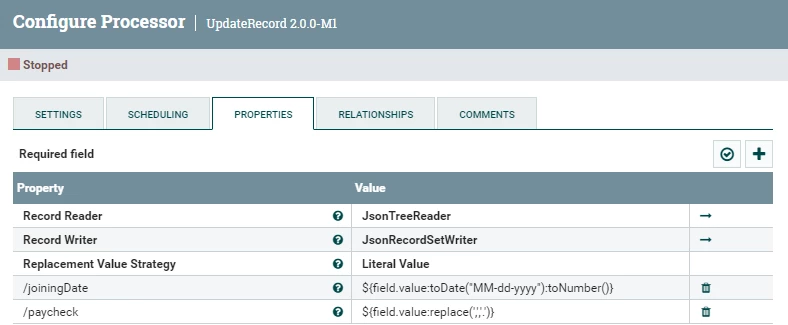
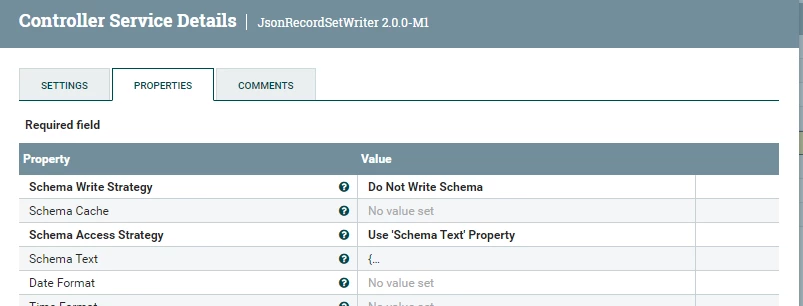
Another option is to use UpdateRecord to do the proper formatting, conversion for all attributes that require such thing and then just use basic shift spec to re arrange values accordingly. With UpdateRecord you need to use Avro Schema to define the proper types in the JsonRecordSetWriter.

UpdateRecord:

SAMSAL_0-1702658706215.png


JsonRecordSetWriter:

SAMSAL_1-1702658737506.png


AvroSchema in the Schema Text Property:


{
"type": "record",
"name": "nifi-record",
"fields":
[
{ "name": "id", "type": "string"},
{ "name": "system", "type": "string"},
{ "name": "sourceSystem", "type": "string"},
{ "name": "name", "type": "string"},
{ "name": "lastName", "type": "string"},
{ "name": "mail", "type": "string"},
{ "name": "country", "type": "string"},
{ "name": "city", "type": "string"},
{ "name": "street", "type": "string"},
{ "name": "building", "type": "string"},
{ "name": "local", "type": "string"},
{ "name": "paycheck", "type": "double"},
{ "name": "joiningDate", "type": { "type":"int", "logicalType":"date" }},
{ "name": "isOfAge", "type": ["boolean","null"]}
]
}


If you find this helpful please accept solution.

Thanks


2 replies

SAMSAL
SAMSALAnswer
Platinum ⭐️⭐️⭐️
December 15, 2023

Hi @MWM ,

There are couple of issues I noticed regarding the input json and the spec:

1- Regarding the "paycheck" value "3456,98" , I noticed there is coma (,) is that correct? if that is the case , Im not sure the conversion will work in this case.  You have to probably replace the coma with dot (.) and then convert toDouble. It takes few steps to do this in jolt since there is no string replace function using split, join as follows:


,
{
"operation": "modify-overwrite-beta",
"spec": {
....
"paycheckArray": "=split('[,]',@(1,paycheck))",
"paycheckJoin": "=join('.',@(1,paycheckArray))",
"paycheck": "=toDouble(@(1,paycheckJoin))",
....
}
}
,
{
"operation": "remove",
"spec": {
"paycheckArray": "",
"paycheckJoin": ""
}
}


2- Regarding the boolean value "isOfAge" , since you have moved it under person object, the spec would as follows:


{
"operation": "modify-overwrite-beta",
"spec": {
...
"person": {
"isOfAge": "=toBoolean(@(1,isOfAge))"
}
....
}
}


3- Regarding converting the date value "joiningDate" to number , this is tricky and I dont think you can do it via Jolt, you either have to extract it using EvaluateJsonPath as an attribute then do update attribute using expression language to do the proper formatting and conversion. Since JoltTransformation spec allows expression language , you can reference this attribute in the modify spec. here is an example:

https://stackoverflow.com/questions/76678896/jolt-how-to-convert-datetimestamp-to-epoch-on-dynamic-json-keys

Another option is to use UpdateRecord to do the proper formatting, conversion for all attributes that require such thing and then just use basic shift spec to re arrange values accordingly. With UpdateRecord you need to use Avro Schema to define the proper types in the JsonRecordSetWriter.

UpdateRecord:

SAMSAL_0-1702658706215.png


JsonRecordSetWriter:

SAMSAL_1-1702658737506.png


AvroSchema in the Schema Text Property:


{
"type": "record",
"name": "nifi-record",
"fields":
[
{ "name": "id", "type": "string"},
{ "name": "system", "type": "string"},
{ "name": "sourceSystem", "type": "string"},
{ "name": "name", "type": "string"},
{ "name": "lastName", "type": "string"},
{ "name": "mail", "type": "string"},
{ "name": "country", "type": "string"},
{ "name": "city", "type": "string"},
{ "name": "street", "type": "string"},
{ "name": "building", "type": "string"},
{ "name": "local", "type": "string"},
{ "name": "paycheck", "type": "double"},
{ "name": "joiningDate", "type": { "type":"int", "logicalType":"date" }},
{ "name": "isOfAge", "type": ["boolean","null"]}
]
}


If you find this helpful please accept solution.

Thanks


Translate
MWM
MWMAuthor
Silver ⭐️⭐️⭐️
December 18, 2023

@SAMSAL Thank you for help, everything works unfortunately except the date, but as you said, it is more complicated


Translate