

Josiah_Johnston
Silver ⭐️⭐️
July 31, 2021
Question

Processor fails with FlowFileAccessException: Unable to create ContentClaim due to java.io.FileNotFoundException

I set up a process group to pull ~10^8 S3 files, consolidate them and save to HDFS. My FetchS3Object processor fails after 2-17 hours with the following error. When this happens, a ConsumeKafka_2_6 processor in a separate group fails with the same error message. Other processors have this message flicker in and out, but can typically self-resolve.


16:29:54 UTC ERROR
FetchS3Object[id=50cb6c89-c4a3-3df6-807b-7f92555fd572] FetchS3Object[id=50cb6c89-c4a3-3df6-807b-7f92555fd572] failed to process session due to Failed to import data from com.amazonaws.services.s3.model.S3ObjectInputStream@1a9a94ff for StandardFlowFileRecord[uuid=bd5ccda4-d432-4086-8f4f-bb763afd108b,claim=,offset=0,name=Apr-2020/20200420-17H53M38S.json,size=0] due to org.apache.nifi.processor.exception.FlowFileAccessException: Unable to create ContentClaim due to java.io.FileNotFoundException: /opt/nifi/content_repository/993/1627576194712-2847713 (No such file or directory); Processor Administratively Yielded for 1 sec: org.apache.nifi.processor.exception.FlowFileAccessException: Failed to import data from com.amazonaws.services.s3.model.S3ObjectInputStream@1a9a94ff for StandardFlowFileRecord[uuid=bd5ccda4-d432-4086-8f4f-bb763afd108b,claim=,offset=0,name=Apr-2020/20200420-17H53M38S.json,size=0] due to org.apache.nifi.processor.exception.FlowFileAccessException: Unable to create ContentClaim due to java.io.FileNotFoundException: /opt/nifi/content_repository/993/1627576194712-2847713 (No such file or directory)
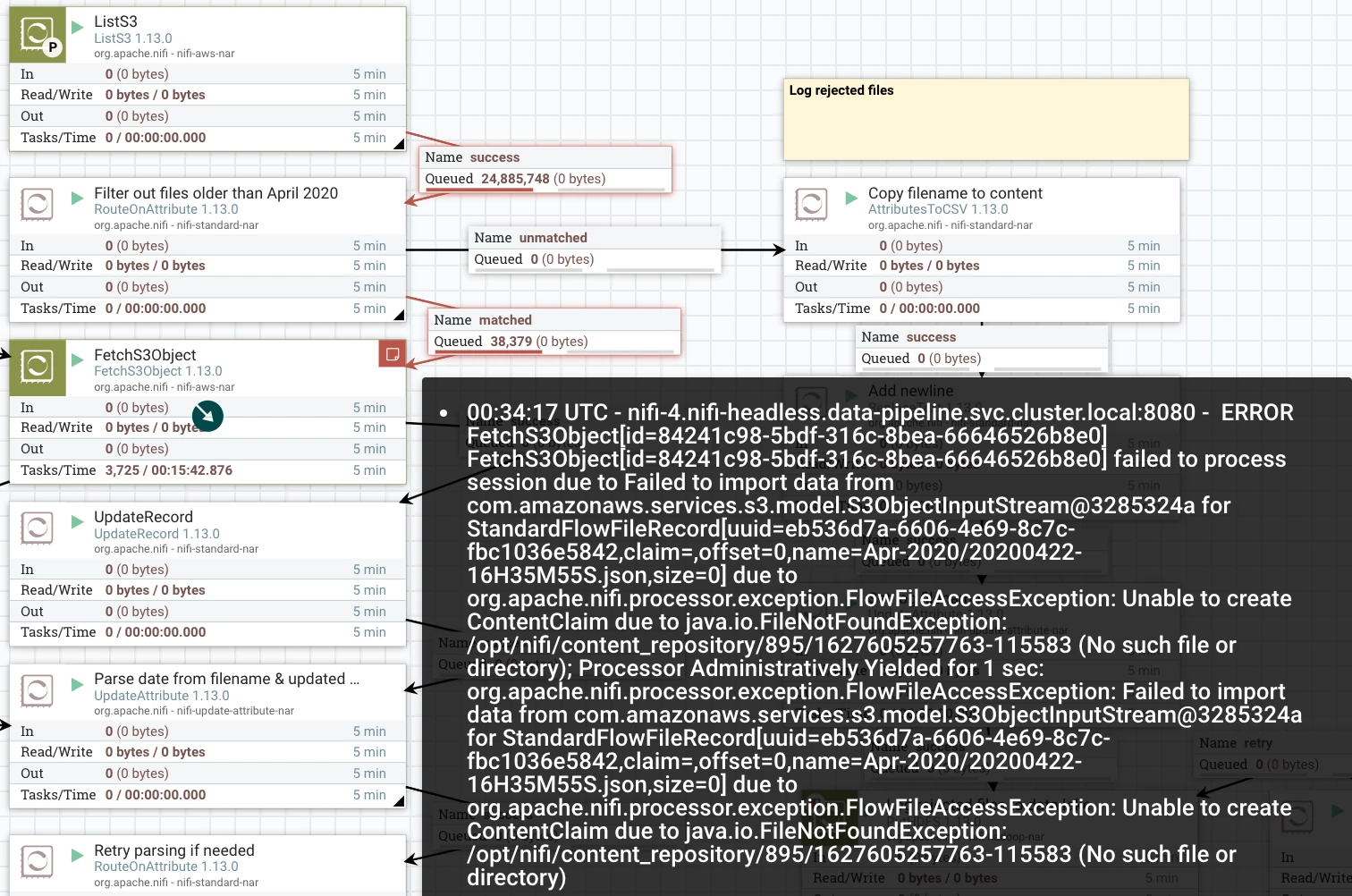
 

Untitled 5.png 

The only way I've found to fix it is to reboot the NiFi node mentioned in the error message. Sometimes that resolves it immediately; other times the error message shifts to a different node and I have to play whack-a-mole before it resolves. When I connect to a problem node, its file system works fine (plenty of space, can read, write, etc), but that directory (/opt/nifi/content_repository) is empty. On healthy nodes, that directory is full of subdirectories. 


On a problem node, log files showed the same error message as above (no extra details). When I lower the FetchS3Object ConcurrentTask count (Ex 100 to 5), it can run longer before an error, but it hits the same error eventually. 


Any help would be much appreciated. The closest error message I found in existing posts pointed to too many open files, but that wasn't part of the error messages I've been getting. 

5 replies

Green_
Gold ⭐️⭐️
August 1, 2021

@Josiah_Johnston 

You mentioned that a problematic node's content repository is empty when you check. What about the flowfile repository? If you reboot a node and the problem shifts to a different one, do the repositories turn out empty on the new node as well (even if there were files flowing in that node previously)?


How have you configured your content repository/content claim properties in the nifi.properties file?

Translate
Josiah_Johnston
Silver ⭐️⭐️
August 2, 2021

I'll need to recreate a multi-node error condition to answer your first part. I did manage zero errors with 15M files over 72 hours with FetchS3Object's ConcurrentTasks=5. 

I tried values of 500 & 10 today. In both cases, the problem appeared within a few hours, though only one node was impacted each time. 


nifi.properties content repository/claim properties


# Content Repository
nifi.content.repository.implementation=org.apache.nifi.controller.repository.FileSystemRepository
nifi.content.claim.max.appendable.size=1 MB
nifi.content.claim.max.flow.files=100
nifi.content.repository.directory.default=../content_repository
nifi.content.repository.archive.max.retention.period=3 days
nifi.content.repository.archive.max.usage.percentage=85%
nifi.content.repository.archive.enabled=true
nifi.content.repository.always.sync=false
nifi.content.viewer.url=/nifi-content-viewer/


Translate
Green_
Gold ⭐️⭐️
August 3, 2021

Your archive properties are definitely generous but I don't believe they're related to the problem. One thing that stands out to me is that your content repository directory is `../content_repository` and not `./content_repository`. Could that have been just a mistake in the reply or is that the actual configured value? I'd be suspicious of that because the errors you get state the missing path is `/opt/nifi/content_repository/...` Whilst the configuration you posted would actually imply the repository is at the same directory level as the nifi home directory. 


If this isn't the case and you just copied the configuration incorrectly, I'm afraid I don't have too many other ideas. Seeing as you can reproduce the error fairly easily my recommendation would be to do so and to more closely monitor the file system like I mentioned In the previous reply - checking the status of the flowfile/content repositories and monitoring this 'whack-a-mole' phenomenon across nodes. If you come up with new findings you could post them here. 

Translate
