@hus
Thank you for the clarification on your use case.
The only purpose built processor NiFi has for appending lines to an exsisting file is the putSyslog processor. But it is designed to work with syslog formatted messages being sent to a syslog server for RFC5424 and RFC3164 formatted messages and can't be used to append directly to a local file.
However, your use case could be solved using the ExecuteStreamCommand processor and custom script. The ExecuteStreamCommand processor passed a FlowFile's content to the input of the script.
Example:
I created the following script which I placed on my NiFi node somewhere where my NiFi service user has access. Gave my NiFi service user execute permissions on the bash script (I named it file-append.sh)
#!/bin/bash

STD_IN=$(</dev/stdin)
touch $1/$2
echo "$STD_IN" >> $1/$2
This script will take stdin from the executeStreamCommand processor which will contain the content of the FlowFile being processed. $1 and $2 are command arguments i define in the ExecuteStreamCommand processor which I use to dynamically define the path and filename the content will be appended to . It then takes FlowFiles content and either start a new file or append to a file if it already exists with the passed filename.
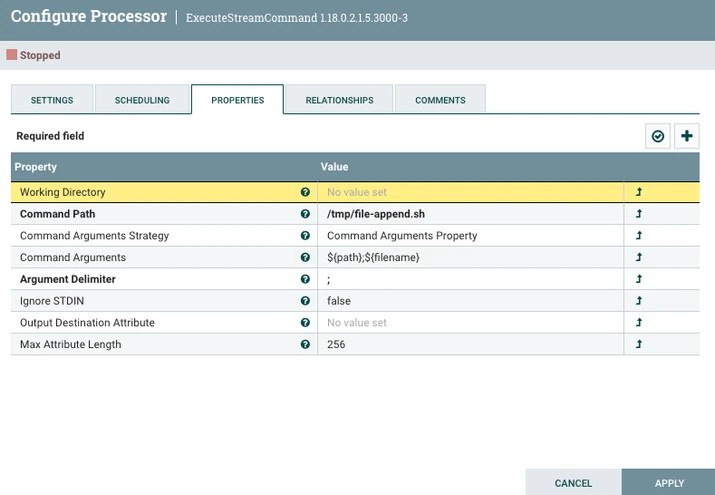
You can see that I set my two command arguments by pulling values from the "path" and "filename" NiFi FlowFile attributes set on the FlowFile being processed.
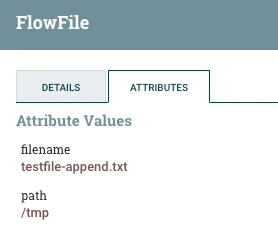
With this dataflow design you can append lines to various files as needed.
Please help our community thrive. If you found any of the suggestions/solutions provided helped you with solving your issue or answering your question, please take a moment to login and click "Accept as Solution" on one or more of them that helped.
Thank you,
Matt