Brenigan
Gold ⭐️
June 24, 2022
Solved

PyStreamCallBack object has no attribute length... ERROR in NiFi

Hello!

I am trying to  read  JSON body from a flowfile and write the length of a JSON array of elements to new flowfile attribute. But somehow I am getting aforementioned error all the time.
Here is my script.


from org.apache.commons.io import IOUtils
from java.nio.charset import StandardCharsets
from org.apache.nifi.processor.io import StreamCallback
import json

#Define a subclass of StreamCallback for use in session.write()
class PyStreamCallback(StreamCallback):
def __init__(self):
pass
def process(self, inputStream, outputStream):
jsn = IOUtils.toString(inputStream, StandardCharsets.UTF_8)
array = json.loads(jsn) # type: dict
i = 0
while i <= 1: # ищем вложенность второго уровня, чтобы посчитать кол-во элементов (записей в таблице)
root_key = list(array.keys())[0]
array = array[root_key]
i += 1
self.length = str(len(array))

def get_length_of_array(self):
return self.length

# end class
flowfile = session.get()
if(flowfile != None):
flowfile = session.write(flowfile, PyStreamCallback())
flowfile = session.putAttribute(flowfile, "length", PyStreamCallback().get_length_of_array())
session.transfer(flowFile, REL_SUCCESS)


Can someone please explain me what am I doing wrong?


Thank you beforehand!

araujo
araujoAnswer
Platinum ⭐️⭐️⭐️
June 25, 2022

@Brenigan ,


The issue that you are seeing is because you are instantiating PyStreamCallback twice. You should do it once and reference that object in the subsequent calls to the session functions.


The code below works as you'd expect:

from org.apache.commons.io import IOUtils
from java.nio.charset import StandardCharsets
from org.apache.nifi.processor.io import StreamCallback
import json

#Define a subclass of StreamCallback for use in session.write()
class PyStreamCallback(StreamCallback):
def __init__(self):
self.length = 0

def process(self, inputStream, outputStream):
jsn = IOUtils.toString(inputStream, StandardCharsets.UTF_8)
array = json.loads(jsn) # type: dict
i = 0
while i <= 1:
root_key = list(array.keys())[0]
array = array[root_key]
i += 1
self.length = str(len(array))

def get_length_of_array(self):
return self.length

# end class
flowfile = session.get()
if(flowfile != None):
reader = PyStreamCallback()
flowfile = session.write(flowfile, reader)
flowfile = session.putAttribute(flowfile, "length", reader.get_length_of_array())
session.transfer(flowfile, REL_SUCCESS)


There is a simpler way to do what you're trying to do, though. For example, say you have the following JSON object in the incoming flowfile:

{
"root": {
"items": [1, 2]
}
}


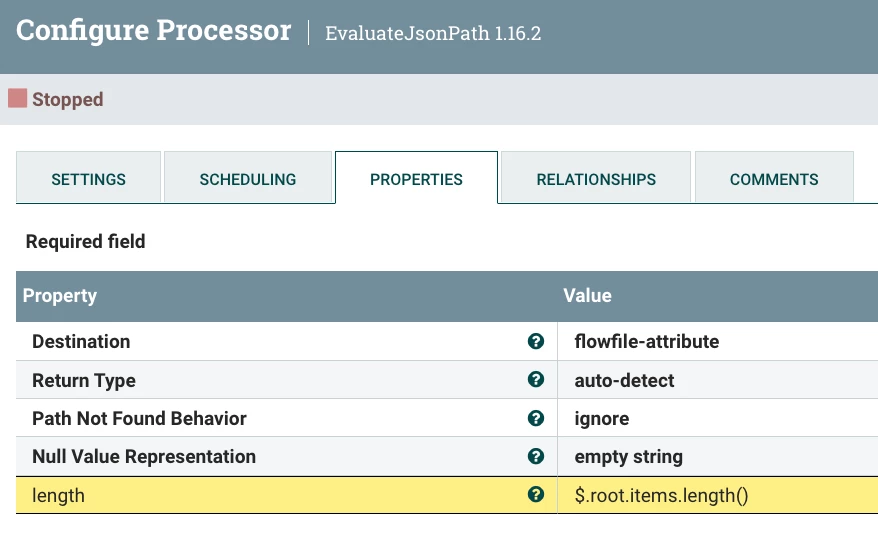
If you want to set the flowfile "length" attribute with the length of the "items" array, you can simply use the EvaluateJsonPath processor with the following configuration:


araujo_0-1656134097658.png


Cheers,

André


-- Was your question answered? Please take some time to click on "Accept as Solution" below this post. If you find a reply useful, say thanks by clicking on the thumbs up button.

1 reply

araujo
Platinum ⭐️⭐️⭐️
araujoAnswer
Platinum ⭐️⭐️⭐️
June 25, 2022

@Brenigan ,


The issue that you are seeing is because you are instantiating PyStreamCallback twice. You should do it once and reference that object in the subsequent calls to the session functions.


The code below works as you'd expect:

from org.apache.commons.io import IOUtils
from java.nio.charset import StandardCharsets
from org.apache.nifi.processor.io import StreamCallback
import json

#Define a subclass of StreamCallback for use in session.write()
class PyStreamCallback(StreamCallback):
def __init__(self):
self.length = 0

def process(self, inputStream, outputStream):
jsn = IOUtils.toString(inputStream, StandardCharsets.UTF_8)
array = json.loads(jsn) # type: dict
i = 0
while i <= 1:
root_key = list(array.keys())[0]
array = array[root_key]
i += 1
self.length = str(len(array))

def get_length_of_array(self):
return self.length

# end class
flowfile = session.get()
if(flowfile != None):
reader = PyStreamCallback()
flowfile = session.write(flowfile, reader)
flowfile = session.putAttribute(flowfile, "length", reader.get_length_of_array())
session.transfer(flowfile, REL_SUCCESS)


There is a simpler way to do what you're trying to do, though. For example, say you have the following JSON object in the incoming flowfile:

{
"root": {
"items": [1, 2]
}
}


If you want to set the flowfile "length" attribute with the length of the "items" array, you can simply use the EvaluateJsonPath processor with the following configuration:


araujo_0-1656134097658.png


Cheers,

André


Translate
-- Was your question answered? Please take some time to click on "Accept as Solution" below this post. If you find a reply useful, say thanks by clicking on the thumbs up button.