

SAMSAL
Platinum ⭐️⭐️⭐️
Apr 26, 2024 1:29 PM UTC
Solved

Querying Data Provenance using FlowFile Attribute or Content

Hi,

I'm not sure if this has been asked before but Im finding it strange that there is not much info or discussion about it. Basically I have scenario where at some point of time I believe I was getting some corrupted data from an API call. When I went to verify that by executing the API call after few hours from the error I dont see the corrupted data. How do I prove\disapprove  this? if I can search the data provenance for that particular response flowfile I would be able to see what did i get at that time after the call. The problem is the out of the box search provenance criteria doesn't provide a way to search against the content or the flowfile custom attributes and it only allows to search against system fields attributes that I dont store. Is there a way to perform such search even by creating some dataflow using certain processors in nifi or using some scripting language?

@MattWhoor any body who can help with I would really appreciated.


MattWho
MattWhoAnswer
Titanium ⭐️⭐️
Apr 26, 2024 1:40 PM UTC

@SAMSAL 

You can add additional attributes that you want to indexed with provenance that you could then use in your provenance searches.

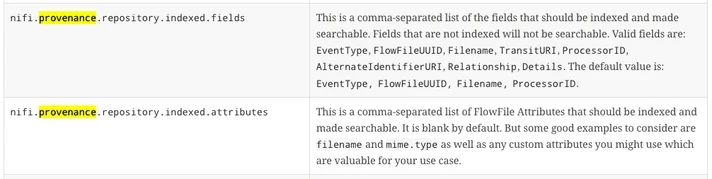
Take a look at the following properties available with the Write Ahead Provenance Repository:

MattWho_0-1714138509350.png

Since you want to be able to search on some FlowFile attribute, you would add it to the "nifi.provenance.repository.indexed.attributes".  Keep in mind that adding additional indexed attributes or fields will increase the size of your provenance_repository disk usage.  

Added attributes or fields will start being indexed after restart of your NiFi.  NiFi can not go back and reindex already processed FlowFiles, but this should help you going forward.

Please help our community thrive. If you found any of the suggestions/solutions provided helped you with solving your issue or answering your question, please take a moment to login and click "Accept as Solution" on one or more of them that helped.

Thank you,
Matt


3 replies

MattWho
Titanium ⭐️⭐️
MattWhoAnswer
Titanium ⭐️⭐️
Apr 26, 2024 1:40 PM UTC

@SAMSAL 

You can add additional attributes that you want to indexed with provenance that you could then use in your provenance searches.

Take a look at the following properties available with the Write Ahead Provenance Repository:

MattWho_0-1714138509350.png

Since you want to be able to search on some FlowFile attribute, you would add it to the "nifi.provenance.repository.indexed.attributes".  Keep in mind that adding additional indexed attributes or fields will increase the size of your provenance_repository disk usage.  

Added attributes or fields will start being indexed after restart of your NiFi.  NiFi can not go back and reindex already processed FlowFiles, but this should help you going forward.

Please help our community thrive. If you found any of the suggestions/solutions provided helped you with solving your issue or answering your question, please take a moment to login and click "Accept as Solution" on one or more of them that helped.

Thank you,
Matt


Translate
SAMSAL
SAMSALAuthor
Platinum ⭐️⭐️⭐️
Apr 26, 2024 3:41 PM UTC

Awesome @MattWho . That is great information. However as you said this is going to help moving forward but what about past information? Is there still a way to search the provenance data outside the search feature which doesnt provide capability to search by custom attribute or content?  My guess is not  based on your answer  but I just wanted to confirm.

Translate
MattWho
Titanium ⭐️⭐️
Titanium ⭐️⭐️
Apr 29, 2024 12:05 PM UTC

@SAMSAL Without being indexed, I can't think of any other way to parse the provenance data. 

Translate

