smartraman
Silver ⭐️⭐️
August 13, 2021
Solved

Removing Special Characters from JSON in NIFI

Hi Support Team,


I have JSON input for Nifi flow with some special characters. Could someone help me with how to remove special characters following payload? we would need only value with array and double-quotes.

input json: - 

{
"TOT_NET_AMT" : "[\"55.00\"]",
"H_OBJECT" : "File",
"H_GROSS_AMNT" : "[\"55.00\"]",
"TOT_TAX_AMT" : "[9.55]"
}


Expect Result : 


{
"TOT_NET_AMT" : "55.00",
"H_OBJECT" : "File",
"H_GROSS_AMNT" : "55.00",
"TOT_TAX_AMT" : "9.55"
}

MattWho
MattWhoAnswer
Titanium ⭐️⭐️⭐️
August 24, 2021

@smartraman 

This can also be accomplished through a different and more complex configuration of the ReplaceText processor:

Using below input content example:

{
"TOT_NET_AMT" : "[\"55.00\"]",
"H_OBJECT" : "File",
"H_GROSS_AMNT" : "[\"55.00,58.00\"]",
"TOT_TAX_AMT" : "[9.55]"
}


I would set up the replaceText processor as follows:
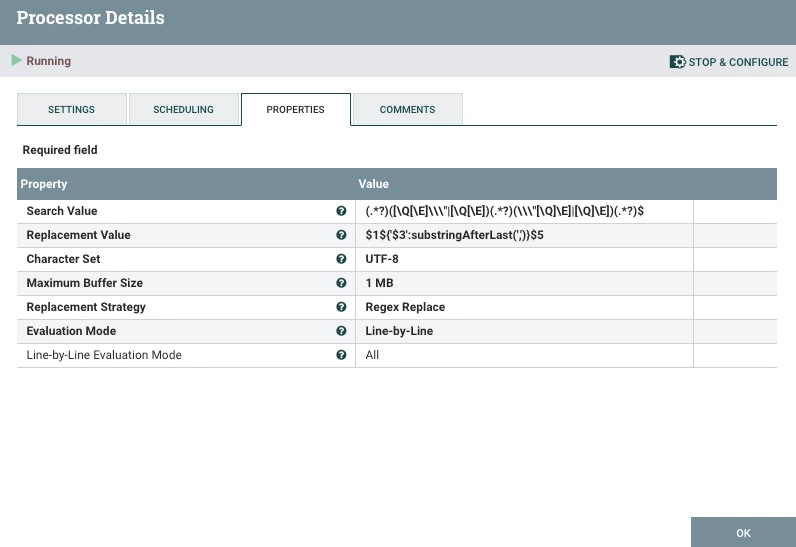
MattWho_0-1629827182325.png

Instead of just searching for those character patterns and replacing them with nothing, I break entire input line-by-line in to a series of capture groups.  That way I can omit the capture groups matching the patterns you want removed ([ or [\" or \"] or ]) and then manipulate the capture group containing a possible comma separated list, so that only the last value in that list is returned.


I used below java regular expression which results in 5 capture groups:

(.*?)([\Q[\E]\\\"|[\Q[\E])(.*?)(\\\"[\Q]\E]|[\Q]\E])(.*?)$


I then used the following Replacement Value in which I used NiFi expression language against the 3rd capture group.  If that capture group does not contain any commas, the entire string is returned.


With example above and this configuration, you end up with the following new content:

{
"TOT_NET_AMT" : "55.00",
"H_OBJECT" : "File",
"H_GROSS_AMNT" : "58.00",
"TOT_TAX_AMT" : "9.55"
}


If you found this helped with your latest query, please take a moment to login and click on "Accept as Solution" below this response.

Thank you,

Matt



3 replies

MattWho
Titanium ⭐️⭐️⭐️
Titanium ⭐️⭐️⭐️
August 13, 2021

@smartraman 

You can use a ReplaceText processor to remove these special characters from your json.
Using your example, I could produce yoru desired output using the following java regular expression:


(\\")|[\Q[\E]|[\Q]\E]


Source:

MattWho_2-1628865095458.png


My ReplaceText processor was configured as follows:

MattWho_0-1628864989816.png


result:

MattWho_1-1628865039271.png


If you found this response addressed your query, please take a moment to login and click on "Accept as Solution".

Thank you,

Matt

Translate
smartraman
Silver ⭐️⭐️
August 17, 2021

Hi Support,


Thanks for the previous help. but some time input payloads have multiple entries in this list format after replacing regex the below output came. but we are expecting H_GROSS_AMNT following the below details.

we would need the last value of the array or string. 


{
"TOT_NET_AMT" : "55.00",
"H_OBJECT" : "File",
"H_GROSS_AMNT" : "55.00,58.00",
"TOT_TAX_AMT" : "9.55"
}


expected value -


{
"TOT_NET_AMT" : "55.00",
"H_OBJECT" : "File",
"H_GROSS_AMNT" : "58.00",
"TOT_TAX_AMT" : "9.55"
}


Much appreciate it in advance.

Translate
MattWho
Titanium ⭐️⭐️⭐️
MattWhoAnswer
Titanium ⭐️⭐️⭐️
August 24, 2021

@smartraman 

This can also be accomplished through a different and more complex configuration of the ReplaceText processor:

Using below input content example:

{
"TOT_NET_AMT" : "[\"55.00\"]",
"H_OBJECT" : "File",
"H_GROSS_AMNT" : "[\"55.00,58.00\"]",
"TOT_TAX_AMT" : "[9.55]"
}


I would set up the replaceText processor as follows:

MattWho_0-1629827182325.png

Instead of just searching for those character patterns and replacing them with nothing, I break entire input line-by-line in to a series of capture groups.  That way I can omit the capture groups matching the patterns you want removed ([ or [\" or \"] or ]) and then manipulate the capture group containing a possible comma separated list, so that only the last value in that list is returned.


I used below java regular expression which results in 5 capture groups:

(.*?)([\Q[\E]\\\"|[\Q[\E])(.*?)(\\\"[\Q]\E]|[\Q]\E])(.*?)$


I then used the following Replacement Value in which I used NiFi expression language against the 3rd capture group.  If that capture group does not contain any commas, the entire string is returned.


With example above and this configuration, you end up with the following new content:

{
"TOT_NET_AMT" : "55.00",
"H_OBJECT" : "File",
"H_GROSS_AMNT" : "58.00",
"TOT_TAX_AMT" : "9.55"
}


If you found this helped with your latest query, please take a moment to login and click on "Accept as Solution" below this response.

Thank you,

Matt



Translate

