

Solved
SplitJson for ConsumerKafka
Hi guys
I'm new to nifi and I need some help if possible.
I am consuming from a Kafka Consumer that, when paused for some time, returns the json with several records, and I would like to divide them into separate files 1:1
ConsumeKafka ResultSet:

here is my json from 1 record
{
   "before":null,
   "after":{
      "uid":"80faad95-3383-4093-b4c1-e1840f076eef",
      "nome":"yuri",
      "sobrenome":"feminino",
      "email":"yuri.feminino@garupa.co",
      "celular":"53999122007",
      "cpf":"3",
      "avaliacao":"AfQ=",
      "created_at":1687173349000,
      "updated_at":1687423717000,
      "promocode":null,
      "fcm_registration_id":"edzz9eK3QDOUx-jsmpix4K:APA91bFPjXEsD7h-fYzih-pbr-TMfnF21Qk6sPDQYoa52etUwuIn3jCv1nM7ts4QYQ6f2Wcg-S88KdZsAqcEk98ZUAle-xnvFreavHUjB9_JBjj5wKDfjIYx6Z0en65Po_9knVGpz1u9",
      "paypal_client_id":null,
      "paypal_refresh_token":null,
      "foto":"https://garupa-dev.s3.amazonaws.com/207e9b35-c4b2-4660-af4f-cc20a629b581.jpg",
      "stripe_customer_id":null,
      "stripe_card_id":null,
      "cidade":null,
      "verificado":0,
      "cidade_cadastro":"Bagé",
      "estado_cadastro":"RS",
      "pais_cadastro":"BR",
      "uid_cidade":"5526ac90-b4b3-5c9d-f644-10dae4fcb79d",
      "sexo":"F",
      "observacoes":null,
      "uid_usuario_sigg":null,
      "telefone_verificado":true,
      "chamar_mulher":0,
      "situacao":1,
      "cadastro_ativo":true,
      "estudante":null,
      "observacoes_estudante":null,
      "professor":null,
      "gov_car":null,
      "data_nascimento":null,
      "cat_desconto":"NORMAL",
      "bairro":null,
      "numero":null,
      "cep":null,
      "complemento":null,
      "logradouro":null,
      "ddi":"55",
      "app_version":"3.2.2 24/05/2023",
      "corridas_finalizadas":3,
      "nota_app":null,
      "data_nota_app":null
   },
   "source":{
      "version":"2.1.3.Final",
      "connector":"postgresql",
      "name":"garupa",
      "ts_ms":1688069986956,
      "snapshot":"false",
      "db":"dfn2li0o7jp2l0",
      "sequence":"[\"831864725408\",\"831864731400\"]",
      "schema":"public",
      "table":"passageiros",
      "txId":3008149,
      "lsn":831864731400,
      "xmin":null
   },
   "op":"u",
   "ts_ms":1688069987250,
   "transaction":null
}{
   "before":null,
   "after":{
      "uid":"538377eb-2241-4bbe-aa8f-adf2432b2cf8",
      "nome":"yuri",
      "sobrenome":"refatoracao",
      "email":"yuri.refatoracao@garupa.co",
      "celular":"51992393118",
      "cpf":"3",
      "avaliacao":"AfQ=",
      "created_at":1687175340000,
      "updated_at":1687189491000,
      "promocode":null,
      "fcm_registration_id":null,
      "paypal_client_id":null,
      "paypal_refresh_token":null,
      "foto":"https://garupa-dev.s3.amazonaws.com/17c7bfc4-c3bd-486d-882c-17cf14e94c66.jpg",
      "stripe_customer_id":null,
      "stripe_card_id":null,
      "cidade":null,
      "verificado":0,
      "cidade_cadastro":"Bagé",
      "estado_cadastro":"RS",
      "pais_cadastro":"BR",
      "uid_cidade":"5526ac90-b4b3-5c9d-f644-10dae4fcb79d",
      "sexo":"F",
      "observacoes":null,
      "uid_usuario_sigg":null,
      "telefone_verificado":true,
      "chamar_mulher":0,
      "situacao":1,
      "cadastro_ativo":true,
      "estudante":null,
      "observacoes_estudante":null,
      "professor":null,
      "gov_car":null,
      "data_nascimento":null,
      "cat_desconto":"NORMAL",
      "bairro":null,
      "numero":null,
      "cep":null,
      "complemento":null,
      "logradouro":null,
      "ddi":"55",
      "app_version":null,
      "corridas_finalizadas":1,
      "nota_app":null,
      "data_nota_app":null
   },
   "source":{
      "version":"2.1.3.Final",
      "connector":"postgresql",
      "name":"garupa",
      "ts_ms":1688069987110,
      "snapshot":"false",
      "db":"dfn2li0o7jp2l0",
      "sequence":"[\"831864771784\",\"831864771784\"]",
      "schema":"public",
      "table":"pax",
      "txId":3008150,
      "lsn":831864771784,
      "xmin":null
   },
   "op":"u",
   "ts_ms":1688069987251,
   "transaction":null
}{
   "before":null,
   "after":{
      "uid":"e49c67e7-214c-4a19-923a-5188db938e14",
      "nome":"Yuri",
      "sobrenome":"Novo Pax Apple",
      "email":"yuru.pplae@hotmail.co",
      "celular":"99634382",
      "cpf":"3",
      "avaliacao":"AfQ=",
      "created_at":1684248098000,
      "updated_at":1688036553000,
      "promocode":null,
      "fcm_registration_id":"dOGi__Id0EosgQqjmd0IUX:APA91bHpJfIWoi1e9liV2iui6VfucFZNm2fC66axm2frf_XUPWkI07G4i8wVgyYAnAPSsnfAia_ATJGHpfJXRi5HOZPy6kIaVd8tN7vcoeBhS7Jj4Rcce03NyF785XYfGGMi88ekkx1f",
      "paypal_client_id":null,
      "paypal_refresh_token":null,
      "foto":"www.foto.com.br",
      "stripe_customer_id":null,
      "stripe_card_id":null,
      "cidade":null,
      "verificado":0,
      "cidade_cadastro":"Bagé",
      "estado_cadastro":"RS",
      "pais_cadastro":"BR",
      "uid_cidade":"5526ac90-b4b3-5c9d-f644-10dae4fcb79d",
      "sexo":"M",
      "observacoes":null,
      "uid_usuario_sigg":null,
      "telefone_verificado":true,
      "chamar_mulher":0,
      "situacao":1,
      "cadastro_ativo":true,
      "estudante":null,
      "observacoes_estudante":null,
      "professor":null,
      "gov_car":null,
      "data_nascimento":null,
      "cat_desconto":"NORMAL",
      "bairro":null,
      "numero":null,
      "cep":null,
      "complemento":null,
      "logradouro":null,
      "ddi":"598",
      "app_version":"3.2.1",
      "corridas_finalizadas":2,
      "nota_app":null,
      "data_nota_app":null
   },
   "source":{
      "version":"2.1.3.Final",
      "connector":"postgresql",
      "name":"garupa",
      "ts_ms":1688069987263,
      "snapshot":"false",
      "db":"dfn2li0o7jp2l0",
      "sequence":"[\"831864799856\",\"831864799856\"]",
      "schema":"public",
      "table":"passageiros",
      "txId":3008151,
      "lsn":831864799856,
      "xmin":null
   },
   "op":"u",
   "ts_ms":1688069987757,
   "transaction":null
}
I tried a splitJson with that specs
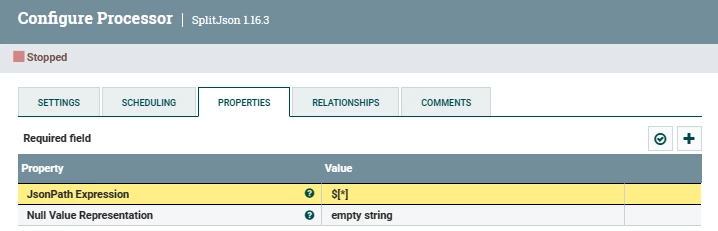
but my return got 6 values, but need to be 3, with all that json

I just want to get a line from the consumekafka and says that was 1 record , to all lines, to thejolttransform can be apllied normally before
what should i do?
Thanks.


